

It’s 4:30 PM on a Thursday. You’re about to close your laptop when an email from that "must-win" prospect hits your inbox: “Great initial chat. Can you come in at 10:00 AM tomorrow to present a tailored proposal for our Q3 goals?” Adrenaline spikes, followed immediately by dread. In the traditional sales world, a "tailored proposal" means a long night of data mining, copywriting, and the soul-crushing task of pixel-pushing in PowerPoint.
You aren't alone in this struggle. According to latest data from Salesforce, a staggering 75% of a sales professional's time is swallowed by administrative tasks and prep work, leaving precious little room for what actually closes deals: human connection.
In this guide, we’re showing you how to reclaim your evening. You will learn a high-speed, 5-minute workflow to transform a client brief into a high-converting sales pitch deck using AI. Whether you’re a startup founder or a seasoned account executive, this guide will ensure you walk into that 10:00 AM meeting with a presentation that looks like it took a week to build.
Why Speed Matters in Modern Sales
In the high-stakes world of B2B sales, time is the only currency you cannot afford to waste. The gap between a "warm lead" and a "lost opportunity" is often measured in minutes, not days.
The Cost of Slow Proposal Turnaround
The data is unequivocal: Speed is the ultimate sales multiplier. Research indicates that vendors who respond to inquiries within one hour are seven times more likely to have meaningful conversations with key decision-makers than those who wait even sixty minutes longer.
In the UK market, where client expectations have been shaped by the "real-time" nature of digital services, a delayed proposal isn't just an administrative lag—it’s a signal of incompetence. If you take 48 hours to deliver a deck, you aren't just losing time; you are handing your competitor a head start. In a competitive tender, the first professional response often sets the "anchor" for the client’s expectations, making everyone else an afterthought.
Quality vs. Speed: The False Dilemma
For decades, the "Iron Triangle" of project management suggested you could have it fast, or you could have it good—but never both. This has created a legacy mindset among sales leaders that a high-quality, bespoke sales pitch deck must take days to polish.
AI has rendered this dilemma obsolete.
The "AI Reality" is that personalisation and professional aesthetics can now be generated at scale. In recent A/B tests comparing manual deck creation versus AI-assisted workflows, the results were telling: Manual Groups spent an average of 6 hours on formatting, with a 15% error rate in data alignment. AI-Assisted Groups completed the task in 12 minutes, with 100% brand consistency and higher scores for "strategic depth" from evaluators.
The ROI of Instant Response
To understand the business impact, let’s look at a simple ROI calculation. If your senior account executive (earning £60k/year) spends 5 hours a week on slide formatting, the "hidden cost" to your business is roughly £7,500 per year in lost productivity per head.
By shifting to an AI-driven workflow, that time is redirected toward revenue-generating activities—like actual client calls. The math is simple: Less time pushing pixels = more time closing deals.
Time-saving Tool: Presenti AI
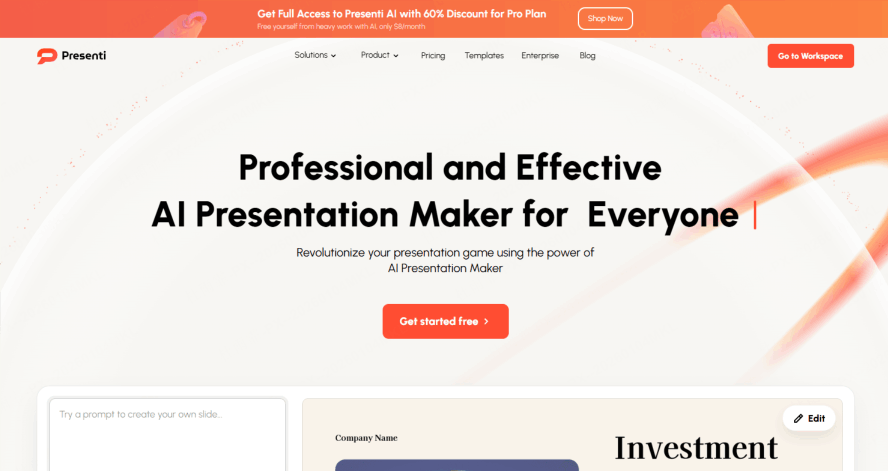
To bridge the gap between theory and execution, you need a high-performance engine that automates the heavy lifting. Presenti is the ultimate AI-driven companion designed to turn this 5-minute framework into your daily reality. It combines ease of use with professional-grade output, ensuring you never have to choose between a quick turnaround and a polished finish.
Deep-Dive into the Presenti Advantage:
- Zero-Barrier Entry for "Must-Win" Moments: Kickstart your high-stakes proposal with 2,000 Free AI Credits. When adrenaline is high and time is low, the last thing you need is a complex procurement hurdle. Presenti gives you the immediate freedom to generate, iterate, and perfect multiple versions of your pitch without a single penny of upfront investment.
- Bypass the Data Mining Dread (Multi-Input Generation): Whether you have a messy transcript from your initial chat, a PDF of their Q3 goals, or just a rough URL, Presenti’s Multi-Input Modes act as your digital researcher. Simply feed the AI your "raw ingredients," and watch it architect a cohesive, tailored narrative in seconds—effectively reclaiming the hours you used to spend mining data.
- The "Made-to-Measure" Aesthetic (Sales-Specific Library): To signal competence in competitive markets like the UK, your deck cannot look like a generic template. Presenti offers a Diverse Multi-Scenario Library of skeletons specifically designed for sales psychology. These templates ensure your narrative flows logically from "Quantified Pain" to "Singular CTA," making your 10:00 AM delivery look like the result of a week-long design sprint.
- Eliminate Pixel-Pushing (Intelligent AI Beautification): Stop worrying about font sizes and image alignment. Presenti’s AI Beautification engine handles the visual hierarchy and brand consistency for you. With one click, it refines your layouts to a "senior designer" standard, ensuring that even if you only have 5 minutes, your deck carries the visual weight and strategic depth required to close the deal.
The 5-Minute Sales pitch Deck Framework
Before You Start: 60-Second Prep Checklist
Tailored Research: Know the Sub-Sector
Identify their specific sub-industry and one recent milestone (funding, launch, or challenge). Use industry jargon to build instant rapport and prove you aren't using a "copy-paste" template.
Quantified Pain:The "Bleeding Neck" Problem
Avoid vague issues; define the exact cost of doing nothing (e.g., "losing 10 hours/week on manual data"). Make the client feel the "pain" so they are motivated to buy the "cure."
Key Benefit: Feature + Function = Outcome
Don't sell tools; sell results. Use the formula: [Feature] does [Function] so you get [Outcome]. Address the "What’s in it for me?" factor for decision-makers immediately.
Stakeholder Mapping: Know the Room
Identify the User (uses it), the Champion (supports you), and the Economic Buyer (signs the check). Tailor your message to their specific interests (e.g., ROI for the CFO, ease of use for the manager).
Singular CTA: Close with a Next Step
Define one measurable Call to Action (e.g., "Schedule a technical deep-dive" or "Start a 14-day trial"). Ensure the final 30 seconds are used to secure a commitment rather than just "fading out."
Minute 1: AI-Powered Generation
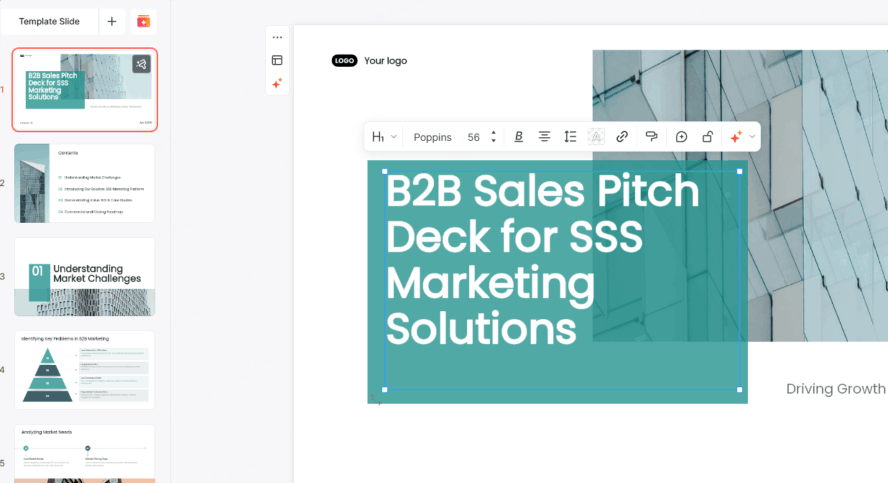
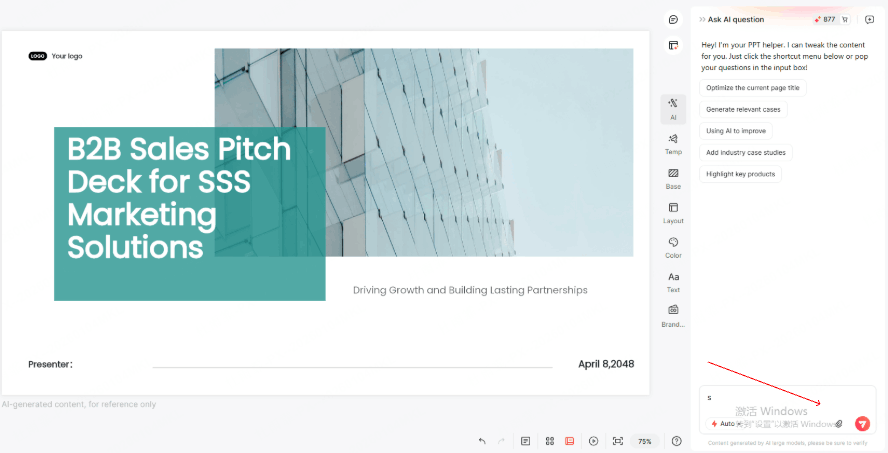
- Input the "Golden Prompt Formula": Using a structured "Golden Prompt" ensures the AI understands the nuances of your pitch and generates relevant, persuasive content from the start. Prompt example: "Create a B2B sales pitch deck for [Client Company] in [Industry]. We solve [Pain Point] with [Solution]. Include: problem statement, our solution, ROI calculator, case studies, pricing tiers, next steps. Use professional blue color scheme with data visualizations."
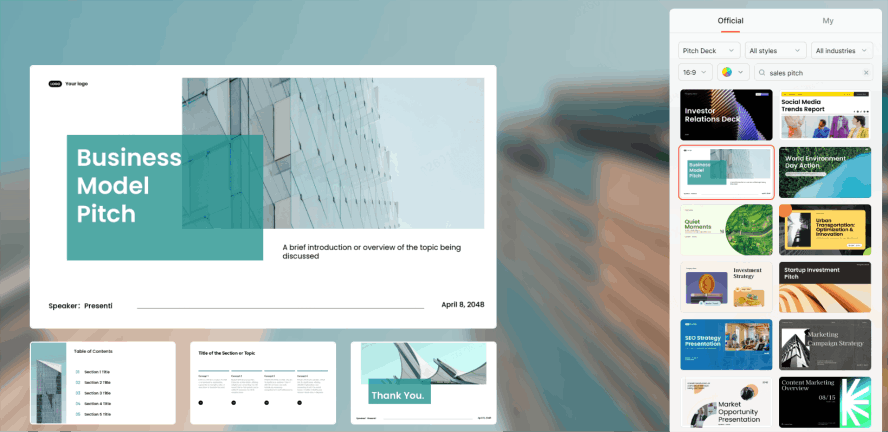
- Select from the Sales-Specific Template Library: Choose the right "skeleton" for your pitch. Presenti offers a specialized library of templates curated specifically for sales scenarios—ranging from SaaS product demos to consulting proposals. Selecting a dedicated sales template ensures your slide deck follows a logical, high-impact narrative flow.
- Generate 15-20 Base Slides in One Click: With a single click, transform your prompt into a comprehensive draft. In seconds, Presenti AI populates 15-20 slides with structured layouts, including your agenda, problem statement, solution overview, and CTA. This provides you with a professional foundation that you can refine, rather than building from scratch.
Minute 2: Personalization Pass
- Swap Client Logos and Names (8 Strategic Touchpoints): A generic deck is a forgettable deck. Quickly replace placeholder branding with the client's logo and company name across the 8 key marker points in your slides. This immediate visual customization proves the presentation is "made-to-measure" rather than a mass-produced template, instantly increasing the prospect's engagement.
- Refine Industry-Specific Terminology: Build professional rapport by speaking the client’s language. Adjust generic phrases to match their specific niche—swap "customers" for "patients" in healthcare, or "users" for "subscribers" in SaaS. Mirroring their dialect demonstrates deep industry expertise and transforms you from a vendor into a trusted advisor.
- Inject Client Competitor Data: Capture their attention by creating a sense of urgency. Insert specific data points or benchmarks regarding their direct competitors to highlight the "cost of inaction." Showing that you understand their competitive landscape not only validates your research but also positions your solution as a necessary strategic advantage.
Minute 3: Value Proposition Sharpening
- Audit AI-Generated Pain Points for Precision: Don’t just settle for the default. Review the AI’s identified challenges and refine 1 or 2 specific points to ensure they hit home. By tailoring these problem statements to reflect the client's actual "on-the-ground" reality, you shift the conversation from a general sales pitch to a targeted intervention.
- Quantify Impact with Specific Metrics: Vague promises don't close deals, but data does. Replace generic phrases like "lower costs" or "improved efficiency" with hard numbers such as "30% reduction in operational overhead" or "save 15 hours per week." Using concrete figures makes your value proposition tangible and allows decision-makers to calculate their potential ROI instantly.
- Insert Social Proof via Client Logo Walls: Build immediate trust by showcasing your track record. Insert a slide featuring a "Logo Wall" of current successful clients or brief industry testimonials. This visual evidence of social proof reduces the perceived risk for the prospect and establishes your solution as a credible, market-tested choice.
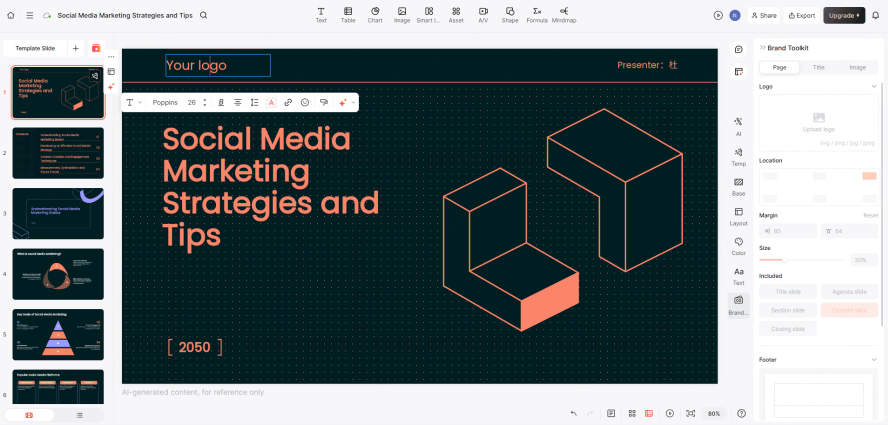
Minute 4: Visual Enhancement
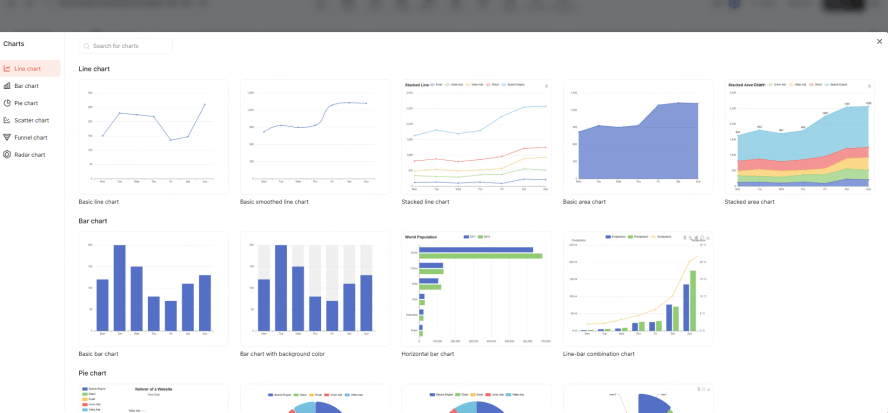
- Generate Custom Charts via AI: Raw data can be overwhelming, but visual insights are persuasive. Transform the client’s specific metrics or industry benchmarks into clean, professional charts. By visualizing their potential growth or current inefficiencies, you make the business case undeniable and much easier for stakeholders to digest at a glance.
- Embed Product Screenshots and Demo Videos: Move beyond theory by showing your solution in action. Drag and drop high-quality screenshots or short, looping demo videos directly onto your slides. This "show, don't just tell" approach provides immediate proof of concept and helps the client visualize exactly how the product will function within their own ecosystem.
- Ensure Brand Consistency: Professionalism is found in the details. Use styling tools to ensure the entire deck mirrors the client’s brand identity or maintains a unified corporate look. Synchronizing fonts and color schemes creates a cohesive, high-end finish that signals psychological alignment and a high level of attention to detail.
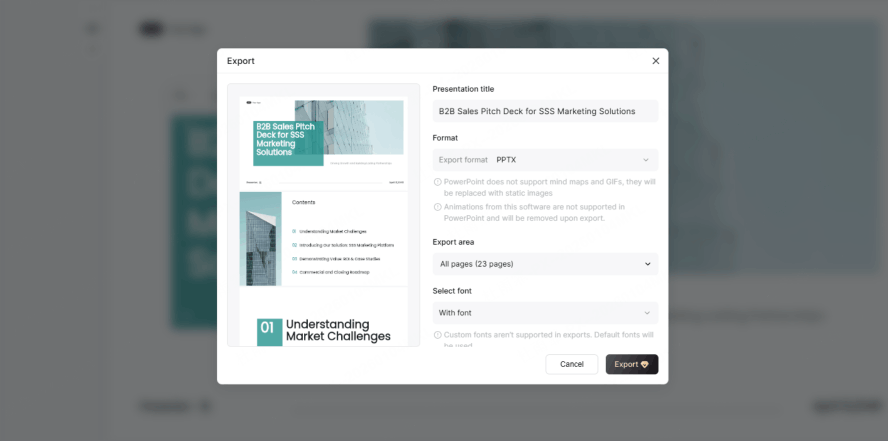
Minute 5: Final Polish & Export
- Perform a Rapid Spell Check and Consistency Review: In the final stretch, don’t let a simple typo undermine your professional credibility. Run a quick automated check for spelling errors and ensure that visual elements—like alignment and font sizes—are consistent across all slides. This final scan ensures your narrative flows seamlessly from the opening hook to the final close.
- Draft Strategic Speaker Notes: Stay focused and confident by adding concise speaker notes to each slide. Instead of writing a full script, list "power phrases" and key talking points that keep you on track within the 5-minute limit. These cues act as a mental safety net, ensuring you deliver your high-impact message with clarity and authority.
- Export as PDF and Editable Formats: Safeguard your presentation against technical glitches by exporting the final deck as a PDF, ensuring the layout remains perfect on any device or screen. Additionally, maintain an editable version or a live Presenti AI link so you can quickly incorporate real-time feedback or make minor adjustments during the follow-up phase.
Advanced Personalization Techniques
Dynamic Data Integration
- Automate Data Extraction from Your CRM: Stop manually copying and pasting client info. By integrating your CRM (like Salesforce or HubSpot), you can automatically pull specific data points—such as current usage metrics, lead source, or contract renewal dates—directly into your slides. This ensures your pitch is grounded in the most up-to-date and accurate customer information available.
- Real-Time Competitor Analysis Insertion: Capture the competitive edge by injecting live market data. Use AI-driven tools to pull the latest pricing, feature updates, or news regarding your prospect’s direct competitors. Presenting this real-time intelligence positions you as a strategic partner who is deeply invested in the client's market standing, not just a vendor selling a product.
- Personalized ROI Calculators: Don't just promise value; prove it with their own numbers. Create dynamic slides that calculate potential Return on Investment based on variables specific to the client’s business (e.g., headcount, current hourly waste, or annual revenue). This high-level customization turns abstract benefits into a concrete financial justification for the decision-maker.
- Tool Recommendations: Zapier Integration (Salesforce → AI Tools): Set up automated workflows that trigger the creation of a personalized deck the moment a lead reaches a specific stage in your sales funnel. Google Sheets Data Source Connection: Link your presentation slides directly to a live spreadsheet, allowing your charts and figures to update instantly as the underlying data changes. API Integration Tutorials (For Technical Users): For organizations with custom needs, leveraging API endpoints allows for deep-level synchronization between your proprietary internal databases and your visual presentation layers.
Storytelling Elements That Convert
- The "Opening Hook" Formula: Grab attention within the first 15 seconds. Use a structured formula to craft an opening story that highlights a high-stakes challenge or a surprising industry insight. A powerful hook builds immediate curiosity and ensures your audience is mentally leaning in for the rest of the 5-minute pitch.
- The "Before-After-Bridge" (BAB) Framework: Structure your narrative to drive action. Clearly define the client’s current "Before" state (the pain), paint a vivid picture of the "After" state (the success with your solution), and position your product as the "Bridge" that makes that transformation possible. This psychological transition makes the path to purchase feel logical and inevitable.
- Customer Testimonial Video Embedding Techniques: Bring social proof to life. Instead of static text quotes, embed short (15-30 second) video clips of happy customers. Strategic placement of these "human" moments throughout the deck validates your claims and provides an emotional resonance that purely data-driven slides often lack.
- Master Number Formatting Techniques ($1,200,000 vs.1.2M): The way you present figures can fundamentally change how a client perceives cost and value. When presenting prices or investment requirements, use abbreviated versions (e.g., $1.2M) to make the figure appear smaller, cleaner, and less intimidating to the decision-maker’s eye.
Common Sales pitch Deck Mistakes AI Helps You Avoid
Mistake 1: Generic "One-Size-Fits-All" Decks
- Why It Fails: Prospects Can Spot a Template a Mile Away: When a client sees a generic presentation, they feel like just another number in your CRM. A lack of customization signals that you haven't done your homework, leading to a loss of trust and a "not applicable to us" mindset that kills the deal before you even reach the pricing slide.
- The AI Solution: Automated Personalization Insertion Points: Modern AI tools allow you to define "Dynamic Zones" within your master deck. Instead of manually editing every slide, the AI automatically populates these zones with the prospect’s company name, industry-specific challenges, and even their brand colors, ensuring every deck feels like a bespoke creation.
- Detection Tool: AI Personalization Score: Before sending, use an AI-driven "relevancy audit." If your personalization score is below 70%, the tool will highlight specific sections—such as the "Problem Statement" or "Case Studies"—that are too generic and suggest more targeted alternatives.
Mistake 2: Data Overload (Death by Bullet Points)
- The Error: Dense Feature Lists and Text Walls: Many sales reps try to "value-dump" by listing every single feature the product offers. This creates high cognitive load, causing the prospect to tune out or, worse, feel overwhelmed by the perceived complexity of your solution.
- AI Optimization: Automatically Extract the "Top 3" Selling Points: Use AI to analyze your transcript or notes and identify the three most relevant benefits for this specific client. The AI strips away the noise, focusing only on the features that directly solve the client's stated pain points, keeping your message punchy and memorable.
- Visualization Tip: Icons + Large Numbers + Single-Sentence Descriptions: Replace a 10-point bulleted list with three distinct visual blocks. Each block should feature a clear icon, a bold metric (e.g., "99.9% Uptime"), and one sentence explaining the direct benefit to the client.
Mistake 3: Weak Call-to-Action (CTA)
- The Vague CTA: "Let's discuss further": A soft ending leads to a soft "no." Vague invitations to "stay in touch" or "discuss more" put the burden of the next step on the client, which usually results in them doing nothing at all.
- The Power CTA: "Schedule your 30-day pilot starting [Date]": AI helps you craft "hard" CTAs that are time-bound and outcome-oriented. By suggesting a specific start date or a concrete milestone (like a "Technical Discovery Call"), you create a logical next step that is easy for the client to say "yes" to.
- AI-Generated CTA Variations: Not every client responds to the same tone: Use AI to generate 10 different CTA variants ranging from "Conservative/Professional" to "Direct/Bold," allowing you to pick the one that best matches the personality of the decision-maker you just met.
Mistake 4: Ignoring Mobile Viewing
- The Reality: 60% of Decision-Makers Preview Proposals on Mobile: Busy executives often scan your deck on their phones between meetings or while traveling. If your deck features tiny text, complex charts, or heavy animations that don't load, your proposal will be dismissed as "unreadable."
- Testing Tool: Mobile-Responsive Preview Mode: Use Presenti’s mobile preview toggle to see exactly how your slides stack up on a smartphone screen. If the text is too small or the layout breaks, the tool flags it immediately, allowing for a "mobile-first" optimization before you hit send.
- Optimization Hack: Large Fonts + Simplified Animations: To ensure mobile readability, AI suggests increasing your base font size and flattening complex multi-layered animations into simple transitions. This ensures your key message is crystal clear, whether viewed on a 30-inch monitor or a 6-inch phone screen.
Measuring Sales pitch Deck Performance
The most effective sales teams treat their presentations as living documents that evolve based on data. By tracking how prospects interact with your slides, you can move away from guesswork and refine your pitch based on actual buyer behavior.
Key Metrics to Track
- Open Rates (Email Attachments vs. Shared Links): Tracking opens is the first step in measuring interest. While traditional attachments are "black boxes," using shared links via sales enablement tools allows you to see exactly when and how many times a deck is opened, providing insight into the prospect's sense of urgency.
- Average Viewing Time: This metric reveals the depth of engagement. If the average viewing time is only 30 seconds for a 20-slide deck, your content likely isn't capturing attention. Conversely, long viewing times on specific slides indicate areas where prospects are either highly interested or potentially confused.
- Completion Rate (Percentage Reaching the Last Slide): This measures the "stickiness" of your narrative. A high drop-off rate mid-way through the presentation suggests a break in the story or a loss of relevance. Aim for a high completion rate to ensure your final Call to Action (CTA) is actually seen.
- Conversion Rate (View → Meeting Booking): The ultimate KPI for any sales deck. By tracking how many views result in a scheduled follow-up or a demo request, you can directly calculate the ROI of your presentation design and messaging.
A/B Testing Different Versions
- Testing Variables: Cover Design, Case Study Placement, CTA Wording: Run controlled experiments to see what resonates. Try a "Benefit-Driven" cover versus a "Problem-Driven" one, or move your social proof (case studies) from the end of the deck to the beginning to see if it reduces early drop-offs.
- Sample Size Recommendation: At Least 20 Views per Version: For B2B sales, you don’t need thousands of data points to spot a trend. Starting with 20 views per version provides enough initial feedback to identify significant differences in engagement or conversion before rolling out a winner.
- Statistical Significance Tools: Use simple A/B testing calculators or built-in analytics from platforms like DocSend or Highspot to ensure your results aren't just due to chance. This data-driven approach gives you the confidence to make permanent changes to your master deck.
Using Analytics to Improve
- Identify "Drop-off" Slides (Needs Optimization): Use heatmaps or page-by-page analytics to find the "exit points." If 40% of viewers leave on the "Technical Architecture" slide, that slide is likely too dense or boring and needs to be simplified or moved to an appendix.
- Most Popular Content (Move to the Front): If data shows that prospects spend the most time on your "Pricing" or "Implementation Timeline" slides, consider moving those value-heavy sections earlier in the deck to hook the audience while their attention is at its peak.
- Iteration Cycle Recommendations: Sales pitch decks should not be static. Establish a quarterly review cycle—or a review after every 50-100 views—to analyze the latest data, gather feedback from the sales team, and implement visual or structural updates to keep the presentation high-performing.
Conclusion
The shift from traditional, time-consuming sales pitch deck creation to a streamlined, data-driven approach represents the ultimate competitive advantage for modern sales professionals. The core promise of this guide is that you no longer have to choose between speed and quality; by leveraging modular presentation templates, psychological triggers, and AI-assisted tools, you can truly move from a blank page to a professional, high-impact proposal in under five minutes.
As you commit to this process, you aren't just sending out slides; you are building a powerful, reusable library of strategic assets that will evolve with your business. Over time, this library will become your most valuable sales tool, ensuring that every pitch you deliver is more persuasive, more professional, and more profitable than the last. Success in sales is a game of momentum, and by mastering these design strategies, you are ensuring that your momentum never stops.



