A content audit presentation should help people decide what to do with existing content. A spreadsheet of page views is a starting point, not the presentation. Bring a short set of proposed actions, the reason for each action, and the unresolved decisions that need an owner.
Start with the audience's choice: keep useful content, update a specific weakness, combine genuinely overlapping material, retire something that no longer serves a purpose, or investigate when the evidence is incomplete. These are editorial decisions, not automatic consequences of a traffic threshold. You can use Presenti for a marketing presentation draft once you have grouped the findings and written the proposed actions; it is not a substitute for collecting or interpreting the audit data.

Give the audit a question and a boundary
“We audited our content” is too broad to frame a meeting. “Which onboarding resources should we improve before the next product release?” gives the audience a decision, a collection of assets, and a reason to act.
Put the scope near the opening: which assets were included, which languages or channels were excluded, the observation period, and the business task they support. A blog audit, a sales-collateral audit, and a help-center audit should not use the same definition of success.
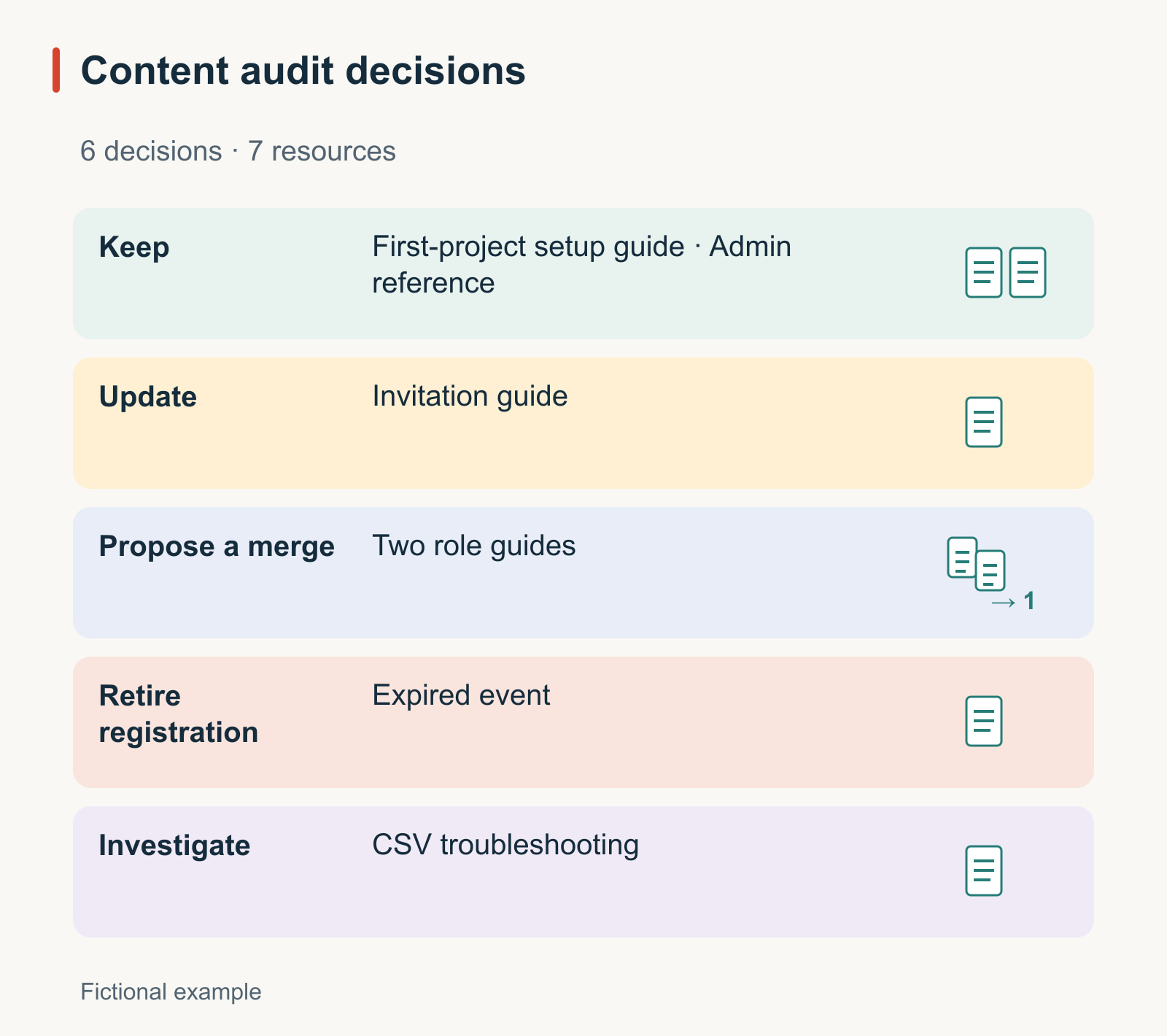
For the worked example, imagine a fictional team reviewing six inventory entries covering seven onboarding resources before a release. The pair proposed for a merge contains two articles. The team's question is whether customers can find the right setup instructions and complete the first task. It has not audited the whole website or measured an increase in conversion.
Turn the inventory into six defensible decisions
The example below deliberately mixes clear findings with incomplete evidence. It shows the level of detail behind a recommendation; it is not a list of real Presenti assets or measured customer results.
| Asset | Observed issue or value | Proposed action | What must happen before the action |
|---|---|---|---|
| First-project setup guide | The steps still match the product; support staff use the guide to answer the same setup question | Keep | Confirm the upcoming release does not change the steps |
| Workspace invitation guide | Its screenshot shows a button that has moved; the written invitation steps remain useful | Update | Capture the current interface and revise the affected step |
| Two articles about choosing a workspace role | Both answer the same introductory question; one contains an important exception absent from the other | Propose a merge | Preserve the exception, choose the destination, and plan link handling |
| Launch-event registration page | The event is over and the registration action is unavailable | Retire the registration experience | Decide whether visitors still need a recording, summary, or archive notice |
| CSV import troubleshooting guide | Recorded traffic is low, but the analytics tag was missing during part of the observation period | Investigate | Resolve the measurement gap and check support use |
| Advanced administration reference | Few visitors use it, but it serves a narrow task that no other page covers | Keep | Confirm technical accuracy with the product owner |
The first slide after the scope can summarize these choices: two assets stay, one needs a targeted update, one pair needs a merge decision, one expired experience needs a destination decision, and one asset needs more evidence. Do not turn that summary into a claim that the entire content library is healthy.
Keep the full inventory available for questions. The main deck should let the audience challenge a recommendation without reading dozens of tiny rows.
Use different evidence for different content jobs
Traffic is useful when an asset is intended to attract visits. It is less conclusive when an asset exists to answer an occasional technical question, support a salesperson, or help an existing customer complete a task. Record the content's job before judging its performance.
- Discovery content: look at the relevant audience, queries or entry paths when available, and whether visitors can reach the intended next step.
- Task instructions: test whether the instructions are correct and complete, and ask which support questions still occur after someone reads them.
- Sales material: check whether the audience and claims are current and whether the material actually supports the conversation it was made for.
- Reference material: check accuracy, findability, and whether another maintained source answers the same question.
Show the observation window beside each metric. A recently launched page and a long-established page do not have comparable exposure simply because both appear in the same report. Mark unavailable measurements as unavailable, not zero.
For the CSV guide, the important sentence is “We cannot distinguish low demand from missing measurement yet.” A slide titled “Delete underperforming pages” would erase that uncertainty and push the room toward an unsupported decision.
Make one proposed update tangible
For the invitation guide, show the existing screenshot beside a current screenshot of the same task. Highlight the changed location of the button, then show the replacement instruction. The rest of the guide can stay if it remains accurate.
For example, the old instruction might say “Select Invite above the member list,” while the current interface places the action inside a menu. The proposed change should name the verified menu and action from your own product, not guess what they are. This is a scoped repair: replace the obsolete visual, revise the affected instruction, and retest the invitation route.
This slide is stronger than a large “Needs updating” label because reviewers can see the defect and the proposed remedy. It also prevents a minor correction from becoming an unnecessary rewrite that removes useful explanation or screenshots.
Treat a merge as a content and navigation decision
Two pages with similar titles are not automatically duplicates. Compare the reader's task, prerequisites, examples, and exceptions. In the fictional role-selection pair, the important exception needs to survive in the destination before either original is retired.
Show four things in the meeting: the proposed destination, the information carried over from each source, the affected entry paths, and who will verify the result. Avoid presenting “merge” as a one-click cleanup action.
For websites, Google's canonicalization guidance describes ways to signal a preferred URL for duplicate or very similar pages. A canonical tag is not a substitute for deciding whether the pages actually serve the same purpose. Redirects, canonicalization, link changes, and deletion have different effects and need an appropriate technical plan.
The expired event page needs a different decision. If there is a useful recording or summary, visitors may still need an archive. If the page has no remaining purpose, document what happens to existing links. Do not redirect unrelated old material to a generic homepage merely to make every URL return a successful response.
Prioritize the reader's problem before the amount of traffic
In the example, the broken invitation instruction is a strong first action: the task matters to onboarding, the defect is clear, and the repair is bounded. The role-selection merge may be valuable, but it requires agreement about the destination and preservation of the exception. The CSV guide should not be retired while measurement is unresolved.
Use a short decision queue rather than a score that hides these differences:
- Repair now: the invitation guide, because readers encounter a verified mismatch in a current task.
- Agree before changing: the role-selection pair and the event destination, because each affects content or navigation that others may rely on.
- Gather evidence: the CSV guide, because the present data cannot support a disposal decision.
- Maintain: the setup and administration guides, because they still serve distinct tasks.
If the team has a limited release window, choose work it can finish and validate. Publishing several partial fixes is not necessarily better than resolving the one instruction that blocks a user's next action.
Build the deck around the conversation
A useful sequence for this meeting is scope, proposed decisions, the invitation-guide example, the contested merge, the delivery queue, and the approvals needed. The number of slides follows the discussion; it is not a universal audit format.
Keep observations and proposals visually separate. “Screenshot shows an obsolete control” is an observation. “Replace that image and retest the invitation route” is a proposal. “Customers will activate faster” is an outcome hypothesis until you measure it.
Give Presenti a prepared brief with those distinctions. Include the six-entry inventory, the approved task definitions, and any explicit unknowns. Ask for a presentation draft, not for an invented traffic analysis or fabricated screenshots.
Prepare a presentation for the onboarding content owners. The supplied inventory contains six entries covering seven resources and is a fictional worked example. Keep observations, proposed actions, and unresolved questions distinct. Emphasize the outdated invitation screenshot, preservation of the role-selection exception, and missing measurement for the CSV guide. Do not invent analytics, customer quotations, impact estimates, or product controls. End with the decisions the owners need to make.
Report delivery and results separately
After the meeting, record the agreed action, owner, dependency, and acceptance condition. For the invitation guide, acceptance means the new visual matches the current interface and a reviewer can follow the revised steps. For the merge, acceptance includes the preserved exception and working entry paths.
Then decide how you will observe whether the change helped. A repaired instruction can be verified immediately; a change in support demand or product completion needs suitable measurements and a comparison period. Do not report a file update as a proven business outcome.
Google's people-first content guidance emphasizes useful, trustworthy content and warns against changing dates simply to make pages appear fresh. In an audit presentation, the practical implication is straightforward: describe what became more useful, not just how many pages were touched. When the next meeting starts, the audience should be able to see which reader problems were resolved and which decisions still need evidence.