
In modern workplaces and learning environments, sharing ideas visually is no longer optional. Reports, research papers, technical documentation, and project summaries are often expected to be presented as clear, engaging PowerPoint slides.
However, manually turning a document into a polished PPT is time consuming and frustrating. Structuring content, rewriting text, designing layouts, and aligning visuals can take hours. This is exactly where AI powered document to PowerPoint tools make a real difference.
In this guide, you will learn how to convert documents into PowerPoint presentations efficiently using Presenti AI. Whether you work with Word files, PDFs, Markdown documents, or mind maps, Presenti AI helps you generate professional presentations in minutes.

1. Document to PowerPoint Conversion Tool
Presenti AI is a professional AI PowerPoint generator designed for fast and accurate document conversion. It automatically understands document structure, extracts key ideas, and transforms content into visually structured slides.
Unlike traditional converters that simply copy content, Presenti AI focuses on presentation logic. It analyzes headings, paragraphs, lists, and media elements to create slides that are easy to follow and visually balanced.
Key Capabilities of Presenti AI
- AI powered outline recognition and slide structuring
- Automatic layout and visual hierarchy optimization
- Support for multiple document formats
- Editable templates suitable for business, education, and technical teams
Below are the main document types supported.
1.1 Convert Word Documents to PowerPoint
Word to PowerPoint conversion is ideal for business reports, academic defenses, internal reviews, and executive summaries.
Presenti AI converts Word content into structured slides while preserving the logical flow. Headings become slide titles, paragraphs are summarized into bullet points, and key sections are distributed across slides naturally.
This makes it especially useful for consultants, project managers, and educators who need to turn written material into presentation ready content quickly.
1.2 Convert TXT Files to PowerPoint
Plain text files are often used for drafts, meeting notes, or technical outlines. Presenti AI transforms TXT documents into clean, readable slides with smart spacing and hierarchy.
This option is perfect for early stage presentations, brainstorming sessions, or quick internal demos where clarity matters more than heavy design.
1.3 Convert PDF Files to PowerPoint
PDF files are usually the hardest to work with manually. Copying text, images, and charts often breaks formatting and wastes time.
Presenti AI accurately extracts content from PDFs and converts it into editable PowerPoint slides. Complex documents such as whitepapers, research reports, or product documentation can be turned into presentations without manual rework.
1.4 Convert Markdown Documents to PowerPoint
Markdown is widely used by developers, engineers, and technical writers. Presenti AI directly converts Markdown files into structured PowerPoint presentations while preserving headings, lists, and code related sections.
This feature is especially useful for software teams presenting system designs, architecture overviews, or technical documentation to non technical stakeholders.
1.5 Convert XMind Mind Maps to PowerPoint
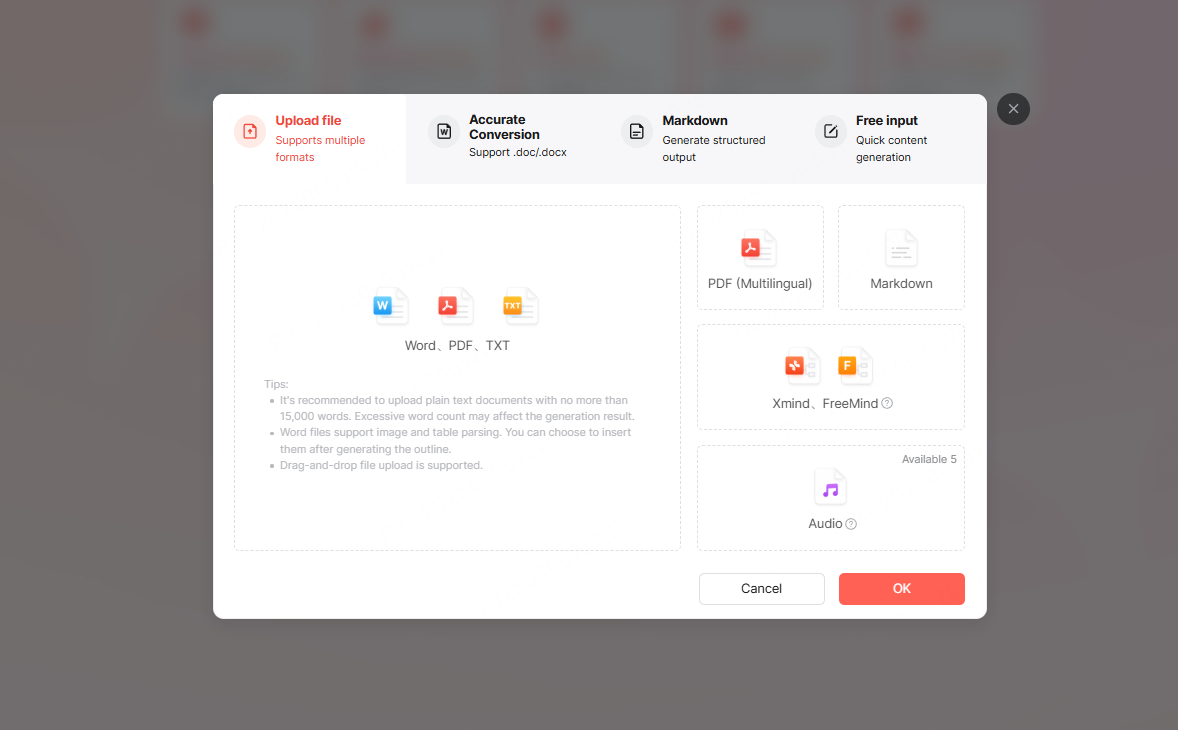
Mind maps are commonly used for planning, brainstorming, and strategy development. Presenti AI allows you to convert XMind files directly into PowerPoint slides while maintaining logical relationships and hierarchy.
Each branch becomes a slide or section, making it ideal for project planning, product roadmaps, and workshop presentations.
2. How to Convert a Document into PowerPoint
The document to PowerPoint workflow in Presenti AI is simple and efficient. You can complete the entire process in just a few steps.
Step 1: Upload Your Document
Start by uploading your document to Presenti AI. Click the Import File to Generate PPT option and select a file from your local device.
Supported formats include Word, TXT, PDF, Markdown, and XMind.
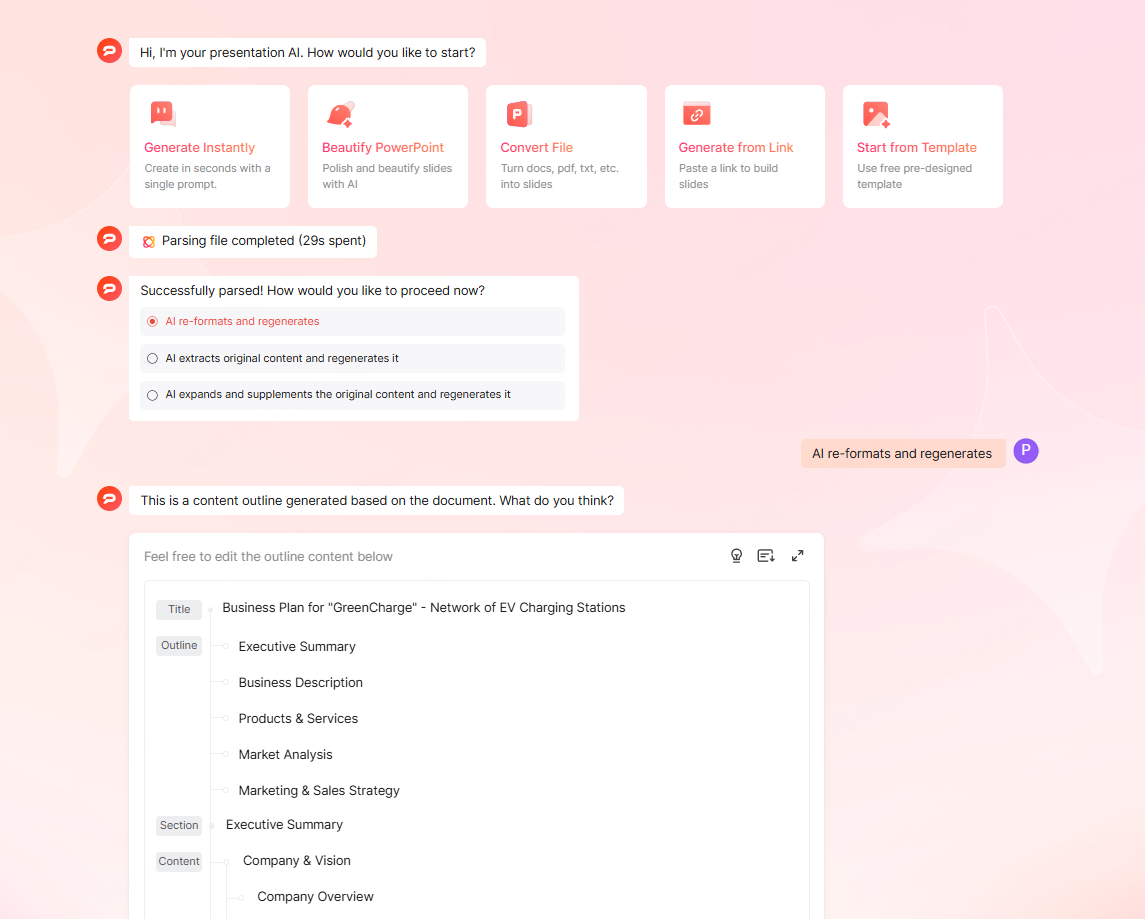
After upload, you can choose how the AI should process your content:
- Reorganize and format the content automatically
- Summarize key points and generate concise slides
- Expand and enrich the original content for presentation
This flexibility allows you to adapt the output to different audiences, from executives to technical teams.
Step 2: AI Content Analysis
Once a generation method is selected, Presenti AI enters the content analysis phase.
During this stage, the AI analyzes paragraph structure, sentence patterns, and keyword distribution. It identifies the main ideas, supporting points, and logical flow of the document.
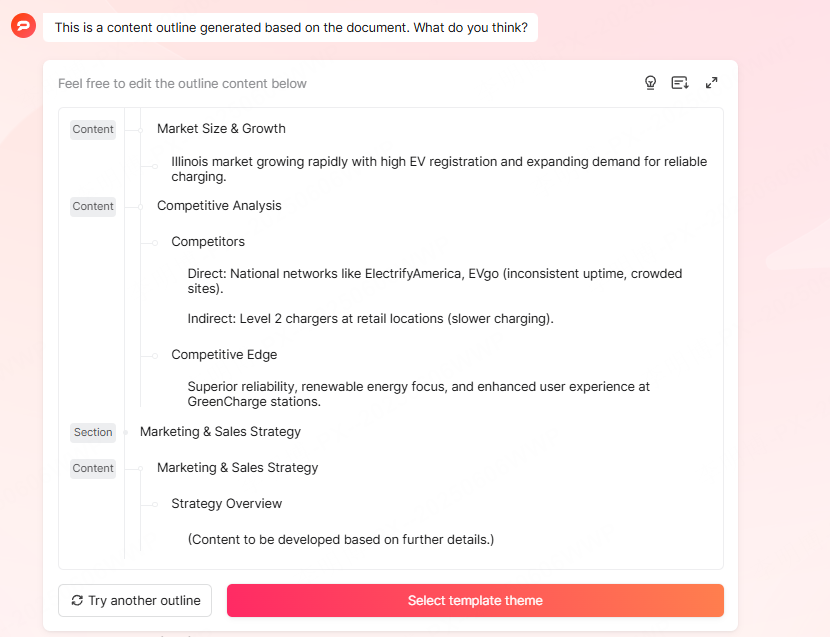
Based on this analysis, Presenti AI creates a clear presentation outline. Topics are broken into slides with well defined titles and bullet points. The result is a presentation structure that feels natural and easy to understand.
If needed, you can manually adjust the outline or switch to a different generation mode before proceeding.
Step 3: Generate the PowerPoint
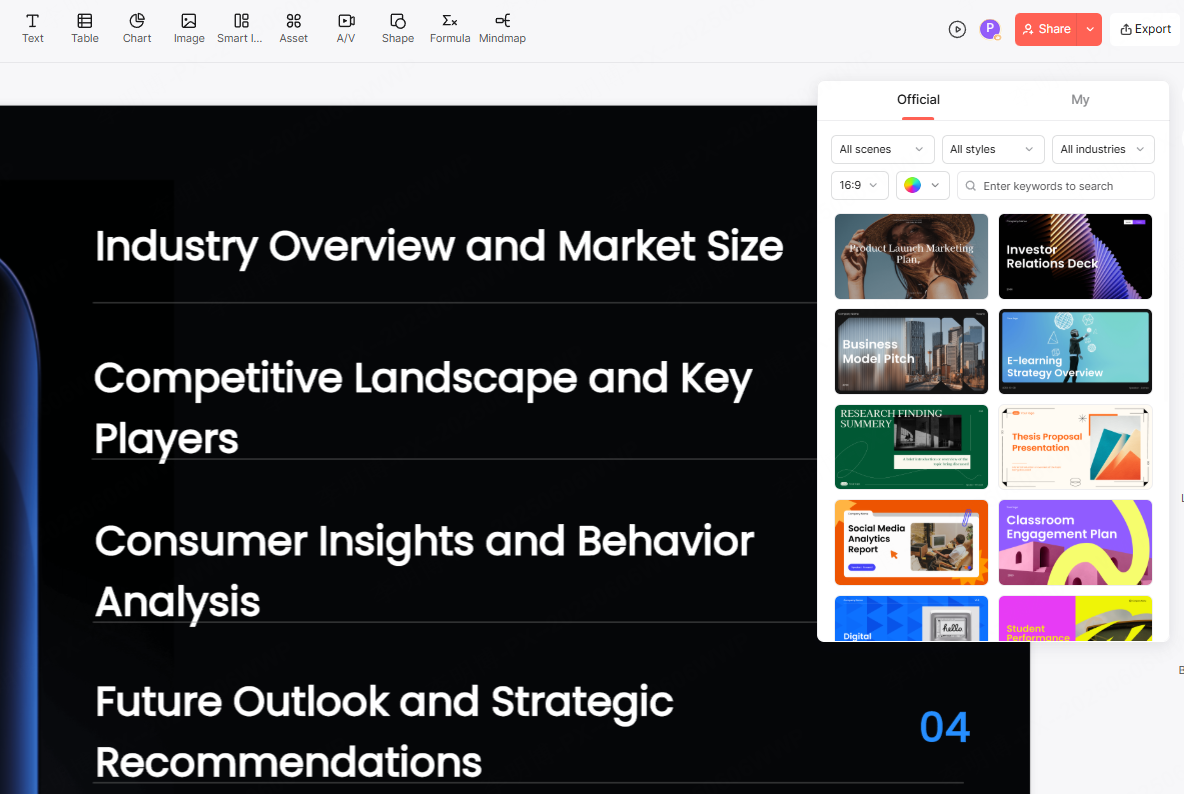
After reviewing the structure, click Choose PPT Template Theme and select a design that fits your purpose.
Presenti AI then generates the PowerPoint slides automatically. Layouts, font sizes, color schemes, and spacing are optimized based on content importance and slide type.
Once generation is complete, you can preview the presentation online, make edits directly in the editor, and then download the final file or share it via a link.
3. Advantages of Converting Documents to PowerPoint
Transforming documents into PowerPoint presentations offers both efficiency and clarity. With Presenti AI, the benefits become even more noticeable.
Save Time
What used to take hours can now be completed in minutes. Presenti AI eliminates the need for manual summarization, slide layout design, and formatting adjustments.
This is especially valuable for tight deadlines, last minute meetings, or recurring reporting tasks.
Improve Productivity
From content extraction to slide design, the entire workflow is automated. You get structured logic and polished visuals without switching between multiple tools.
This allows teams to focus on refining ideas rather than formatting slides.
Enable Collaboration
Presenti AI supports real time online editing. Team members can review, edit, and improve slides together, regardless of location.
This makes it ideal for distributed teams, remote education, and cross functional projects.
4. Who Should Use Presenti AI
Presenti AI is designed for professionals who need fast, reliable presentation generation:
- Project managers preparing status updates
- Educators converting lesson materials into slides
- Developers presenting technical documentation
- Consultants creating client ready decks
- Students preparing academic presentations
If your workflow involves turning written content into presentations regularly, Presenti AI can significantly reduce effort and improve output quality.
Final Thoughts
Converting documents into PowerPoint no longer needs to be a manual process. With AI powered tools like Presenti AI, you can transform Word files, PDFs, Markdown documents, and mind maps into professional presentations in minutes.
By combining intelligent content analysis with automated design, Presenti AI helps you present ideas clearly, efficiently, and consistently across teams and audiences.
If you are looking for a scalable way to convert documents into PowerPoint, Presenti AI is a practical solution worth adopting.









