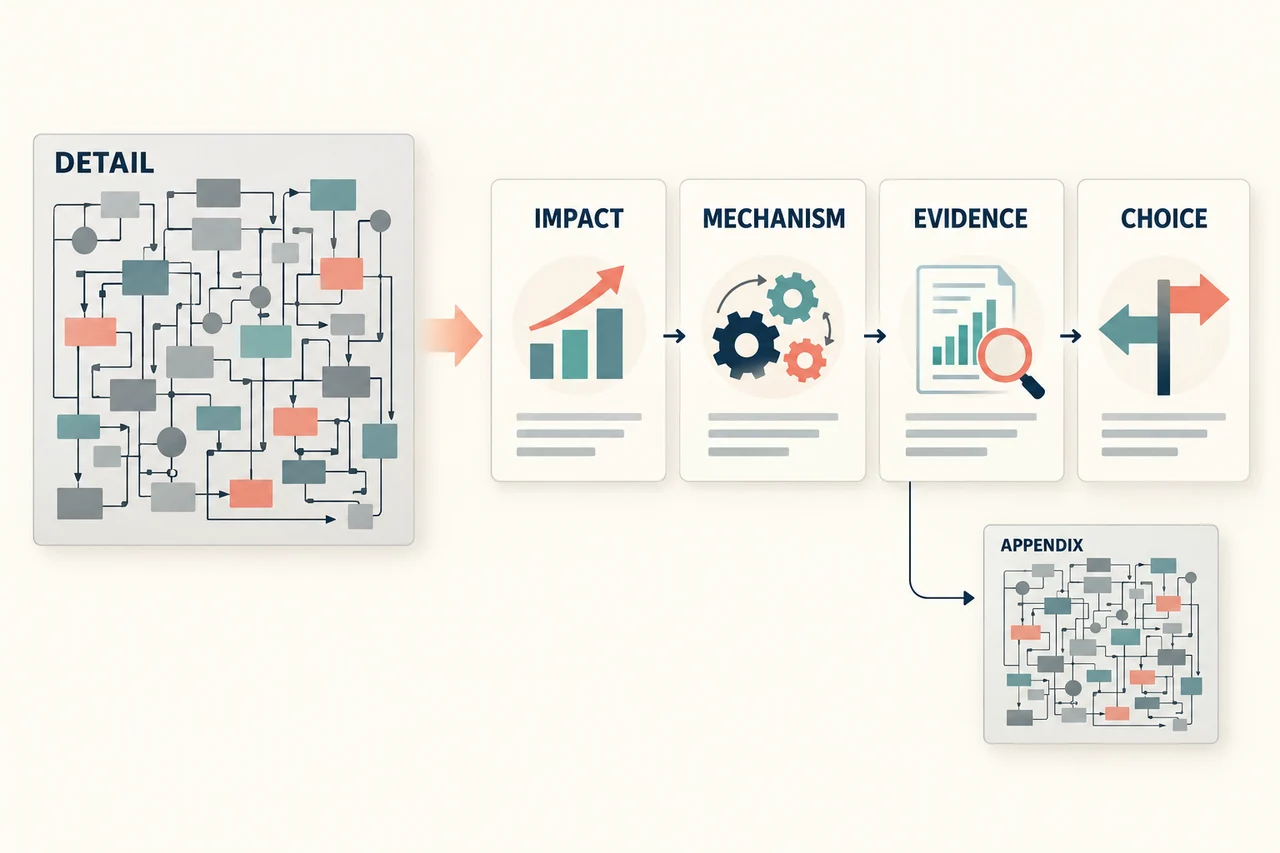
A data dictionary presentation should resolve a disagreement about meaning, not project a spreadsheet of every column onto a screen. Start with a business question people already interpret differently. Trace it to a few records, agree on the definition, then show who maintains it and what changes for reports that use it.
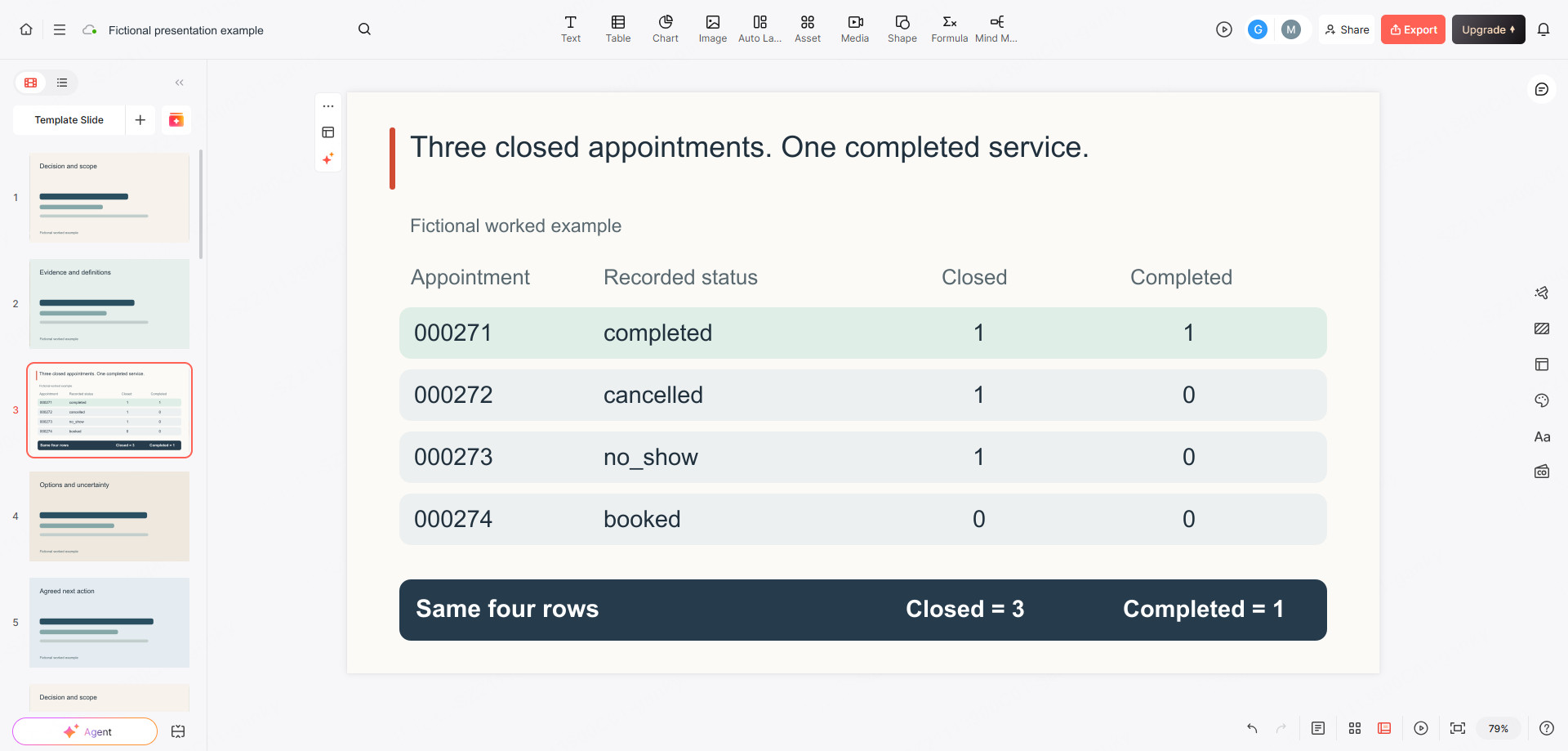
Consider a fictional appointment business. Its dashboard says “three appointments completed,” but the operations manager says only one customer received the service. Neither person has invented a number: the dashboard counts closed appointments, including cancellations and no-shows. The label makes three different outcomes look like the same thing. All records, roles, and changes in the example below are invented to demonstrate a dictionary review—not customer data or a Presenti implementation.
After your team settles the definitions, Presenti's text-to-presentation workflow can turn the approved explanation into an editable slide draft. Paste the selected field definitions and example rows, not a confidential database export. The dictionary remains your source of truth; the presentation is the small, audience-specific view used to make a decision.

Begin with the term that caused the disagreement
In this example, the audience is the operations manager, reporting analyst, and engineer responsible for the booking export. They need to approve what “completed appointment” means before the next reporting release. They do not need a tour of every field in the booking system.
A useful dictionary connects the language people use to the data they can inspect. The USGS guide to data dictionaries describes names, definitions, data types, nullability, reference values, and business rules as useful dictionary contents. For this meeting, those details should answer a concrete question: does the row represent a delivered service, or only an appointment that will no longer take place?
Set the scope on the opening slide: “One row per appointment in the daily booking snapshot, for one location.” For this example, the snapshot was taken at 08:00 UTC on 9 October 2026; it records the state at that cutoff, not the latest state today. Show that time and the dictionary version on the slide. An appointment is not a customer; the same customer can have several appointments. A snapshot is also not a history of every status change. These two sentences prevent plausible but incorrect uses of otherwise valid data.
| Appointment ID | Status in the snapshot | Completion time, UTC | Business interpretation |
|---|---|---|---|
| 000271 | completed | 2026-10-08T09:30:00Z | Service was recorded as delivered |
| 000272 | cancelled | Missing | Booking was cancelled; not a delivered service |
| 000273 | no_show | Missing | Customer did not attend; not a delivered service |
| 000274 | booked | Missing | No final outcome has been recorded in this snapshot |
With the old dashboard rule, completed, cancelled, and no_show are all closed statuses, so the displayed total is three. Under the proposed definition of completed, only 000271 qualifies. The fourth row must not be silently treated as another no-show merely because the service date has passed. Its outcome is unresolved in this extract.
Separate a field's format from its business meaning
A type answers what a value can look like. A definition answers what it stands for. A date-shaped value does not tell the reader whether it is the booking date, service date, or export date. Likewise, a number-shaped ID is not necessarily a quantity that should be added or rounded.
| Field | Type and allowed values | Definition | Misuse to prevent |
|---|---|---|---|
appointment_id | Required string; unique within the snapshot | Stable identifier for one appointment, such as 000271 | Do not convert to a number and drop leading zeros; it is not a customer ID |
service_date | Required date, YYYY-MM-DD | Scheduled service date in the location's Europe/London time zone | Do not substitute the booking creation date or a date obtained by truncating a UTC timestamp |
status | Required string: booked, completed, cancelled, or no_show | Recorded appointment state as of the snapshot time | Do not use closed as a synonym for completed; closed is a separate derived grouping |
completed_at | UTC timestamp, or missing | Recorded service-completion time | Missing does not mean midnight, zero duration, or confirmed non-attendance |
The W3C Metadata Vocabulary for Tabular Data provides ways to describe column types, required values, keys, and other constraints in machine-readable metadata. Such validation can help detect malformed or missing values. It cannot, by itself, decide whether your business should count a cancelled appointment as completed. Keep the technical constraint and the business agreement together, but do not confuse them.
For a business audience, show one row and one possible mistake beside the field, rather than introducing every database term first. The leading zeros in 000271 make the string type understandable immediately. The difference between service date and completion timestamp makes the time-zone rule worth discussing, rather than looking like an obscure engineering footnote.
Show how a join can double the customer count
A correct field definition can still produce a wrong total when two tables are combined. Extend the same fictional extract with a customer snapshot containing two rows: one for C001 and one for C002. Its customer_id is unique. The appointment snapshot also carries customer_id, but each customer can have several appointments. Suppose the four appointment rows are linked as follows:
| Customer ID | Appointment ID | Appointment status |
|---|---|---|
| C001 | 000271 | completed |
| C001 | 000272 | cancelled |
| C002 | 000273 | no_show |
| C002 | 000274 | booked |
The customer snapshot has two customer rows. Joining it to these appointments produces four rows at appointment grain. Counting the non-empty customer IDs in the joined result returns four, even though there are still only two customers. Nothing duplicated in the customer source; the join repeated each customer once for each matching appointment. A slide labeled “four customers” would therefore double the correct total.
Write the intended measure before choosing the count. For “customers with any appointment in this extract,” count the distinct customer IDs in the qualifying appointment rows: C001 and C002, so two. For “appointments,” count the distinct appointment IDs: four. For “customers with a completed appointment under v2.0,” first apply the agreed completion rule, including the required completion time, then count distinct customer IDs. Only 000271 qualifies in the original four-row extract, so that total is one. These are different business questions, not interchangeable ways to tidy up the same calculation.
Put the relationship in the dictionary beside the fields: one row per customer in the customer snapshot; one row per appointment in the appointment snapshot; one customer can match many appointments. Check that the customer-side key is actually unique at the selected snapshot time. If a customer appears twice there as well, one appointment can match multiple customer rows and the join can multiply the result again. Counting distinct customers may hide that extra duplication while other measures remain wrong.
Also name the population that the join can see. A matched customer-appointment result does not include customers with no matching appointment. Missing customer mappings and unmatched IDs need an explicit treatment, not silent deletion. The joined four-row table supports the counts shown here; it does not establish the total number of customers in the business.
For the presentation, keep the two-row customer snapshot beside the four-row joined result and label the grain under each. The audience can then see exactly why the number changed. If the final report needs one row per customer, summarize the qualifying appointment records to that grain before combining customer-level measures, or calculate the distinct-customer measure explicitly. Verify the count and population against the small example before applying the rule to a full report.
Make missing and conflicting values explicit
In the four-row extract, the same missing completion timestamp appears with three different statuses. For a cancellation it is expected. For a no-show it is also expected, for a different reason. For the unresolved booking it says only that completion has not been recorded. Replacing all three with “not completed” may be convenient for one calculation, but it destroys distinctions the team needs to manage the work.
Now add a fifth hypothetical record during the meeting. This record is an exception: its status is completed, but it has no completion timestamp. The operations manager may know the service happened; the analyst cannot infer the time from this row. The proposed rule is to classify it as a definition exception, investigate it, and show the excluded exception count alongside the completed total. Do not rewrite the underlying status just to make the report reconcile.
This is an important choice, not a universal rule. A different business might accept the status alone as evidence of completion. If so, document that policy and define when a timestamp is required. What is unsafe is letting two report authors choose different policies without a visible distinction.
| Card entry | Example to take to the approval meeting |
|---|---|
| Business term | Completed appointment |
| Meaning | An appointment recorded as delivered, with a recorded completion time |
| Included records | Status is completed and completed_at is present |
| Not included | Cancelled, no_show, and booked records; completed records missing the required timestamp are reported separately as exceptions |
| Unit and scope | Distinct appointment_id, not distinct customers; one location and one dated snapshot |
| Time convention | Reporting period uses service_date in Europe/London; completed_at is retained in UTC |
| Source mapping | Daily booking snapshot: appointment_id, service_date, status, completed_at |
| Authority and version | Operations manager approves the meaning; reporting analyst maintains the card; proposed dictionary v2.0 |
| Known limitation | The current snapshot alone cannot reconstruct what the status was at an earlier reporting cutoff |
Reuse the left-hand entries for another disputed term, but replace the whole right-hand column. “Active customer,” “resolved ticket,” and “recognized revenue” need different inclusion rules and authorities; swapping their names into this example would not produce valid definitions.
Assign ownership of meaning, mapping, and changes
A row marked “owner: data team” often hides three unanswered questions. Who can approve the meaning? Who can repair the source mapping? Who will tell report users that the meaning changed? In the fictional appointment team, assign those duties separately.
- Operations manager: approves whether a delivered service requires the completion timestamp and resolves operational exceptions.
- Booking-system engineer: confirms how statuses and timestamps reach the export, including delays and correction behavior.
- Reporting analyst: maintains the dictionary entry, identifies affected reports, and records the approved version.
- Dashboard owner: changes the label and formula, then provides examples that the business owner can accept.
These are responsibilities for the example, not a requirement to create four jobs. A small team can combine roles, but the decision record still needs a named accountable person and a usable contact route. An engineer should not have to invent a commercial definition, and a business owner should not approve a mapping nobody has verified.
Keep unresolved scope out of the approval. The team has not yet agreed on whether a no-show fee belongs in revenue for this report. The presentation should not imply that a clean appointment definition settles revenue recognition, refunds, or tax treatment. Those are separate terms with different source records and decision owners.
Show what the definition change does to history
The proposed v2.0 release separates two terms: closed appointment and completed appointment. The old dashboard label “completed” pointed to the broader closed rule. Changing only the label or only the formula would leave users comparing unlike numbers.
| Report version | Displayed term | Rule | Count |
|---|---|---|---|
| v1.0, old dashboard | Completed | completed, cancelled, or no_show | 3 |
| v2.0, clarified grouping | Closed | completed, cancelled, or no_show | 3 |
| v2.0, new operational measure | Completed | completed with a recorded completion time | 1 |
The change from three to one is not evidence that service performance deteriorated. The records are identical; the definition changed. Show this bridge before presenting any time-series chart that crosses the release boundary.
For the fictional rollout, propose v2.0 from the reporting week beginning 2 November 2026. Preserve the v1.0 dictionary and exported reports. Where retained snapshots contain the necessary fields, calculate a separate restated history and label it with v2.0. Where they do not, keep the series separate and identify the break. A current-state export cannot reliably recreate every historical reporting cutoff.
The change record should identify the old rule, new rule, effective reporting period, approving owner, affected reports, and treatment of history. Also state whether the source export changes or only the report interpretation changes. Here the export stays the same; the business definition, dashboard label, and calculation change together. This distinction lets engineering estimate work without mistaking a semantic decision for a schema migration.
Present the definition decision in five slides
A business review needs the dictionary behind it, not the entire dictionary on screen. For this example, use these five slides:
- “Three closed appointments are not three delivered services.” Put the disputed dashboard label beside the operations question.
- “The same four rows explain both totals.” Show the small record table; distinguish completed, cancelled, no_show, and unresolved booked.
- “Approve this meaning of completed.” Show the field-and-term card, concentrating on inclusion, exceptions, and time convention.
- “v2.0 changes the comparison, not the underlying events.” Show the three-to-one bridge, the effective period, and the limits of historical restatement.
- “Approve the definition and assign the reporting change.” Name the decision owner, mapping owner, and report owner; leave the revenue question outside this approval.
Attach the full dictionary and change record to the presentation so the team can retrieve the approved details after the meeting. If you create a slide draft from these notes, keep field identifiers exactly as written, preserve the word “fictional,” and do not let a shorter heading erase the distinction between closed and completed. No automatic database scan or catalog synchronization is implied by turning the notes into slides.
The proposed outcome is specific: approve completed as a delivered appointment with a recorded completion time; retain closed as a separate grouping; publish the v2.0 report definition with a visible history break or a separately labeled restatement. The team now has an agreement someone can implement, not just a glossary everyone can interpret differently.