A decision tree slide is useful when the audience needs to follow a set of conditions to an outcome. Start with the written rules, turn each branching point into a clear question, label every route, and test the diagram with real or realistic cases. Drawing the boxes first often produces a tidy shape with incomplete logic.
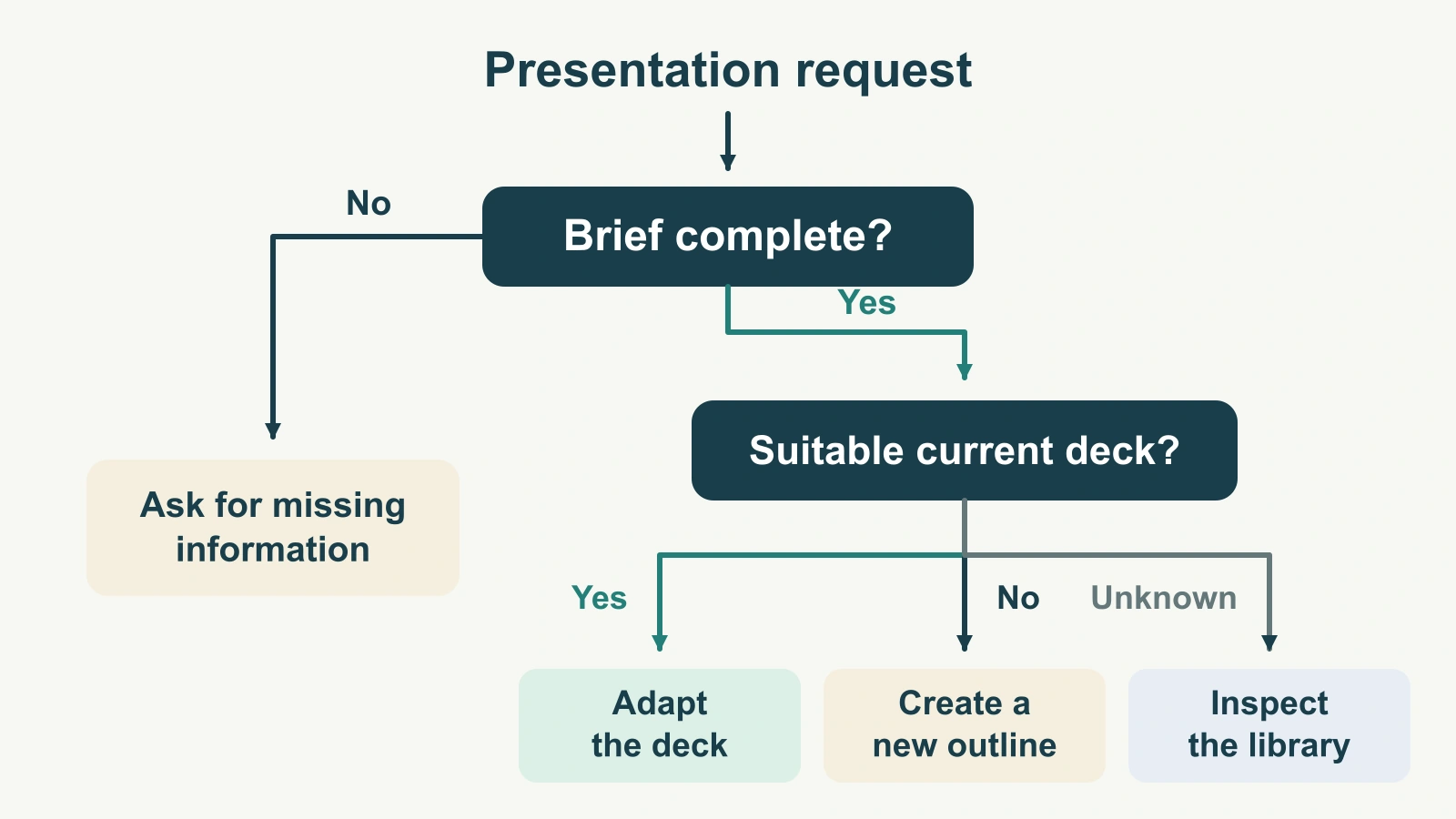
The example below routes a presentation request: ask for missing information, adapt an existing deck, or create a new outline. It is a simple working rule for a fictional team, not a universal approval process. Once the rules and explanation are settled, you can build a presentation draft from that text. A generated layout still needs to preserve every question, branch and outcome.
Decide whether a tree fits the job
Use a tree when a condition changes what happens next. “If the brief is incomplete, ask for the missing information; otherwise, check for a suitable existing deck” is branching logic. A list of tasks that everyone follows in the same order is better shown as a sequence. A list of departments is a hierarchy, not a decision tree.
A weighted comparison is different again. If you need to score three suppliers against cost, support and fit, use a decision matrix. Forcing those trade-offs into yes/no branches can hide how the choice was made.
Be specific about the intended use. A tree that teaches the main route through a process may omit operational detail that belongs in a full procedure. A tree that people will actually use to make a decision must include the conditions and exceptions they need. Do not label a simplified teaching diagram “the complete process” if it is not complete.
Write the rules before the shapes
For our fictional presentation team, the request must identify the audience, the purpose and the source material. A brief is complete only when all three are available. After that, the team checks whether a current deck is suitable for this audience and purpose.
- If the brief is incomplete, ask for the missing information before choosing a deck.
- If the brief is complete and a suitable current deck exists, adapt that deck.
- If the brief is complete and no suitable current deck exists, create a new outline.
- If the brief is complete but the team does not know whether a suitable deck exists, inspect the library before taking either route.
The fourth rule matters. “We have not looked” is not the same as “there is no suitable deck.” A yes/no diagram that sends every uncertain case down “no” quietly changes the policy.
Define “suitable” beside the diagram: the source is current, the audience and purpose match, and the team is authorized to reuse the material. Those conditions can be a short note on this teaching slide. If the audience needs to evaluate each condition separately, expand that question on a second slide rather than squeeze a long paragraph inside one diamond.
Give each node one job
Begin with “Presentation request.” The first question is “Brief complete?” Its “No” branch ends at “Ask for missing information.” Its “Yes” branch reaches “Suitable current deck?” That second question has three labeled exits: “Yes” to “Adapt the deck,” “No” to “Create a new outline,” and “Not known” to “Inspect the library.”
Each box should contain either a question or an action, not both. “Check the brief and ask for missing information if necessary” hides a condition inside a task box. Separating them makes the logic visible.
Keep the language parallel. If one terminal box says “Adapt the deck,” another should say “Create a new outline,” not the vague noun “Creation.” An outcome should tell the reader what the route means.
Questions can use diamonds and actions can use rectangles if that helps your audience, but the labels and connectors must carry the meaning. Do not rely on a shape convention that you never explain. This article uses a decision tree to communicate a small set of working rules; it does not prescribe a formal modeling standard.
Make “not known” a visible route
The faulty version of this example has only two exits from “Suitable current deck?” It sends an unsearched library to “Create a new outline.” The corrected version has a separate “Not known” route to “Inspect the library.” That inspection can later establish yes or no.
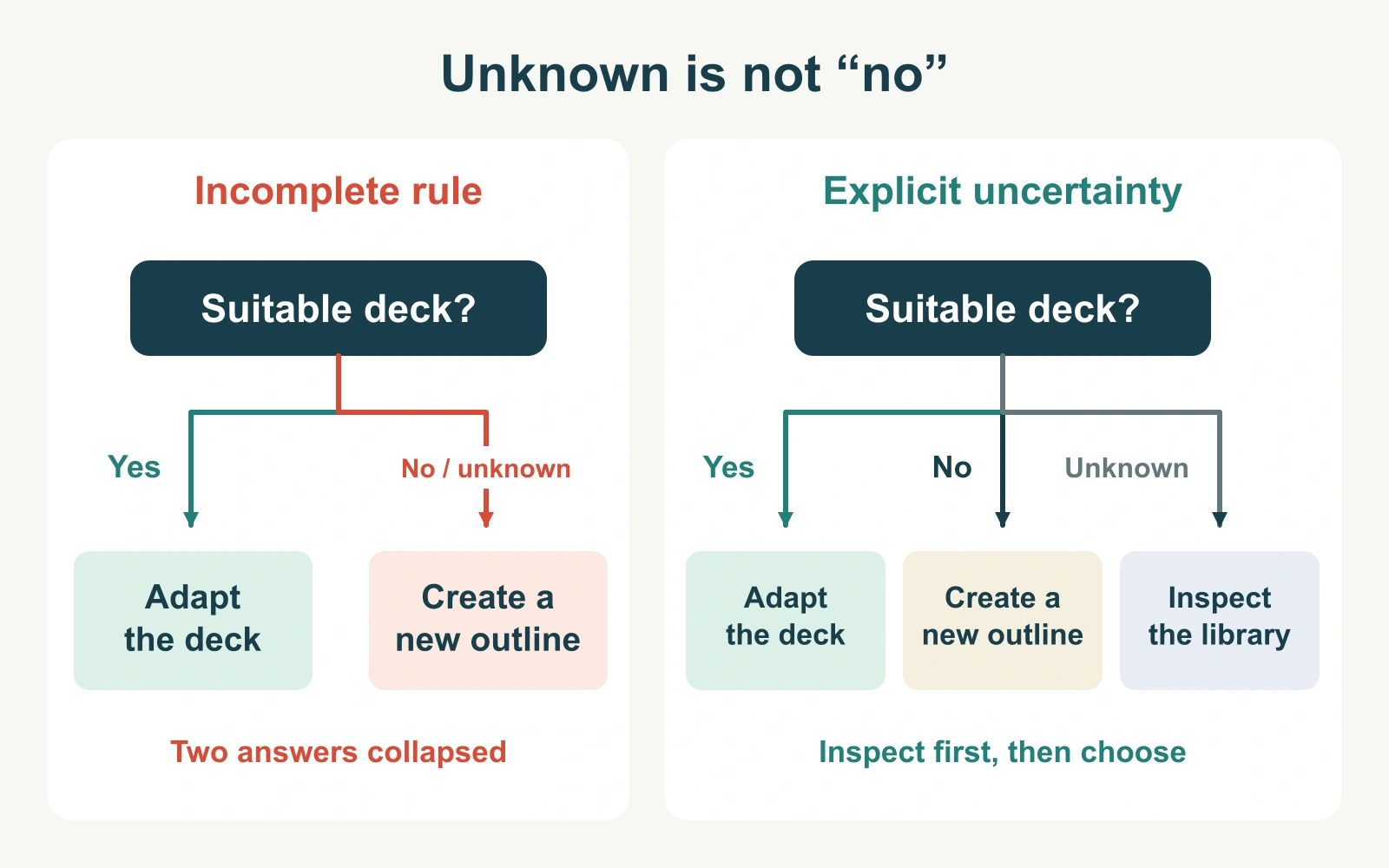
Unknown does not always need a third branch. Sometimes the question can only be asked after the required information is available. In that case, make the prerequisite explicit. What matters is that the diagram does not silently turn missing information into a decision.
The same care applies to overlapping answers. If a question offers “urgent” and “important,” both could be true. Rewrite the question or define which condition takes precedence. The audience should not have to guess which arrow wins.
Trace cases through the tree before presenting it
Do not judge the tree only by how it looks. Walk through cases that reach every terminal action. For the example, these five requests expose both ordinary routes and an ambiguous assumption.
| Request | Relevant facts | Correct next action |
|---|---|---|
| A | Audience and purpose are supplied, but source material is missing. | Ask for the missing information. |
| B | The brief is complete; a current, authorized deck fits the audience and purpose. | Adapt the existing deck. |
| C | The brief is complete; the library has been checked and no suitable deck exists. | Create a new outline. |
| D | The brief is complete; nobody has checked the library. | Inspect the library. |
| E | A deck exists, but its source material is outdated. | It does not qualify as suitable; create a new outline after the completed brief and library check. |
Case E tests the definition, not just the presence of a file. If the team would instead update an existing outline, add that rule deliberately and revise the diagram. Do not let the presenter improvise an exception while the slide still tells the audience something else.
Trace paths with someone who did not draw the tree. Ask them to say the questions and branch labels aloud. A wrong destination may reveal an unclear arrow, a missing condition or a rule the team has not actually agreed.
Fit the logic to the slide without shrinking it away
Keep the main reading direction consistent. A top-to-bottom tree works well when each level has room; a left-to-right tree can suit short questions and wide slides. Leave visible space between branches so a connector cannot appear to belong to two boxes.
Place branch labels close to the connector they describe. Put the answer at the start of the branch rather than midway between two paths. Arrowheads should point to the next node, not merely toward its general area.
If the tree becomes dense, give the audience an overview and expand one branch on a second slide. Repeat the parent question and identify the branch being expanded so the relationship is preserved. Removing an exception to make the diagram fit is a change to the content, not a design improvement.
Use contrast and labels together. A highlighted path can support an explanation, but a grayscale copy should still make sense. Avoid coloring “No” red by default when it simply leads to a legitimate alternative. In this example, creating a new outline is not an error state.
Use the tree as an explanation, not a puzzle
During the presentation, introduce the question the tree answers, then walk through one case. For example: “This request has a complete brief, but we have not checked the library. We stop at inspection; we do not yet decide to create a new deck.” The audience now has a reason to follow the branch.
Keep the written rules with the working file. If a condition changes later, update the relevant labels, the test cases and any slides that expand that branch. Otherwise, the overview can say one thing while the detailed slide says another.
When building the surrounding presentation, supply the exact questions and outcomes to the drafting tool. State that “Not known” is a separate answer and that no probability or score should be added. Review the diagram as logic first and as a visual second. The finished slide should make the next action easier to identify, not merely make the process look organized.