

Artificial intelligence has transformed many aspects of modern work, and presentation design is no exception. In the past, creating a professional slide deck required hours of manual effort. Users had to manage layouts, typography, colors, and visual balance on their own. Nowadays, AI powered presentation generators make it possible to create structured, polished presentations from a single sentence or an existing document. These tools are especially valuable for teams that prioritize speed, clarity, and consistency.
This article explains what AI presentation generators are, why they matter, and how to use them effectively. It also introduces Presenti AI as a practical example for teams and educators who want to streamline their presentation workflow.
What Is an AI Presentation Generator?
An AI presentation generator is a software tool that uses artificial intelligence to automatically create slide decks. Users provide a topic, short description, or source file, and the system converts that input into a complete presentation.
Most AI presentation tools rely on intelligent templates and predefined design rules. The system analyzes the content, identifies logical sections, and organizes information into slides that follow standard presentation structures.
Presenti AI is a typical example of this type of tool. It supports multiple generation methods, offers a large library of presentation templates, and includes AI powered content optimization features. The goal is to help users produce clear and professional slides without manual design work.

Benefits of Using an AI Presentation Generator
No Software Installation Required
Many AI presentation generators operate entirely in the browser. Users do not need to download or install any software on their devices. This approach reduces setup time and avoids compatibility issues across different operating systems.
For remote teams and distributed organizations, browser based access makes collaboration easier. Presentations can be edited from any location as long as an internet connection is available.
Easy to Use for Beginners
AI presentation tools are designed with usability in mind. Even users with no design background can start creating slides within minutes. Interfaces are typically straightforward and guide users step by step.
Instead of adjusting margins or aligning elements manually, users focus on content. Design decisions are handled automatically by the system, which helps reduce cognitive load and learning time.
Suitable for Multiple User Groups
AI presentation generators serve a wide range of users.
Students can organize coursework and prepare class presentations quickly. Educators can create lesson slides with less preparation time while maintaining visual clarity. Business professionals can produce reports, project updates, and pitch decks without relying on design specialists.
This flexibility makes AI presentation tools useful across education, technology, and corporate environments.
Saves Time and Reduces Manual Effort
Traditional presentation creation often involves repetitive tasks that do not add strategic value. Formatting text, adjusting layouts, and selecting color schemes can consume significant time.
AI presentation generators automate these tasks. Users receive a ready to edit presentation in seconds. This allows more time for refining ideas, improving messaging, and preparing for delivery.
How to Use a Free AI Presentation Generator
Using an AI presentation generator follows a simple process. The steps below describe a typical workflow using Presenti AI.
Step 1: Visit the Presenti AI Website
Open a web browser and navigate to the official Presenti AI website. After signing up or logging in, users gain access to the main dashboard where presentation tools are available.
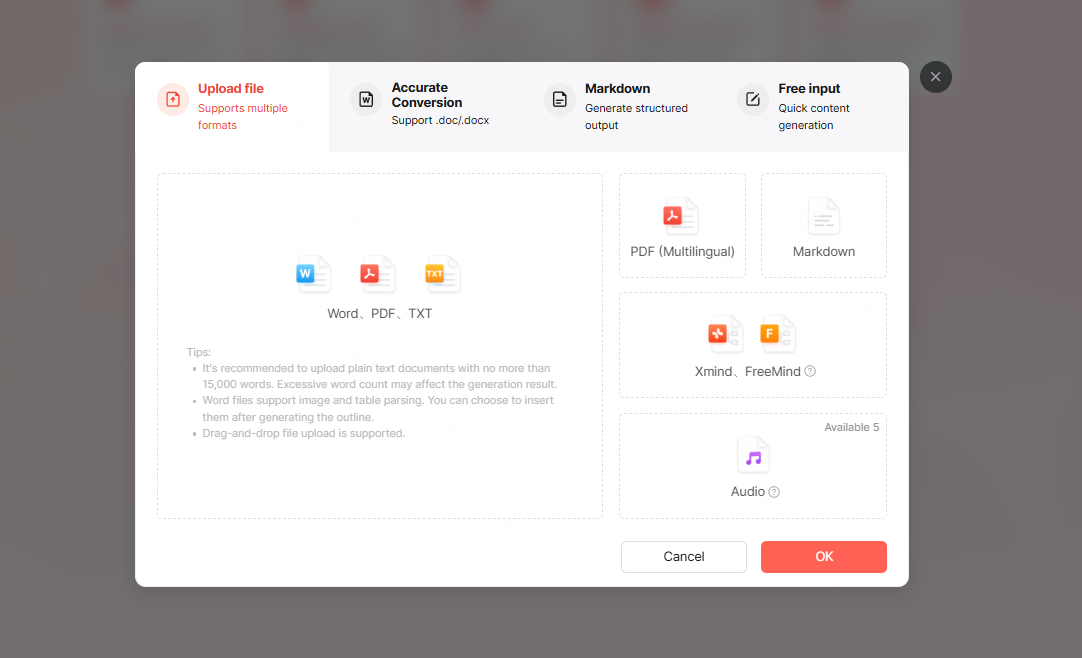
Step 2: Select a Presentation Creation Method
Presenti AI offers several ways to generate presentations based on different needs.
Prompt based generation
Users enter a short topic or sentence. The system generates an outline and fills slides with structured content. This method works well for quick drafts or early stage planning.
Document conversion
Users can upload files such as Word documents, PDFs, TXT files, or Markdown files. Presenti AI analyzes the content and converts it into slides. This option is ideal for turning reports or documentation into presentations.
Theme based creation
Users select a predefined theme and build content within that framework. This method suits teams with specific branding or layout preferences.
Step 3: Generate Slides Automatically
After selecting a method and providing input, users click the generate button. The system processes the request and creates a complete slide deck within seconds.
Step 4: Edit and Improve the Presentation
Once the presentation is generated, users can customize it freely.
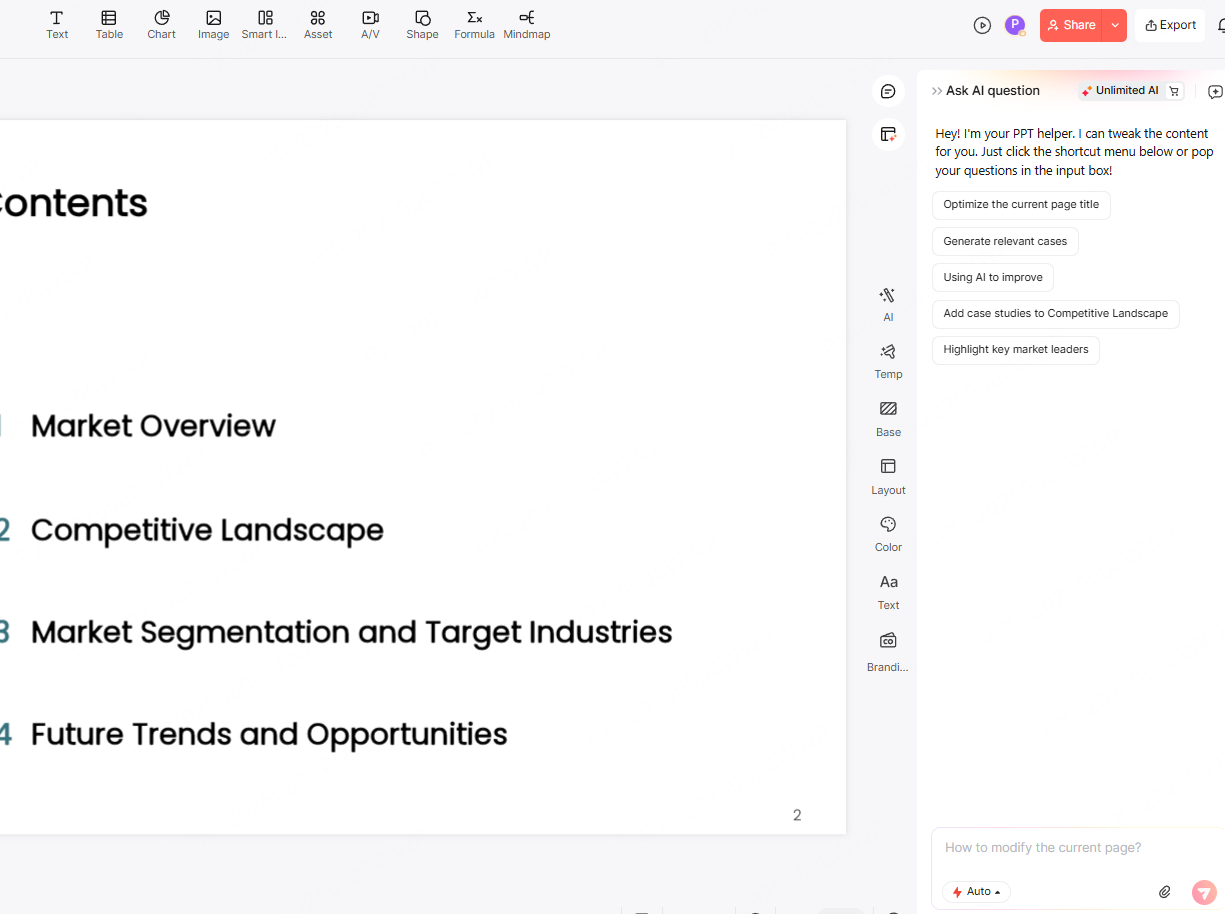
Text can be edited directly on slides. Layouts can be changed with a few clicks. Built-in design assets such as icons and illustrations help improve visual clarity.
Presenti AI also provides AI assisted editing tools. These include rewriting text, simplifying language, expanding key points, and correcting grammar. Such features help ensure the presentation sounds professional and natural.
Common Use Cases for AI Presentation Generators
Business Strategy Meetings
Management teams often need to present strategic plans, market analysis, and forecasts. AI presentation generators help create structured slides that communicate complex information clearly.
Automated layouts and consistent design improve readability and reduce preparation time. Teams can focus on discussion and decision making instead of slide formatting.
Academic and Research Presentations
Researchers and educators frequently present findings at conferences or internal reviews. AI presentation tools help convert academic content into visually organized slides that highlight key insights.
Clear structure and clean visuals improve audience understanding, even for technical topics.
Creative and Product Showcases
Designers and product teams use presentations to explain concepts, prototypes, and workflows. AI presentation generators support visual storytelling by combining images, diagrams, and concise explanations.
This approach helps presenters maintain audience attention and communicate ideas more effectively.
Why AI Presentation Generators Matter
AI presentation generators reflect a broader shift toward intelligent automation in knowledge work. They reduce manual effort while maintaining quality and consistency.
In fast paced environments, teams need tools that support efficiency without sacrificing clarity. AI powered presentation tools meet this need by allowing users to focus on ideas rather than formatting.
For professionals, educators, and developers who create presentations regularly, tools like Presenti AI offer a practical way to improve productivity and communication.









