To shorten a presentation, keep the decision or idea you want the audience to leave with, then remove the material they do not need to understand it. Cut whole detours before trimming individual sentences. A shorter talk needs a shorter argument, not the same argument delivered at twice the speed.
Start by confirming how much of the new slot belongs to you. A ten-minute meeting slot with two minutes for questions leaves eight minutes of speaking time. The guide to matching slide count to the time and task explains why there is no universal number of slides per minute. Here, the job is different: you already have a deck, and you need to edit it.
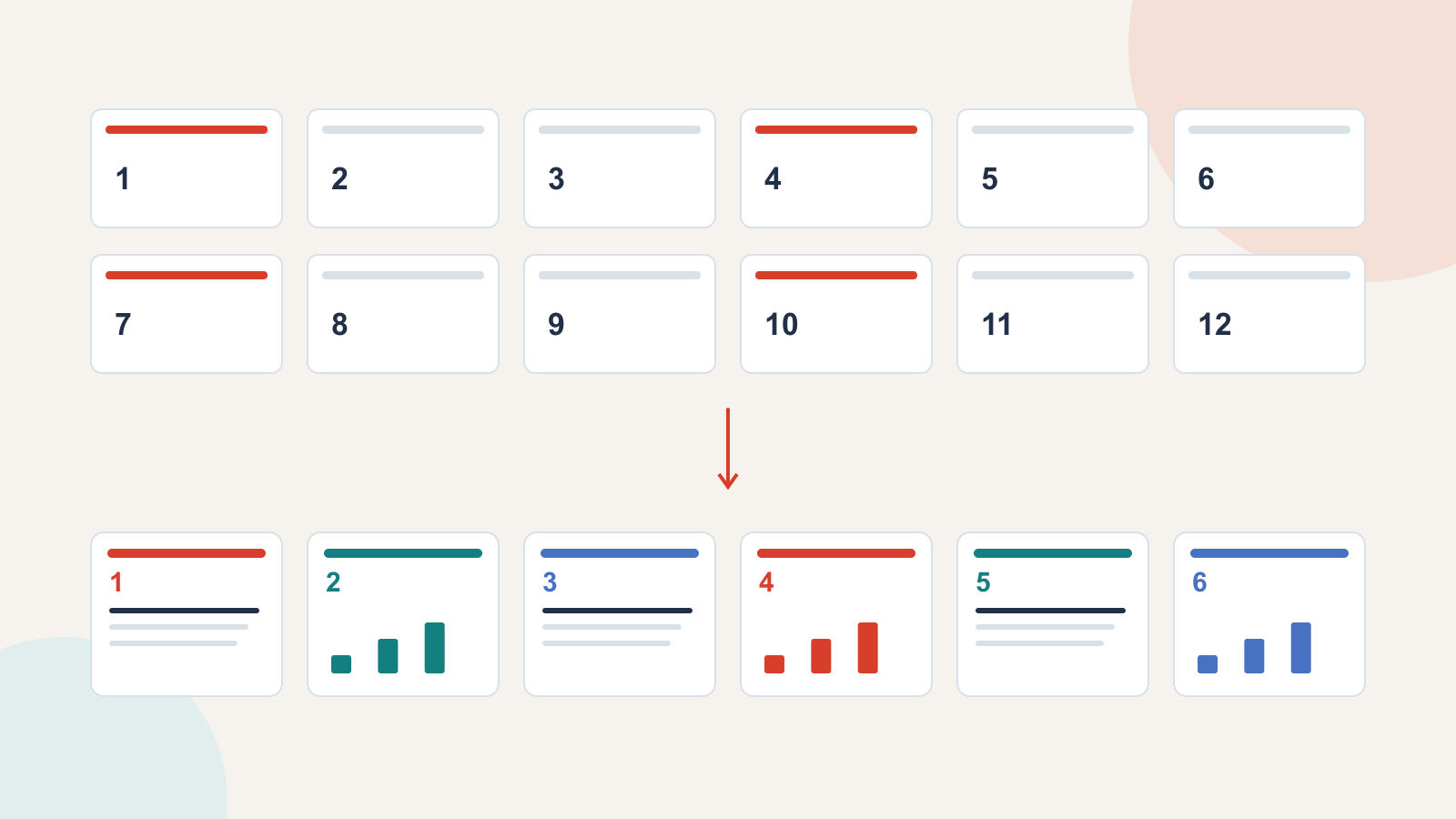
We will reduce a fictional twelve-slide, twenty-minute proposal to six slides for an eight-minute talk. The proposal asks a team manager to approve a four-week lunchtime learning pilot. The dates, counts and costs below are illustrative, not results from an actual company.
Name what the shorter talk must achieve
Write one sentence before opening the slide sorter: “At the end, the manager can decide whether to approve four lunchtime sessions and the proposed preparation time.” That is the shorter presentation's job.
The original deck also explains the history of staff development, describes several teaching formats and sketches a possible annual programme. Those topics may be useful later. They are not all necessary for this decision. Removing them changes the scope of the talk without weakening the immediate proposal.
Be specific about what cannot disappear. In this example, the audience still needs to know why a pilot is worth considering, what it would involve, what staff time it requires, and what would determine whether it continues. A promise without its cost or limitation is not a successful edit.
If the shorter slot cannot accommodate the original decision responsibly, change the request. Ask for agreement to investigate an option, or arrange a separate decision meeting. Do not conceal a material condition to make the deck fit.
Give each existing slide a disposition
Make a copy of the deck and assign each slide one of four actions: keep, combine, move to backup, or remove. Decide by the slide's contribution, rather than how long it took to design.
- Keep: the audience needs this information to follow or challenge the recommendation.
- Combine: two slides answer the same question and can become one clearer explanation.
- Move to backup: the detail answers a plausible question but is unnecessary in the main sequence.
- Remove: the material repeats another point or no longer belongs to the decision.
For the learning pilot, a survey summary is worth keeping. In the example, 18 of 24 respondents expressed interest, but the team has 40 people. The slide must retain that distinction: interest among respondents is not confirmed attendance across the team. The full question wording can move to backup; the respondent count and limitation stay visible.
By contrast, three slides comparing every possible training format are excessive for a small pilot. Keep one reason for the proposed format and the strongest alternative. Move the detailed comparison aside so the manager can inspect it if needed.
Turn twelve slides into six
The assembly map below keeps the recommendation intact while changing the route to it. Each destination slide answers a question the manager is likely to ask.
| Original material | Editing decision | Shorter slide |
|---|---|---|
| 1. Title and introduction | Replace the long introduction with the proposed decision. | 1. Approve a four-week learning pilot? |
| 2. Background; 3. Previous training activities | Combine only the context explaining the current need; remove the historical tour. | 2. What the team wants to learn |
| 4. Survey questions; 5. Responses; 6. Topic preferences | Keep the useful finding and its sample limit. Move the full questionnaire and topic list to backup. | 3. What the responses do—and do not—tell us |
| 7. Format options; 8. Detailed comparison; 9. Recommendation | Combine the proposed format with the main alternative and the reason for a small trial. | 4. Why four short sessions |
| 10. Resources; 11. Pilot schedule | Show the resource commitment alongside what will happen. | 5. What the pilot requires |
| 12. Request and next steps | Keep the decision, owner and conditions for continuing. | 6. Decide the pilot, not the annual programme |
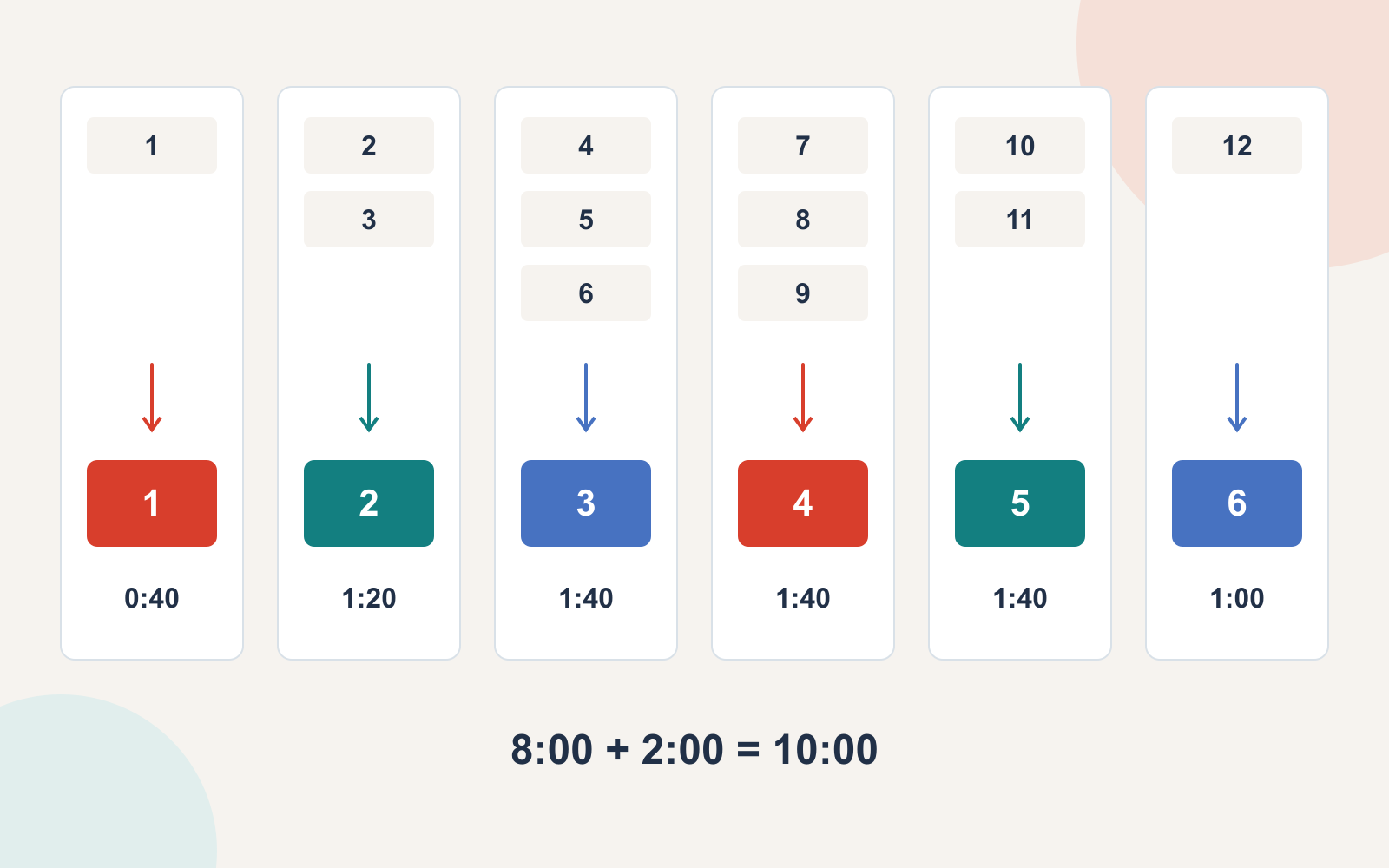
Combining does not mean putting three miniature slides on one page. Slide 3 might need one clearly labelled result and a short limitation, rather than all the original survey charts. Slide 5 can show four session dates and the total preparation commitment without reproducing a complete calendar.
Keep the source material somewhere the presenter can actually find it. Use descriptive backup titles such as “Survey wording and respondent count,” not “Additional information 2.” The guide to organizing backup slides for questions covers how to make that material reachable during a discussion.
Give the short version a real time budget
Allocate time according to the work each slide does. A recommendation and its trade-off deserve more explanation than a title. For the eight-minute example, this is a starting budget to test aloud:
| Slide | Time | What to say |
|---|---|---|
| 1. Decision | 40 seconds | State the proposed pilot and what approval would mean. |
| 2. Need | 80 seconds | Explain the practical learning need without retelling the team's history. |
| 3. Evidence | 100 seconds | Describe the responses, the denominator and what remains uncertain. |
| 4. Format | 100 seconds | Compare the chosen approach with one credible alternative. |
| 5. Commitment | 100 seconds | Explain session time, preparation and responsibility. |
| 6. Request | 60 seconds | Restate the approval needed and the decision after the pilot. |
The total is 480 seconds: eight minutes. The remaining two minutes belong to questions, not an extra conclusion. If your rehearsal runs long, identify the section that consumes the time. Do not remove thirty seconds from every slide automatically; the evidence may already be as concise as it can safely be.
Rewrite the joins after cutting
A shortened deck can have the right slides and still sound disconnected. References to deleted examples, missing definitions and abrupt transitions are common after a substantial cut.
The original talk might say, “After comparing those five formats, we chose lunchtime sessions.” The short version no longer contains that comparison. Replace the line with the actual reason: “A four-week pilot lets us test interest with a limited preparation commitment. A longer course would require a larger commitment before we know who will attend.”
Likewise, do not keep “as we saw earlier” when the relevant chart is now in backup. Either include the essential finding in the sentence or omit the reference. Each transition should connect what the audience has heard to the next question, rather than expose the gaps left by the edit.
Trim your spoken script too. If the slides have become shorter but the notes still contain the full twenty-minute explanation, you have created a prompt to overrun.
Build and rehearse the revised outline
Once the shorter argument is settled, you can turn its text outline into an editable presentation draft with Presenti. Supply the facts, limitations and request you have chosen to retain. The tool can help draft the slides; deciding which evidence the audience still needs remains your responsibility.
Audience: [who decides]. Available speaking time: [minutes, excluding questions]. Decision or takeaway: [one sentence]. Keep: [essential evidence, conditions and request]. Main sequence: [each slide's question and answer]. Backup: [detail available if asked]. Do not add: [unsupported findings or a wider commitment].
Rehearse the shorter talk from beginning to end at a comfortable pace. Include the sentences that connect slides. If time is cut again on the day, tell the audience which decision you can cover, then use the shorter route you prepared. A good cut leaves listeners with fewer points to remember and enough information to judge the point that matters.