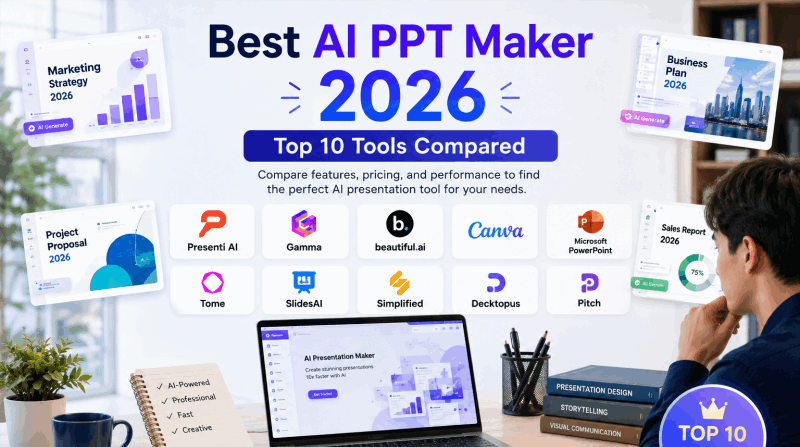
Looking for the best AI PPT maker? The right choice depends on the file you start with and the deck you need to deliver. Presenti AI PPT Maker is a fit when you want to turn text or supported source documents into a structured presentation draft; Gamma is suited to web-native sharing; SlidesAI keeps generation inside Google Slides; Canva is design-led; and PowerPoint Copilot fits organizations already using Microsoft 365.
This guide compares nine current options and includes a historical note on Tome by input method, narrative structure, editing control, PowerPoint export, free access, and collaboration. Use the quick matrix first, then open the tool review that matches your workflow. Any generated deck still needs human review for facts, layout, citations, and brand requirements.
Quick answer: which AI PPT maker fits your workflow?
There is no single best AI PPT maker for every job. Start with the output and editing environment you need.
| Best fit | Look for | Shortlist |
|---|---|---|
| Editable PowerPoint deck from text or files | Document input, structured slides, reliable PPTX export | Presenti and other PPTX-focused tools |
| Prompt-to-deck draft for link sharing | Fast outline generation, web publishing, comments | Gamma and similar web-first tools |
| Editing inside Google Slides | Workspace integration and native slide editing | SlidesAI or another Slides add-on |
| Visual design and template assets | Brand kit, image library, and layout control | Canva AI |
| Existing Microsoft 365 workflow | PowerPoint integration, Word context, and permissions | PowerPoint Copilot, where licensed |
Use “best” as a workflow decision, not a universal ranking. Confirm the current plan’s slide limit, export format, watermark policy, and commercial-use terms.
What counts as an AI PPT maker?
An AI PPT maker turns a prompt, outline, URL, or source file into a presentation structure and visual layout. A useful comparison separates three outputs:
- Editable PPTX: slides can be opened and changed in PowerPoint or another compatible editor.
- Web presentation: content is designed for a browser or shareable link and may not map cleanly to PowerPoint.
- Static export: a PDF or image can be shared, but individual slide elements may not remain editable.
That distinction matters for the query “best AI PowerPoint generator.” A polished web deck is useful for link sharing, but it is not automatically a PowerPoint-ready file.
Best AI PPT Makers by Use Case
1. Presenti AI
Best for source-to-editable presentation workflows
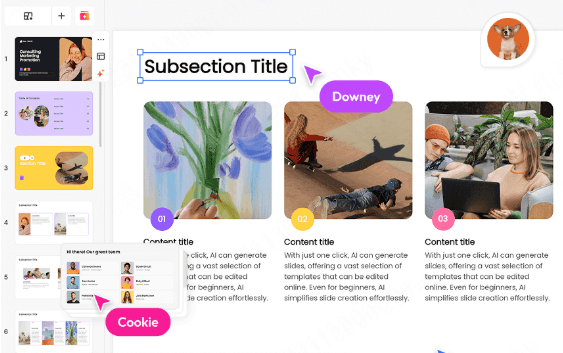
Presenti is designed for turning written material into a structured presentation draft. Depending on the current workspace and plan, users can start from text or supported source documents, review the generated structure, and refine the slides in the editor. Confirm the available import and export formats before promising a specific file type.
Its useful comparison point is the source-to-deck workflow: the starting material, the generated narrative, the editing controls, and the final handoff should be checked together. Review the current plan for editable downloads, PPTX/PDF export, AI allowances, branding, and workspace limits before delivery.
Key features:
- Text and supported source-document workflows
- Structured slide drafts for review
- In-browser editing after generation
- Current plan options for editable downloads and export
- Human review for facts, citations, density, and layout
Access model: Check the current Presenti plan for credits, supported imports, editable downloads, export formats, and workspace limits.
Best for: Business professionals, educators, startup founders, and anyone who needs an editable slide file for handoff.
2. Gamma
Best for web-native, shareable presentation documents
Gamma is a web-first presentation tool for teams that share content via link rather than exporting files. Its card-based format blurs the line between a presentation and a scrollable document, which works well for internal wikis and lightweight memos.
Gamma supports PowerPoint export, including on its free plan. Its card-based authoring and browser presentation experience may differ from the exported deck, so inspect the file for layout and editable elements before delivery.
Key features:
- AI generation from text prompts
- Web-native card format with smooth animations
- Collaboration and commenting tools
- PowerPoint export is available on the Free plan, with Gamma branding on the exported file
Best for: Internal team documentation, web-shared content, quick prototypes.
3. Beautiful.ai
Best for teams with consistent brand standards
Beautiful.ai uses “Smart Slides” — templates that automatically adjust layout as you add or remove content. Review the result after editing, especially when a slide contains dense content.
Beautiful.ai’s Smart Slides automate layout decisions. Evaluate the slide types and editing control you need, including dense charts or tables. Its standard 14-day trial requires a payment card and renews into payment unless canceled before expiry.
Key features:
- Smart Slides that auto-adjust layout
- Strong team and brand kit tools
- Clean, professional template library
- PowerPoint export available
Best for: Enterprise teams that need brand consistency across multiple presenters.
4. Tome (historical; no longer available)
Historical reference only
Tome Slides was a web-native storytelling tool, but its product sunset was announced for April 30, 2025. Do not treat it as a current 2026 recommendation; choose an available alternative when you need to create or export a deck.
5. SlidesAI
Best Google Slides integration for AI generation
SlidesAI offers a Google Slides add-on as well as PowerPoint, ChatGPT, and standalone web workflows. For the Google Slides route, generation and subsequent editing take place in the host editor; choose the route that fits your team’s files.
For teams already living inside Google Workspace, this is the path of least resistance. The AI quality is solid for straightforward content. Complex data or nuanced narrative structures sometimes require significant manual adjustment after generation.
Key features:
- Native Google Slides add-on
- Text-to-slides generation inside Google Workspace
- Theme and color customization
- Direct Google Drive integration
Best for: Google Workspace users who want AI generation without leaving their existing tools.
6. Canva AI Presentations
Best for visually creative, design-heavy presentations
Canva’s AI presentation tools draw on a large asset library of photos, icons, illustrations, and brand elements. Magic Design can generate slide concepts from a prompt, but review the output for brand consistency, licensing, and slide density.
When evaluating Canva, use your actual outline and inspect both the narrative and design. Check whether the generated content preserves your evidence and whether the chosen assets and export meet the delivery requirements.
Key features:
- Magic Design AI for slide generation
- Massive stock photo and illustration library
- Strong brand kit and team features
- Presentation and PDF export
Best for: Designers, marketers, and creative teams who prioritize visual impact.
7. Microsoft Copilot in PowerPoint
Best for existing Microsoft 365 users
Copilot can help draft and refine content inside PowerPoint, including generating slides from a Word document, summarizing an existing deck, suggesting design changes, and rewriting content. Available features depend on the Microsoft 365 plan and tenant configuration. For organizations already paying for Microsoft 365, there is no additional tool to adopt.
The catch is licensing. Copilot requires a Microsoft 365 Copilot license, which adds cost per user. The AI also works best with well-structured input — loosely written prompts tend to produce generic output. For users already working in Microsoft 365, keeping drafting and editing inside PowerPoint can reduce tool switching.
Key features:
- Native PowerPoint integration
- Generate slides from Word documents
- Design suggestions and content rewriting
- Full PowerPoint editing capabilities
Best for: Enterprise teams already on Microsoft 365 with Copilot licensing.
8. Pitch
Best for startup and investor pitch decks
Pitch is commonly used for startup decks, and its AI features can help structure a problem, solution, market, traction, team, and ask narrative. The AI generation understands investor narrative conventions — problem, solution, market size, traction, team, ask — and structures content accordingly.
Collaboration tools are strong, with real-time co-editing, commenting, and version history. The template library skews heavily toward tech and startup aesthetics, which is a strength if that’s your context and a limitation if it isn’t.
Key features:
- Investor narrative AI structuring
- Real-time collaboration and version history
- Startup-focused template library
- Analytics on presentation views and engagement
Best for: Startups, founders, and investor-facing teams.
9. Decktopus
Best for quick, form-based presentation generation
Decktopus takes a structured approach to AI generation. You answer a series of questions about your audience, goal, and content, and the AI builds a tailored deck based on your inputs. The guided process provides prompts for defining the audience and goal, especially for users who find blank prompts difficult to work with.
For Decktopus, compare the available layouts and customization with your actual content. Test the generated outline and confirm export access before relying on the workflow for a deadline.
Key features:
- Guided questionnaire-based generation
- Audience and goal-aware AI structuring
- Speaker notes auto-generation
- PDF and PPT export
Best for: Educators, trainers, and users who prefer guided creation over open prompts.
10. Simplified AI Presentations
Presentation drafting within a content suite
Simplified includes presentation generation in a wider content-creation suite. It may be useful when the same team also prepares copy and visual assets; compare the plan’s presentation and export allowances with those needs.
Try a representative presentation in Simplified before selecting it. A short brief, a data slide, and a final export will reveal more about its fit than a general budget ranking.
Key features:
- AI generation from prompts and outlines
- Integrated image and copy generation tools
- Basic template library
- PDF and image export
Best for: Freelancers, small businesses, and budget-conscious users.
Best AI PowerPoint generator: what to check before you export
If the final deliverable must be a PowerPoint file, check these items before choosing a tool:
- File type: Is the output a real
.pptx, a PDF, an image, or a web link? - Editability: Can you change text, shapes, images, charts, and speaker notes after export?
- Layout fidelity: Do fonts, spacing, charts, and images survive the export?
- Access rules: Is PPTX export included in the free plan, limited by credits, or reserved for a paid plan?
- Review burden: How much manual correction is needed for facts, hierarchy, citations, and brand formatting?
A tool that generates a visually attractive web page may still be a poor fit when another person needs to edit the deck in PowerPoint. Match the output requirement to the tool before judging its design.
Best AI PPT Maker Comparison Table
| Tool | Best for | Starting input | Editing environment | Free access model | PowerPoint handoff | Limit to verify |
|---|---|---|---|---|---|---|
| Presenti AI | Source-to-editable drafts | Text and supported documents | Web editor | Limited free AI; paid document input and exports | Paid plans list editable PPTX/PDF export | Credits, imports, exports, branding |
| Gamma | Web-shared documents | Text prompt | Web-native cards | Limited free tier | Free PPTX export; inspect rendering | AI credits, branding, and rendering |
| Beautiful.ai | Brand-consistent teams | Text and templates | Web editor | 14-day card-required trial; paid plans | Verify editable PowerPoint export | Renewal and subscription |
| Tome (historical) | Historical reference only | — | — | Unavailable | None | Service closed April 30, 2025 |
| SlidesAI | Google Workspace users | Text paste | Google Slides; other supported workflows | Limited free tier | Native editing in the host editor | Input and generation quota |
| Canva AI | Visual-heavy design | Text and templates | Canva editor | Free tier with paid assets | Check PPTX fidelity and asset licensing | Premium assets and AI allowance |
| Microsoft Copilot | Microsoft 365 teams | Word and prompt | PowerPoint | Paid add-on or eligible plan | Native PowerPoint workflow | License, seats, admin permissions |
| Pitch | Startup pitch decks | Text prompt | Web editor | Free tier and paid plans vary | Check editable export and branding | Collaboration and analytics limits |
| Decktopus | Guided creation | Questionnaire | Web editor | Free tier and paid plans vary | Verify PPT/PDF export and editability | Generation and customization limits |
| Simplified | Budget-conscious users | Text prompt | Web editor | Free tier and paid plans vary | Verify current export formats | AI credits and branding |
How to choose the best AI PPT maker for your needs
Choose by the input, editing environment, and final handoff rather than by a universal ranking.
For source documents: compare text-to-presentation, AI PowerPoint generation, and the current Word/PDF input options. Confirm whether the plan includes the import and editable export you need.
For a short prompt: look for a tool that creates a coherent outline before styling the slides. Include the audience, goal, length, must-keep facts, tone, and call to action in the prompt.
For Google Slides: SlidesAI or another add-on keeps editing in the host editor. Check permissions, input limits, and how the generated slides behave after editing.
For Microsoft 365: Copilot or a PowerPoint add-in can reduce tool switching, but licensing and organization permissions matter.
For visual design: Canva and similar tools provide templates and assets, but review the narrative structure, asset license, and export fidelity. See presentation templates for a template-led route and Presenti pricing for current plan limits.
Prompt-to-deck workflow: from idea to a usable presentation
A strong prompt gives the generator enough context to make slide-level decisions. After generation, review the result in three passes:
- Structure: Does every slide have one job, and does the order answer the audience’s questions?
- Evidence: Are numbers, sources, names, and dates preserved correctly?
- Design: Are text density, contrast, alignment, and visual emphasis appropriate for the room or screen?
Free plans, trials, and paid limits
“Free” can mean an ongoing free tier, a small monthly AI allowance, a watermarked export, or a time-limited trial that asks for a card. Compare the access model instead of the headline price alone.
| Access model | What it means | Verify before choosing |
|---|---|---|
| Ongoing free tier | Core generation or editing remains available with usage limits | Credits, slide count, export type, watermark, commercial use |
| Free AI with paid export | You can draft, but PPTX/PDF or clean export may require payment | Export gate and editable output |
| Card-required trial | Paid capabilities work for a limited period and may renew | Trial end date, renewal, cancellation, refund terms |
| Paid add-on | AI is available inside PowerPoint or Google Slides with a separate license | Workspace license, seats, permissions, admin controls |
Frequently asked questions
What is the best AI PPT maker for an editable PowerPoint deck?
Choose the tool that produces a compatible PPTX and lets you review or edit the slide elements you need. Confirm the current export plan, font behavior, and layout fidelity before relying on it for a final deck.
What is the best AI PowerPoint generator from a prompt?
Shortlist tools that accept a detailed prompt, create a coherent slide sequence, and support post-generation editing. Prompt quality and human review still affect the result.
Can an AI PPT maker turn a Word or PDF file into slides?
Some tools accept source documents, while others require pasted text or a URL. Check the current input options and file-size limits for the tool you choose.
Are free AI PPT makers really free?
Some have an ongoing free tier; others limit credits, exports, slide count, or watermark removal. A card-required trial is different from a permanent free plan.
How do I choose between an AI PPT maker and a web presentation tool?
Choose an AI PPT maker when the deliverable must be editable in PowerPoint. Choose a web-first tool when browser sharing, comments, and scrolling are more important than a native PPTX file.
Which AI PPT maker fits your workflow?
Choose Presenti when your starting point is text or a supported source document and the handoff needs an editable presentation draft. Choose Gamma for web-first sharing, SlidesAI for Google Slides, Canva for design-led editing, or Copilot for a Microsoft 365 workflow. Compare the same short brief and inspect the exported file before committing.
The best AI for PPT is the tool that completes your workflow: accurate structure, usable design, the right editing environment, and an export your audience can open. Plan limits and product features change, so verify the current vendor terms before delivery.
Try the AI PPT maker with your own outline and review the generated structure before sharing.