A daily standup meeting template helps the team see what changed, what needs attention today, and who needs help. Keep it short: the formal Daily Scrum has a 15-minute timebox, while other teams can choose a brief format that fits their work. Use the task board or a few notes; a separate presentation is optional.
This format fits Scrum teams, Kanban teams, and cross-functional delivery groups that need a short daily coordination point. It is deliberately different from a weekly report: the standup changes today's work, while a weekly report summarizes a reporting period for stakeholders and decisions.
What Should a Daily Standup Meeting Template Include?
The template needs five working fields: the shared goal, work that moved, today's intended progress, blockers or dependencies, and owned follow-ups. Keep each update brief enough that the group can compare it with the board. Details belong in the task, ticket, or a follow-up conversation.
In Scrum, the Daily Scrum is a 15-minute event for Developers to inspect progress toward the Sprint Goal and adapt the Sprint Backlog. The official Scrum Guide does not require the traditional three questions. A team may use them, but the meeting still needs to produce an actionable plan rather than a sequence of personal reports.
| Template field | What to record | What to avoid |
|---|---|---|
| Sprint Goal or daily objective | One outcome that gives the updates a common direction | A broad project slogan with no connection to today's work |
| Movement since last sync | Completed outcome, changed condition, or useful learning | A diary of meetings, messages, and hours |
| Next progress | The task or collaboration that should move the goal today | A long personal to-do list |
| Blocker or dependency | Impact, help needed, owner, and next check | "Blocked" with no request or responsible person |
| Action log | Concrete follow-up, owner, due or check time, status | Discussion notes with no commitment |
A plain daily standup template can use these fields in a document, board, or chat thread. Add a slide deck only when the team benefits from a shared visual view, such as a distributed team, a multi-workstream release, or a program with dependencies that are hard to scan in a list.

How Do You Run a 15-Minute Standup Meeting Agenda?
A practical standup meeting agenda uses the first minute to frame the goal, about ten minutes to inspect work and blockers, and the final four minutes to confirm changes and owners. These are guardrails, not speaking quotas. A team of five may move faster; a larger group may need to walk the board by work item instead of person.
- 0:00-1:00, restate the goal. Read the Sprint Goal or today's shared objective. In Scrum, adapt the work plan toward the existing Sprint Goal rather than treating the goal as something to rewrite each morning.
- 1:00-8:00, inspect active work. Walk the board from the items closest to done back toward items not started. For each item, state what changed, what should happen next, and whether the plan still supports the goal.
- 8:00-11:00, surface blockers and dependencies. Record the impact, the help needed, and the person who will coordinate the response. Do not diagnose a technical problem in front of people who are not needed.
- 11:00-14:00, adapt today's plan. Reorder, split, pair, hand off, or pause work when that change improves progress toward the goal.
- 14:00-15:00, read back actions. Confirm each follow-up, owner, and next check time. Move unresolved discussion to a named after-standup group.
At the end of the meeting, update the board and agree on each blocker’s next step. Scrum.org’s guidance on conducting the Daily Scrum emphasizes the Sprint Goal, an actionable plan, and follow-up collaboration when an issue needs more time.
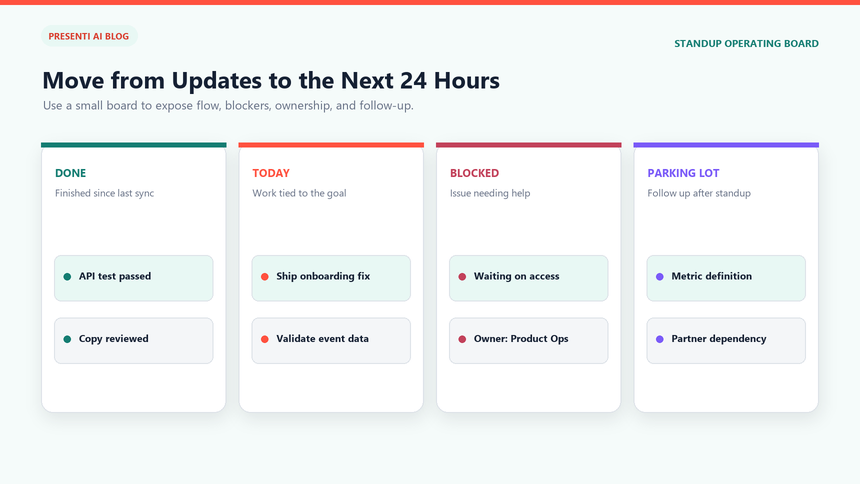
If the meeting repeatedly runs over 15 minutes, reduce routine reporting and save detailed problem-solving for the people involved afterwards. In a general team sync, review whether everyone needs to attend. For a formal Daily Scrum, keep the event focused on the Developers coordinating their plan toward the Sprint Goal.
Which Slides Belong in a Lean Daily Standup Presentation?
If slides help your team coordinate, choose from the ten views below rather than building a ten-slide deck every day. Most teams can combine the goal, active work, and blockers into one to three views. Reuse them, keep the task board current, and avoid spending more time preparing the update than discussing the work.
- Today and the goal. Show the date, Sprint Goal or daily outcome, and the meeting timebox.
- Goal signal. Show the one measure, milestone, or acceptance condition that indicates meaningful progress.
- Work closest to done. List items that can finish today and the final step each requires.
- Work in progress. Show active items, their current state, and the next observable move.
- New or changed priorities. Record only changes since the last sync and explain the effect on today's plan.
- Blockers. Rank blockers by goal impact and urgency, not by who raised them first.
- Dependencies. Name the external team, decision, handoff, or input and the expected response time.
- Action log. Show open follow-ups with owners and check times.
- Parking lot. Capture topics that need a smaller follow-up group after the standup.
- Read-back. Summarize today's adapted plan, owners, and the next synchronization point.
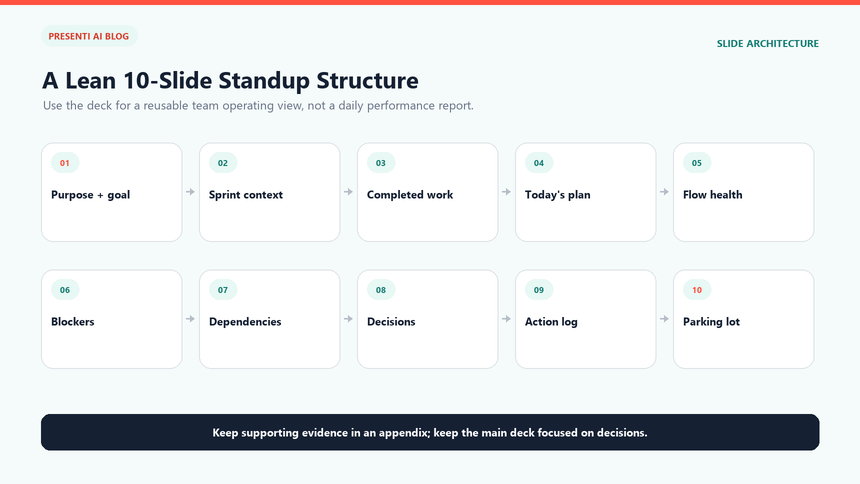
Do not create a new slide for every team member. That structure encourages reporting upward and hides cross-team dependencies. Organize the deck around the goal and the work. Names should appear where ownership matters: on a task, blocker response, decision, or follow-up.
How Should You Track Blockers, Owners, and the Action Log?
A blocker is a condition that stops or materially threatens progress, not every inconvenience. Record enough information for someone to act without replaying the meeting: what is blocked, the impact on the goal, the help or decision needed, the response owner, the next check time, and the current status.
| ID | Blocked work and impact | Help or decision needed | Owner | Next check | Status |
|---|---|---|---|---|---|
| B-07 | Mobile sign-in test cannot start; release confidence is at risk | Approve temporary test credentials | Maya | Today, 11:30 a.m. | Escalated |
| B-08 | Analytics event names are unclear; dashboard work may be reworked | Confirm final event schema | Luis | Today, 2:00 p.m. | Owner assigned |
| B-09 | Vendor response is late; no effect before Thursday | Follow up and prepare fallback | Priya | Tomorrow, 9:00 a.m. | Watching |
The blocker owner is responsible for coordinating the response, not necessarily for doing all the work. The action log can then hold the concrete commitments created by that response. Use a short schema: action, owner, due or check time, linked blocker or work item, and status. Close, reassign, or rewrite stale actions instead of carrying the same vague line every day.
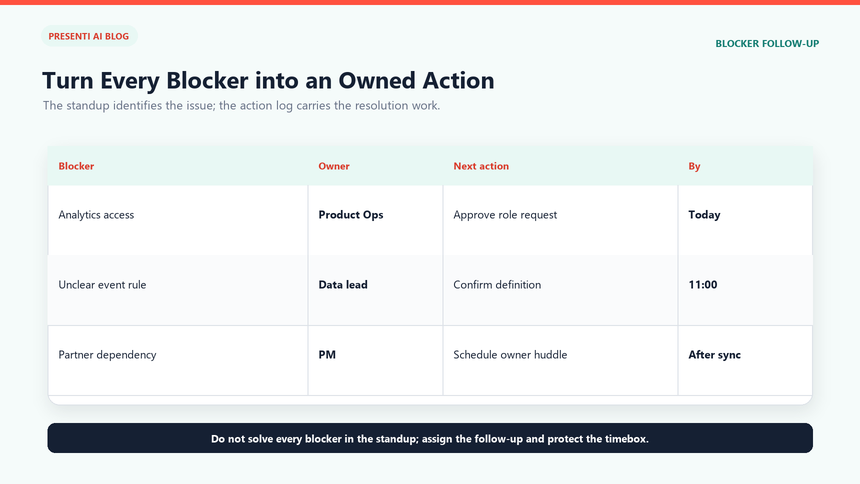
Use the parking lot for explanations that need more than a sentence. At the end of the standup, name the people who need to stay, the question they will resolve, and when the answer returns to the board. This preserves the timebox without allowing difficult work to disappear.
What Does a Completed Standup Example Look Like?
The following example is fictional. It shows the operating detail a product team might record while preparing an onboarding pilot; it does not describe a Presenti customer result.
Goal: make the pilot ready for 100 invited users by Thursday without increasing verification failures. Movement: the team completed the desktop flow, support approved the help copy, and the mobile camera fix entered testing. Today's plan: validate the mobile fix with five devices, finish the event dashboard, and prepare the fallback upload route. Blocker: two test accounts are locked; Maya owns credential approval by 11:30 a.m.. Action: Luis will confirm the event schema with analytics by 2:00 p.m. Priya will draft the fallback decision for the product lead by 3:00 p.m.
| Standup item | Fictional entry | Visible check |
|---|---|---|
| Progress toward goal | Desktop flow complete; mobile fix in test | Acceptance checks linked to both work items |
| Today's priority | Validate five devices before expanding the pilot | Device list and pass criteria assigned |
| Blocker | Locked test accounts delay mobile validation | Credential approval owner and 11:30 a.m. check recorded |
| Dependency | Analytics must confirm the final event schema | Named reviewer and 2:00 p.m. response time recorded |
| Parking lot | Choose fallback if the mobile fix fails | Product, engineering, and support meet after standup |
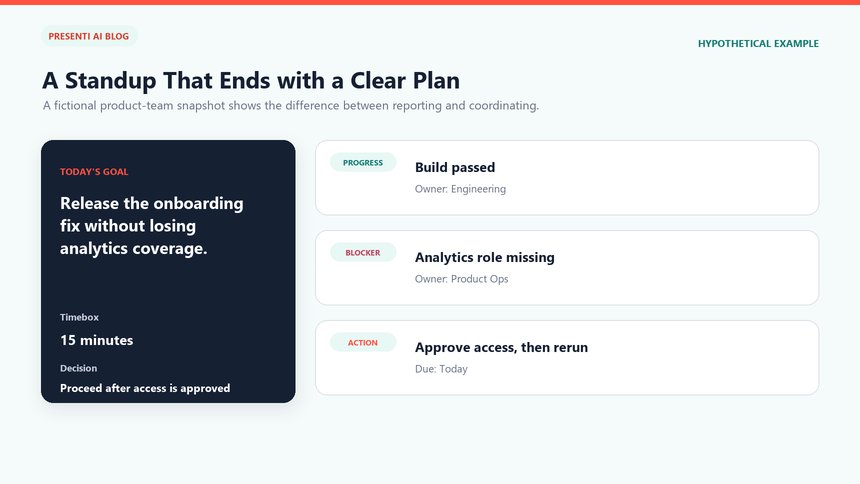
The same team might later use a weekly report to explain the pilot's overall health, measured results, variance, risks, and decisions to stakeholders. Do not turn the daily standup into that report. The daily format answers "what must change today?" The weekly format answers "what changed during the period, are we on track, and what stakeholder decision is needed?"
How Can Presenti Draft a Reusable Standup Template?
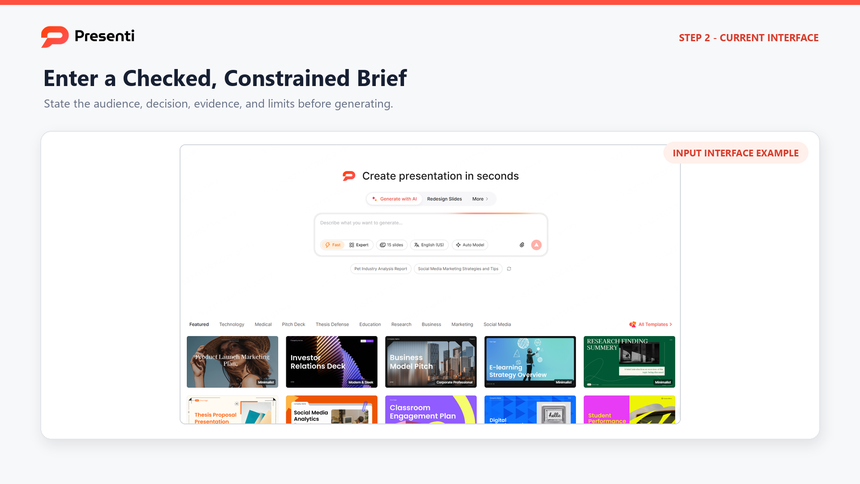
Once the team has a reliable source brief, Presenti can help organize it into an editable first draft. Use text to presentation when the standup content already exists as notes, and choose an appropriate visual system from the presentation template library after the outline is correct. Presenti can structure the material, but the team must verify the work state, owners, dates, dependencies, and sensitive information.
Step 1: Enter the prompt or checked source
Start with the date, audience, Sprint Goal or daily objective, current work items, changed priorities, blockers, dependencies, action owners, and required slide count. Remove secrets and personal data that do not belong in the deck. A constrained prompt can be:
Create a reusable one-to-three-view daily standup brief for a product delivery team. Goal: prepare the onboarding pilot for 100 invited users by Thursday. Show the shared goal, work that changed, blockers, and agreed follow-ups. Include an owner and next check time for every blocker. Add a separate view only when a dependency needs more explanation. Use placeholders for unknown facts. Do not invent progress, commitments, dates, or results.
Use the supplied work status as the source and leave missing details as placeholders. Keep the slides focused on today’s coordination.
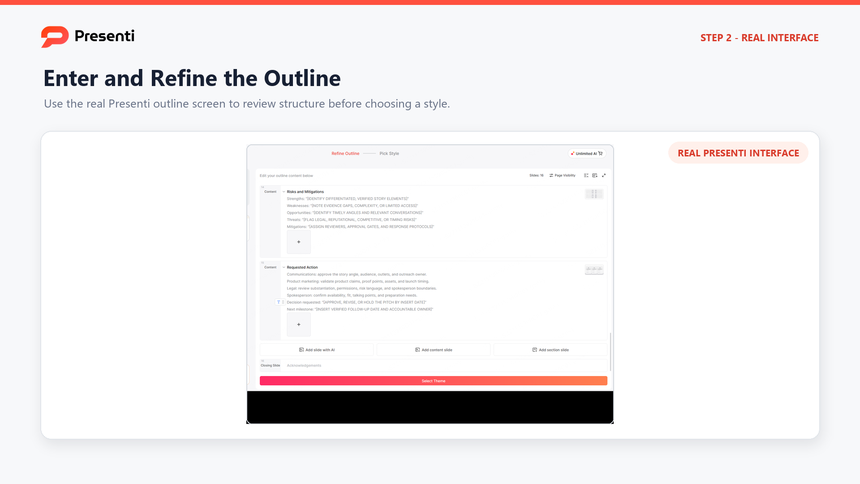
Step 2: Review and correct the outline
Confirm that the outline begins with the shared goal and ends with owners and the adapted plan. Merge duplicate progress slides, remove generic advice, and move detailed problem solving out of the live sequence. If the structure groups updates by person, rewrite it around workflow and dependencies.
Step 3: Choose a readable template
Select the visual template only after the slide jobs are correct. Favor layouts that can hold a goal statement, a compact work board, a blocker table, and an action log. Avoid decorative layouts that reduce the space available for owners, dates, or status labels.

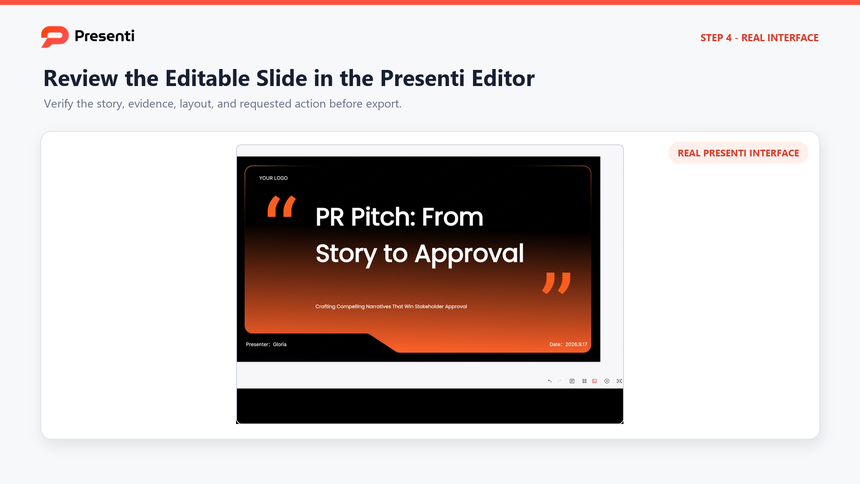
Step 4: Edit and verify the working deck
Compare every work item with the source board. Check the Sprint Goal, status, owner, due time, blocker impact, and dependency. Replace placeholders, shorten dense text, and confirm that the slide order can be covered inside 15 minutes. Ask each listed owner to accept the action before the deck is shared.
Step 5: Export after the final review
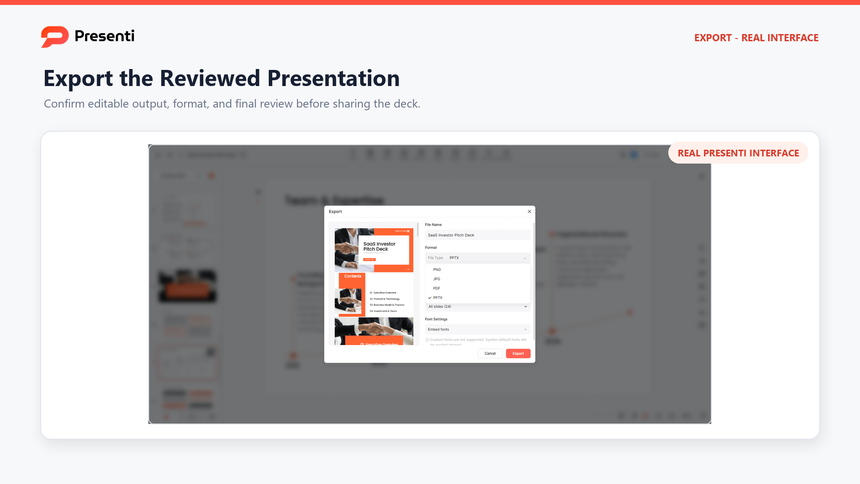
PowerPoint and PDF exports require an eligible paid plan. Choose the format that fits the meeting, then check tables, dates, and links in the final copy. Keep the work tracker current so a downloaded slide deck does not become a conflicting record of task status.
Frequently Asked Questions
What are the three traditional daily standup questions?
They are: what did I complete since the last standup, what will I work on today, and what is blocking me? Use them as prompts, not as a rigid script. In Scrum, the stronger test is whether the discussion inspects progress toward the Sprint Goal and produces an actionable plan.
Should a standup include every task?
No. Focus on work that moved, work that should move today, and exceptions that require coordination. Routine detail can remain visible in the task board or an asynchronous update.
Who owns a blocker after the meeting?
Assign one response owner to coordinate the next action and update the team. That person may need help from several specialists, but a single owner prevents the blocker from becoming everyone's concern and nobody's responsibility.
What is the difference between a daily standup and a weekly report?
A daily standup adapts the team's plan for the next working day. A weekly report summarizes progress, variance, risks, and decisions across a reporting period for a broader stakeholder audience. Do not use the weekly deck as a script for the daily meeting.
Can a remote team run the standup asynchronously?
A team can use asynchronous updates when that suits its working arrangement. Set a response deadline and a clear way to escalate blockers. In Scrum, the Daily Scrum is defined as a 15-minute event for Developers to inspect progress toward the Sprint Goal and adapt their plan; a thread of individual status messages does not by itself provide that shared discussion.
Keep the Meeting Useful and Short
A useful standup leaves the team with a clearer plan for today. Focus on changed work and help needed, then let the relevant people discuss detailed problems afterwards. If a shared board already does the job, use it; the template should reduce preparation, not add another daily reporting task.