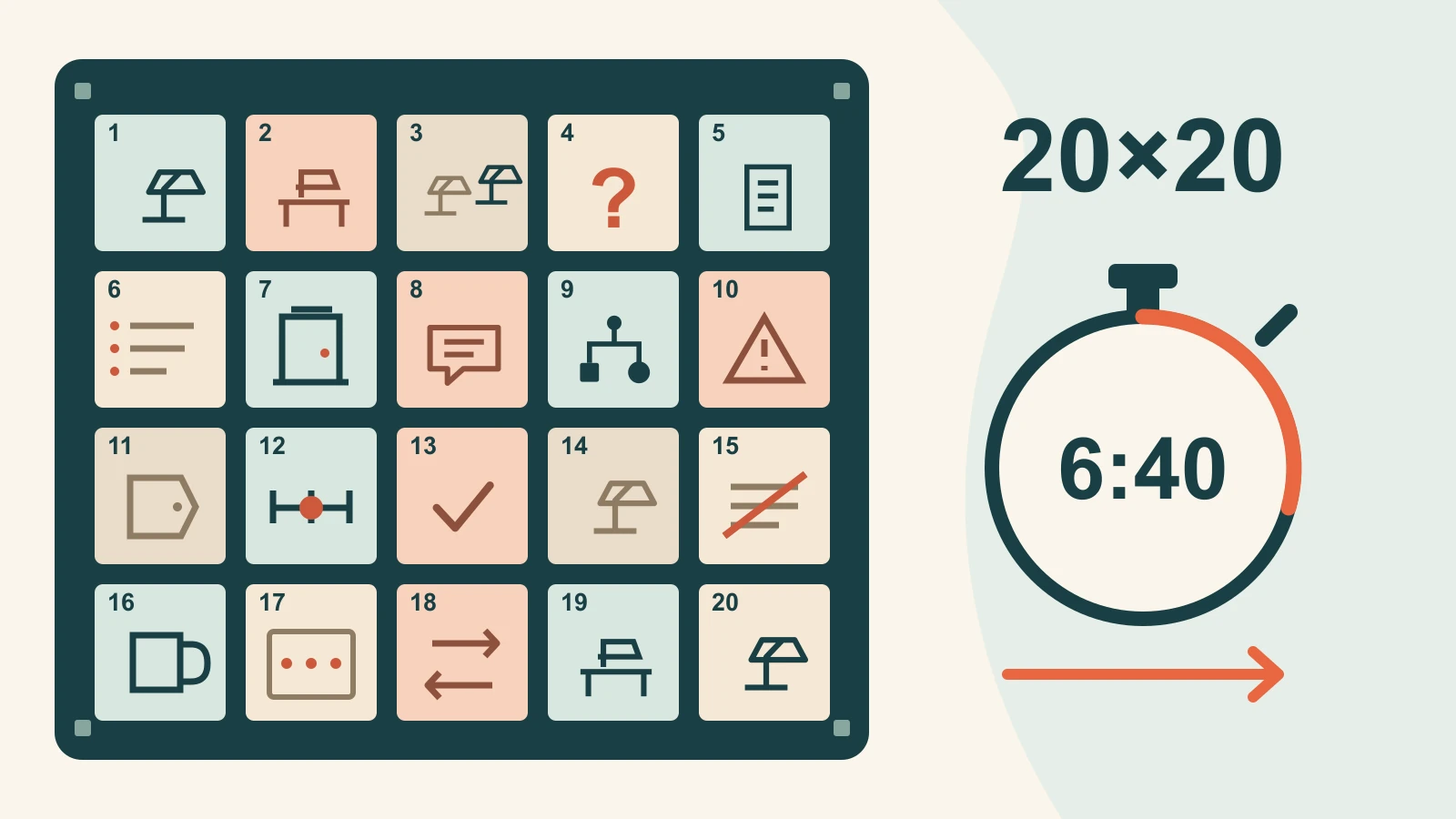
A PechaKucha presentation has 20 slides, each advancing automatically after 20 seconds. That gives you 6 minutes and 40 seconds to tell one story. Plan the sequence before designing the slides: each image needs a job, and each spoken section must be able to finish when its image disappears.
The official PechaKucha format specifies the 20-image, 20-second rhythm. If your assignment does not require that format, use the purpose and available time to decide how many slides your presentation needs. A 20×20 talk is a particular storytelling constraint, not a rule for every presentation.
Choose a story small enough to finish
“Sustainable cities” could fill a lecture. “What a broken desk lamp taught me about repair” gives a short talk a visible object, a problem and a change in perspective. The second idea is easier to follow because the audience can keep returning to the same thing.
Write the point of the talk in one sentence. For example: “Trying to repair one ordinary object changed how I decide what to replace.” That sentence is the destination. The slides should show how you arrived there, rather than offering 20 loosely connected facts about sustainability.
Pick a story you can support with your own experience, photographs, drawings or documented examples. A personal story does not need an invented success statistic. If the lamp remained broken, that can still be an interesting ending: the useful change might be learning when to ask for help, or discovering that replacement parts are unavailable.
A 20-slide storyboard you can adapt
The following is an illustrative story plan about deciding what to do with a broken lamp. It is a narrative example, not repair instructions or a report of a real event. Replace the details with your own experience. Notice that the story develops through questions and decisions; it does not need a separate title slide, agenda and conclusion section before anything happens.
| Slide and start time | What the audience sees | What this moment does |
|---|---|---|
| 1 · 0:00 | The lamp on a dark desk | Open with the object and the moment it stopped working. |
| 2 · 0:20 | The desk when the lamp was in use | Explain why this ordinary object mattered to you. |
| 3 · 0:40 | A possible replacement beside the old lamp | Introduce the easy decision you first expected to make. |
| 4 · 1:00 | A note reading “Could this be repaired?” | Give the story its central question. |
| 5 · 1:20 | The label or identifying details | Show the information you needed before asking for help. |
| 6 · 1:40 | Your initial list of unanswered questions | Explain what you did not know, without guessing a diagnosis. |
| 7 · 2:00 | A repair service or community event entrance | Move from private frustration to seeking knowledgeable help. |
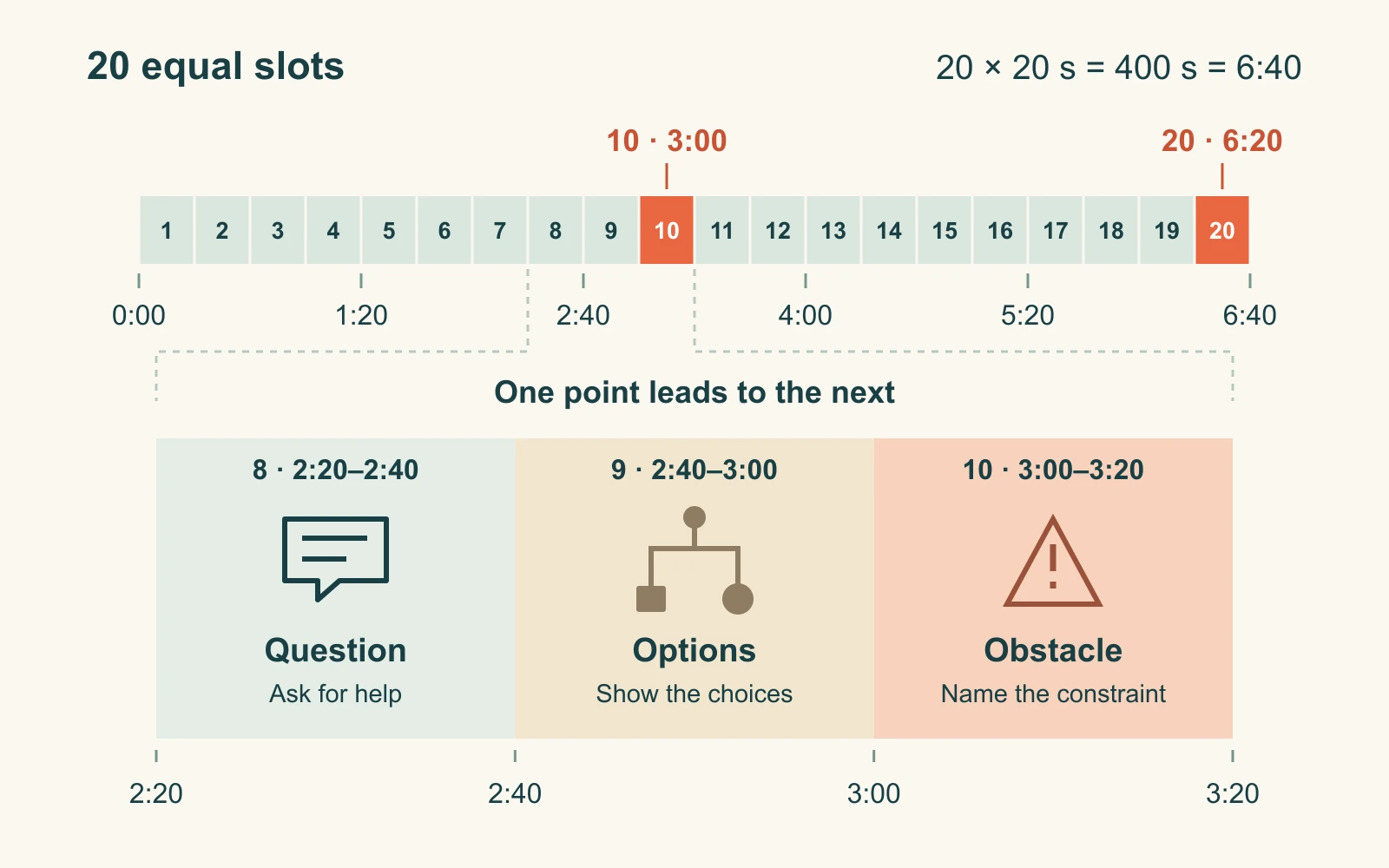
| 8 · 2:20 | A sketch of the conversation | Describe the question that changed how you saw the problem. |
| 9 · 2:40 | A simple map of the options | Make the decision visible: repair, obtain more information or replace. |
| 10 · 3:00 | The obstacle that mattered most | Introduce the real complication, such as an unavailable part. |
| 11 · 3:20 | A close-up of an identifying detail | Explain why that small detail affected the next step. |
| 12 · 3:40 | A timeline of the actual sequence | Show how the attempt unfolded without inflating its impact. |
| 13 · 4:00 | The choice you made | Resolve the practical decision, including a decision not to repair. |
| 14 · 4:20 | The object after that decision | Show the actual result; do not substitute a hoped-for outcome. |
| 15 · 4:40 | One assumption crossed out | State what you had misunderstood at the start. |
| 16 · 5:00 | A different everyday object | Connect the experience to another decision you now approach differently. |
| 17 · 5:20 | Three questions on a small card | Offer a useful takeaway: what failed, who can assess it, and what is worth doing next? |
| 18 · 5:40 | An example where replacement is reasonable | Keep the lesson honest: repair is not always the right answer. |
| 19 · 6:00 | The opening desk image, seen differently | Return to the starting point and make the change in perspective clear. |
| 20 · 6:20 | One final object or short sentence | Land the point and finish before 6:40. |
The times are slide start times. Slide 20 runs from 6:20 to 6:40; there is no extra speaking slot after it. If an organizer requires a title or credit slide within the 20, give it one of these slots and adjust the story. Confirm event-specific instructions before exporting your final deck.
Write for the next image, not just the current one
A timed presentation can feel like a sequence of abrupt interruptions when every slide contains an isolated paragraph. Give each slide a short spoken point and a route into the next image. For the lamp story, the end of slide 6 might be: “I knew what had happened, but not what it meant. So I took the question to someone who did.” The next image introduces the place where you sought help.
That transition carries the audience across the change. It also gives you a natural stopping point. If you run short of time, drop a secondary detail and keep the transition. Do not rush through every remaining sentence simply because it is in your notes.
There is no single reliable word count for a 20-second section. Names, unfamiliar ideas, pauses and your speaking pace all affect the time. Read one section aloud with its image visible. If it takes 26 seconds, remove an idea or simplify a sentence. Speaking faster is a fragile solution because it leaves no room to breathe or recover.
Design images that work at a glance
Choose one focal point per slide. A close-up of the broken object is usually easier to understand in 20 seconds than a collage of tools, messages and receipts. When a diagram is necessary, show only the relationship you are explaining at that moment. You can carry the same object or visual motif across several slides without repeating the same information.
Keep short labels where they help identification. Avoid putting the full script on screen: reading a paragraph competes with listening, and the automatic transition may remove it before everyone finishes. For numbers, use a clearly named unit and a source where needed. If the evidence requires a long explanation, it may belong in a different talk.
Presenti can help you turn a written outline into an editable slide draft, but a coherent draft is only the starting point. Review the 20-image sequence yourself and set the required automatic playback in the tool used for delivery. Do not assume that generating a deck also configures a PechaKucha timer.
Rehearse with the clock running
First, rehearse the whole sequence without pausing the slides. A section that sounds fine on its own may fail when the previous section ends late. Mark the slide numbers where you were interrupted, where the audience would need longer to read, and where you waited with nothing useful to say.
Then fix the cause. If slide 10 overruns because you explain three obstacles, keep the one that actually changed the decision. If slide 11 feels empty, connect its visual detail to the choice rather than adding an unrelated fact. If the images move too abruptly, rewrite the handover sentence.
Run the deck again using the actual delivery setup when possible. Confirm that slides advance every 20 seconds, the first slide starts when expected, and there are exactly 20 slides in the timed sequence. Check whether animations, embedded media or presenter controls change the rhythm. A manual click-through rehearsal does not test automatic playback.
Recover without chasing the missed slide
If you lose your place, let the previous slide go. Look at the current image, say its main point and move toward the next transition. Trying to finish two slides' worth of narration in one slot usually creates another overrun.
Put a short cue beside each slide in your notes: “replacement,” “ask for help,” “missing part,” “new decision.” These are retrieval prompts, not another script to read. Keep the closing point especially simple so it can survive a rushed middle section.
If playback itself fails, follow the organizer's instructions. Do not assume that you can restart the timer or add time. A separate PDF may help explain the content in a fallback situation, but it does not reproduce automatic 20-second pacing.
Start with 20 jobs, then build the slides
Before choosing a visual theme, write a numbered list from 1 to 20 and assign each number a job in the story. Read just those jobs in order. If the sequence repeats itself, jumps over an important decision or saves every useful point for the last slide, change the outline now.
Once the sequence works, choose the images and rehearse against the clock. A strong PechaKucha talk does not feel like 20 miniature lectures. It feels like one story whose images arrive at the moment the audience needs them.