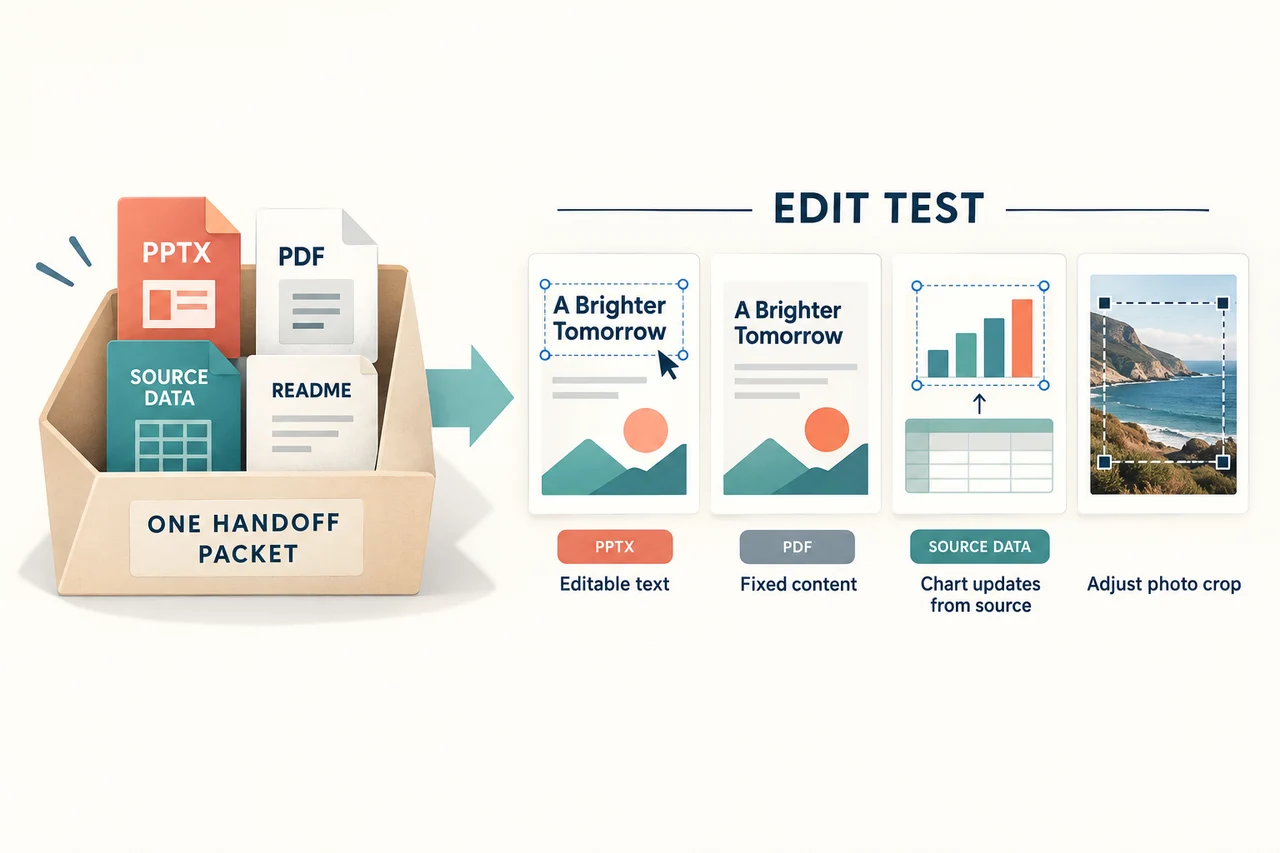
An editable PowerPoint handoff is complete when the recipient can make the changes you agreed to support. Being able to open a PPTX is only the beginning. A slide can look right while its chart is a picture, its diagram is one flattened image, or its next revision depends on a file the recipient does not have.
Agree on the future edits first. Then deliver the presentation, the relevant source material and a short readme that explains how the pieces fit together. The worked package below gives you a concrete model to adapt.
Define what “editable” means for this project
Ask the recipient to name the changes they expect to make. “Update the quarterly numbers” is more useful than “everything must be editable.” It tells you that the chart values, labels, period and any narrative referring to those numbers need a maintenance path.
| Expected change | What the recipient needs | A misleading substitute |
|---|---|---|
| Rewrite a headline | Selectable text with enough space for the likely revision. | A headline baked into a background image. |
| Update chart values | A chart with editable data, or an explicitly agreed source-and-rebuild process. | A chart image described simply as “editable.” |
| Rename diagram steps | Editable labels and a way to adjust the related shapes. | A single image that can only be resized or cropped. |
| Replace a photograph | A separate image object and the permitted replacement assets or source. | A full-slide image containing the photograph and all surrounding text. |
| Reuse the deck for a new period | Clear sources, definitions and instructions for updating dependent text. | A new date on the cover while the chart and source note still describe the old period. |
A static illustration may be entirely appropriate if nobody needs to change its internal elements. Record that choice. The problem is not the presence of images; it is a mismatch between what the recipient expects to maintain and what the file allows.
Also name the destination: PowerPoint on the recipient's actual computer, PowerPoint for the web, Google Slides or another editor. Agreement that a file works in one environment is not evidence for every other environment. Use the separate Google Slides and PowerPoint comparison if the team has not yet chosen its working tool.
Worked package: a three-slide training report
Imagine an agency handing a small training report to a client who will update it next quarter. This is an authored example of delivery requirements, not a tested export from a particular application.
The client needs to rewrite the opening message, update enrollment counts and replace the closing photograph. The agreed package contains:
- Training-report.pptx: the presentation the client will edit.
- Training-report-reference.pdf: a visual reference of the delivered version.
- Training-report-source.txt: the approved chart values, definitions and reporting period.
- Approved-assets: the relevant image files or accessible source links, with the usage information the client needs.
- README.txt: the object map, font arrangements, known limits and update instructions.
The PDF answers “What did this delivery look like?” It does not replace the editable deck or carry its interactive behavior. Generate the reference after the final layout repairs so it corresponds to the same version as the PPTX.
Here is the fictional chart source used for the acceptance exercise:
Quarter,Enrollments
Q1,40
Q2,55
Q3,50
Q4,65

Unit: enrollment records, not necessarily unique people.
Status: illustrative values for a handoff exercise.
Definition: one record per enrollment; repeat enrollment may count again.
The definition matters. A recipient should not change the title from “Enrollments” to “People trained” unless the underlying data supports that change. Source context is part of a maintainable chart, even when changing the numbers is technically easy.
Give the recipient an object map
A short map is more useful than asking the recipient to discover how every slide was built. Describe the important objects, the expected update and where the source lives.
| Slide | Required edit | Delivery arrangement |
|---|---|---|
| 1: headline | Change the reporting message. | Text object; preserve the title's hierarchy and allow a second line. |
| 2: enrollment chart | Replace quarterly counts. | Data-backed chart with the approved values supplied separately; document whether the chart data is embedded or externally linked. |
| 3: photograph | Replace and recrop the image. | Separate image object; keep the caption editable and identify the approved asset source. |
Microsoft distinguishes linked and embedded objects: a linked object depends on an available source file, while an embedded object's source data is included in the presentation. For a linked chart, document the source location and confirm the recipient can access it. For embedded material, include only the data approved for that delivery.
Neither arrangement excuses an unexplained dependency. If the recipient must open a separate workbook or use another application to make the expected change, say so in the readme and demonstrate the agreed update path.
Ask the recipient to make three specific changes
Use a copy of the delivery candidate on the recipient's setup. These actions turn an abstract editability promise into something both parties can inspect.
1. Make the headline longer
Replace “Training enrollment” with “Quarterly enrollment across our regional training programs.” Save, close and reopen the copy. Check the line break, clipping and neighboring objects. If the recipient can select text but every plausible rewrite breaks the slide, the template needs more room or a documented alternate layout. If later revisions will include another language, also test the layout with translated slide text; longer wording must not force you to remove a qualification or shrink essential labels.
2. Change a chart value
In the example, change Q4 from 65 to 72. Confirm that the bar or point and its label both show 72. Check any manually written callout as well; a chart can update while a separate sentence still refers to 65. Save and reopen the file, then restore the approved values or discard the test copy.
If selecting the visual reveals only a picture, it does not meet a requirement to update chart data directly. Either rebuild that chart in the destination tool or agree on a clearly documented replacement workflow before accepting the delivery. Do not rename the limitation as an editable chart.
3. Replace and recrop the photograph
Use a permitted replacement image with a different composition. Check that the intended subject stays visible and that the caption, overlay and surrounding text remain separate. A crop that works for one portrait may not work for a group photograph.
Record the actual outcome and issue owner, then repeat only the failed edit after repair. For other projects, substitute the changes that matter: a table row, a diagram label, a source link or a video. The test should resemble the recipient's next revision.
Document fonts and deliberate layout limits
Choose a font arrangement that supports the recipient's environment. Where PowerPoint font embedding is supported and the font permits it, embedding all characters is more suitable for later text changes than embedding only the characters already used. Microsoft's embedding guidance explains both the editing distinction and font-permission limits.
Name the font and approved fallback in the readme. If a fallback is needed, check the revised line breaks and symbols in the actual deck. Do not assume that a visually similar font has the same widths.
List intentional limits plainly: “The map on slide 6 is a static illustration; change the caption in PowerPoint and request a new map for boundary changes.” That is a workable agreement. “Fully editable” alongside an undocumented static map is not.
Copy this short handoff readme
Use the editable PowerPoint handoff readme as a text template. It includes a package manifest, object map and space for the recipient's actual edit results.
Project / delivery version:
Recipient editor, version and operating system:
Approved working file or link:
Owner and support contact:

Included files and their purpose:
Editable objects and expected changes, by slide:
Chart sources, definitions and reporting periods:
Linked files or media dependencies:
Fonts, permitted use and fallback arrangement:
Static objects and other known limits:

Acceptance edits completed by recipient:
- Longer headline: [actual result]
- Chart value update: [actual result]
- Image replacement/crop: [actual result]
Outstanding issues, owner and agreed resolution:

Next update:
Who supplies the new evidence?
Who edits and approves the deck?
Who regenerates the matching reference PDF?
If the deck started in an AI presentation tool, apply the same delivery agreement to its exported file. Presenti lists editable exports on its paid plans; confirm the objects your recipient needs in the actual PPTX. The package should describe the delivered file, not infer its behavior from how the original looked in a browser.
Once the recipient accepts the package, identify which file will own the next revision. For ongoing collaboration and recovery, use the PowerPoint version-control guide. Keep the handoff readme with that file so the next person can update the work without reconstructing how it was made.