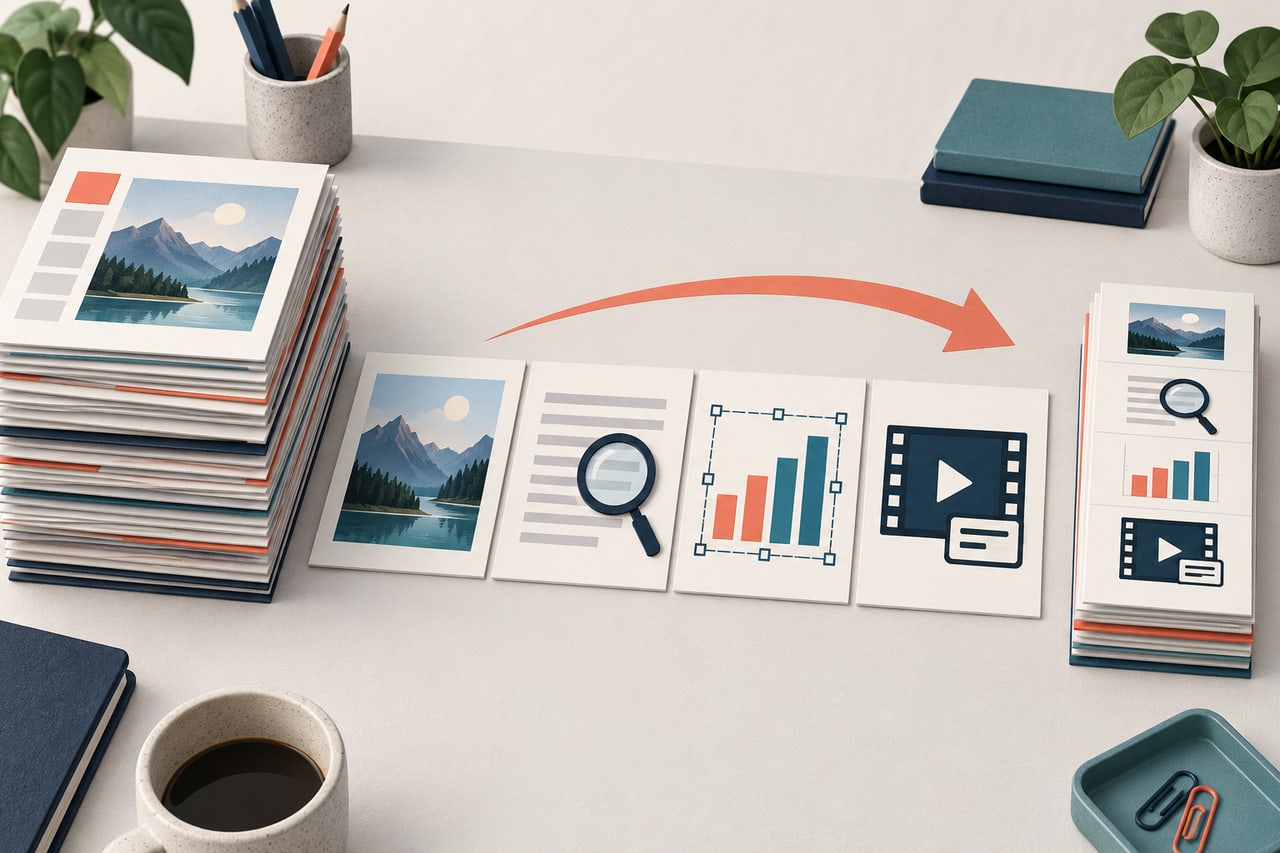
AI presentation tools are beginning to handle more of the work around a deck: organizing source material, proposing an outline, editing slides, and preparing different versions. For teams looking ahead to 2027, the useful question is how well these tools support the revisions and decisions that happen after the first draft.
This article identifies six operational trends to watch. They are directional signals based on products and research available as of September 10, 2026, not guarantees about any vendor's 2027 roadmap. For a topic-to-slides workflow, you can start with Presenti’s AI presentation maker and edit the draft before presenting.
How to Read AI Presentation Trends
A useful trend should change a workflow or buying decision. Visual fashion is a separate subject from this article's focus on how people and systems create, verify, edit, and deliver presentations.
Evaluate each trend with five questions:
- What input does the system use?
- Which steps can it complete without intervention?
- What remains editable and traceable?
- Where must a person review facts, rights, and decisions?
- Can the workflow operate within the team's governance and delivery requirements?
Trend 1: From One Prompt to Agentic Workflows
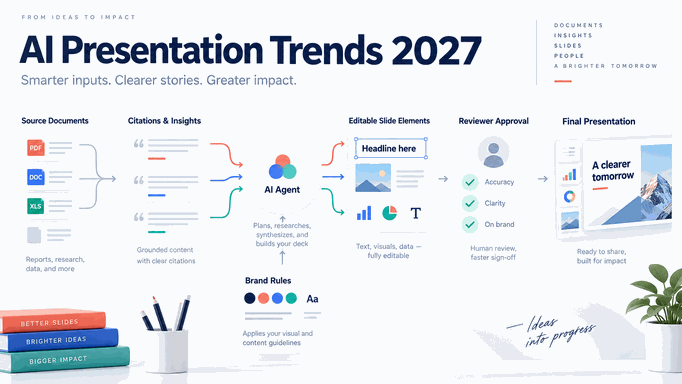
The next step beyond text-to-slides is a sequence of specialized tasks: collecting sources, extracting evidence, building an outline, selecting slide forms, drafting, checking consistency, and revising. Recent presentation research has explored multi-stage and agent-based systems rather than treating the deck as a single image-generation request.
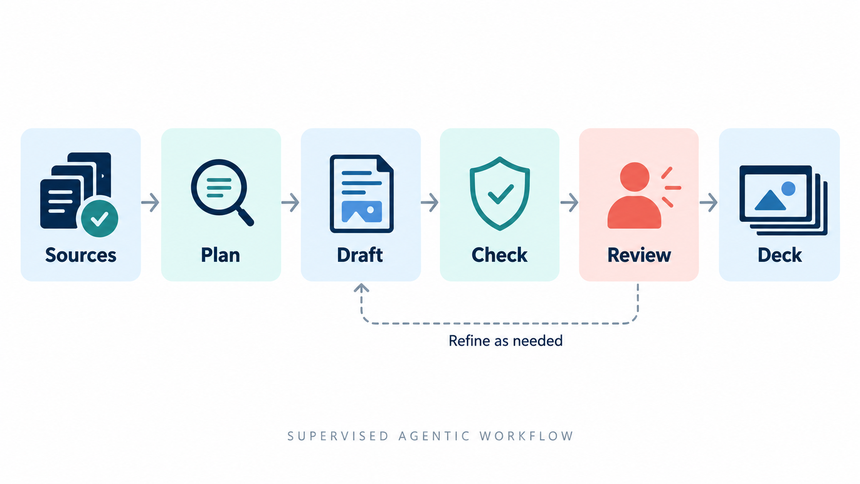
For example, a team might ask an assistant to summarize a report, propose a ten-slide outline, and revise the slides after feedback. Each step needs a clear instruction and an opportunity to correct mistakes before they carry into the next one.
Microsoft's 2026 Work Trend Index reports rapid growth in active agents across its ecosystem and emphasizes documented handoffs and quality standards. The important implication for presentations is not a specific growth rate. It is the need to design repeatable human-agent workflows instead of letting each employee improvise.
Trend 2: Source-Grounded Slides and Citation Review
Presentation generation is becoming more useful when it starts from approved documents, links, datasets, and notes rather than an open-ended request. Grounding narrows the evidence set, but it does not guarantee accuracy.
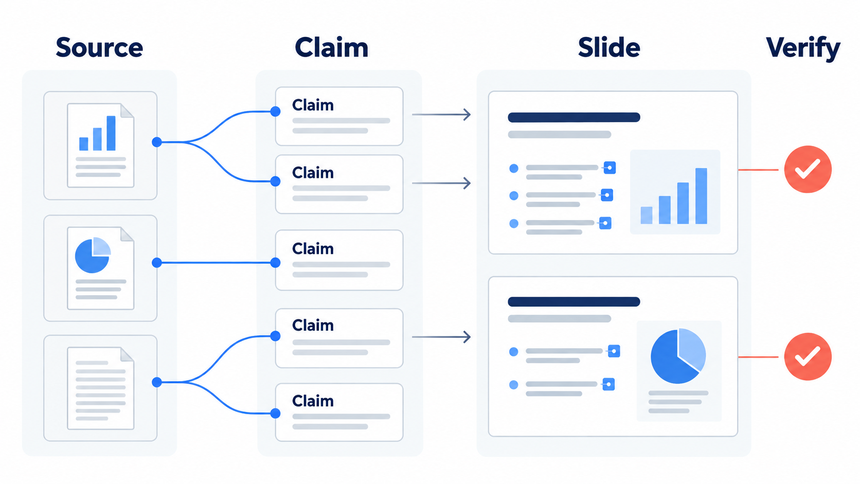
A reviewer should be able to identify the document, passage, or table behind a slide and check whether the summary preserves its meaning. A source link is most useful when it leads to the specific evidence, not just a long document or homepage.
NIST warns that generative AI can produce false content and even false citations. A citation-looking link is therefore not a quality check. Teams need a source ledger, claim-level review, and a rule that unsupported statements are removed or clearly labeled as hypotheses.
Trend 3: Editable Output Becomes a Core Requirement
A presentation is rarely finished after generation. Stakeholders change wording, legal teams adjust claims, analysts update numbers, and presenters reshape the story after rehearsal. A beautiful rasterized slide that cannot be edited becomes expensive at the moment the work matters most.
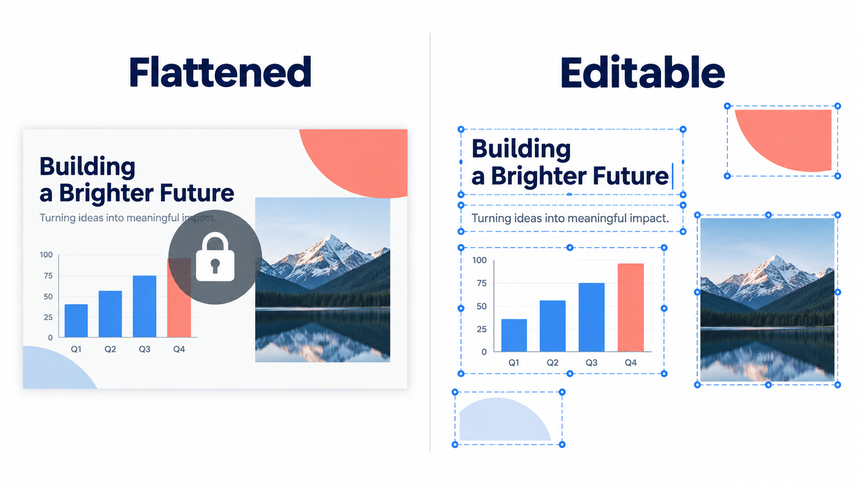
PPTAgent explores generating slides through analysis and editing, while SLIDEFORGE studies controlled changes to slides represented as structured content. These research projects point toward more flexible editing; they do not establish that every commercial tool already supports it.
Test editability with a real maintenance task. Change a headline, replace a chart, apply a new brand color, move one element, update a source, and export. Count the broken layouts and manual rebuilds, not only the time to the first preview.
Trend 4: Brand Systems Move Upstream
Brand consistency works better as an input constraint than as a cleanup stage. Teams are likely to expect AI presentation workflows to understand approved themes, fonts, colors, logos, layouts, image direction, and exceptions before slides are created.
The difficult part is governance. A brand system needs ownership, versioning, accessibility rules, and a process for unusual slide types. A tool that applies the same layout everywhere can still produce a consistent but ineffective deck.
Trend 5: Collaboration Centers on Review State
A team preparing an important presentation needs to know which slides are still in draft and which have been reviewed. As AI produces more material, a clear way to track feedback and approval could become more valuable.
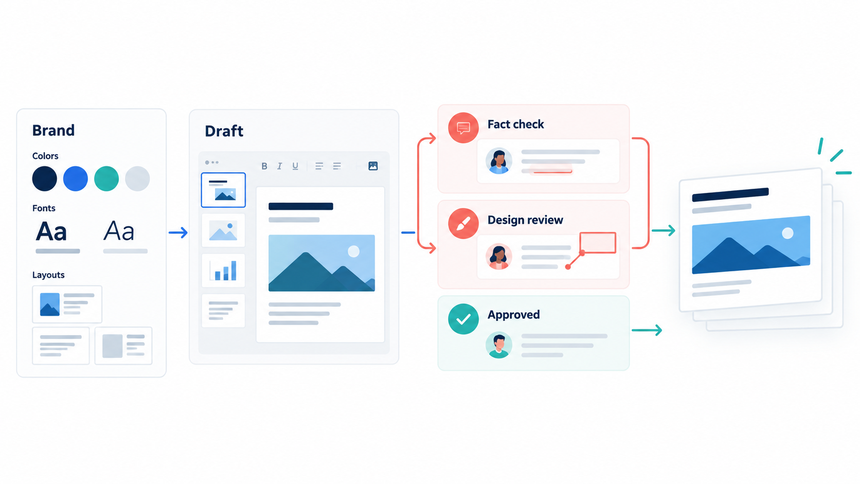
Teams should be able to see who changed a claim, which source was reviewed, and whether a slide became stale after new data arrived. This makes version history, comments, permissions, and handoffs part of presentation quality rather than administrative extras.
The same logic applies when several AI agents or services participate. The workflow should record inputs and outputs at each handoff so a person can locate the source of an error.
Trend 6: One Evidence Base, Multiple Delivery Formats
A presentation increasingly sits inside a wider communication system. The same approved evidence may support a live deck, a leave-behind document, a video presentation, a webinar, or a short update for another channel.
The efficient pattern is not to regenerate each format independently. It is to preserve one evidence base and adapt the narrative, density, aspect ratio, and interaction for each delivery context. This reduces contradiction and makes updates easier to manage.
Research into interactive and multimodal presentation agents suggests that narration, audience questions, and video delivery may become more tightly connected to the slide artifact. Teams should still separate an experimental capability from a production requirement.
The 2027 Risk List: What Does Not Disappear
Better automation does not remove the main risks. It can scale them.
- Unsupported claims: confident slide language exceeds the source evidence.
- False or weak citations: references exist but do not support the exact statement.
- Copyright and privacy exposure: uploaded materials or generated visuals are used without appropriate rights or controls.
- Loss of editability: output looks complete but cannot survive ordinary review.
- Brand drift: repeated generation creates inconsistent layouts, terms, or visual language.
- Automation bias: reviewers accept the deck because it appears polished.
- Vendor lock-in: the team cannot export, archive, or continue editing its work elsewhere.
Procurement and editorial standards should address these risks before a high-stakes deck enters production.
Agree Who Reviews Important Claims
For a customer proposal, agree who checks the figures and who approves pricing before drafting begins. For an internal brainstorm, a lighter review may be enough. Match the process to the consequences of an error.
When a slide contains confidential information, a contractual promise, or a research claim, involve the person responsible for that material. Extra review is useful when it addresses a specific risk, rather than becoming a routine approval step for every slide.
A Procurement Scorecard for AI Presentation Tools
Evaluate tools with a representative source set and deck, not a vendor demo. Use the same task for every option and record failures as well as strengths.
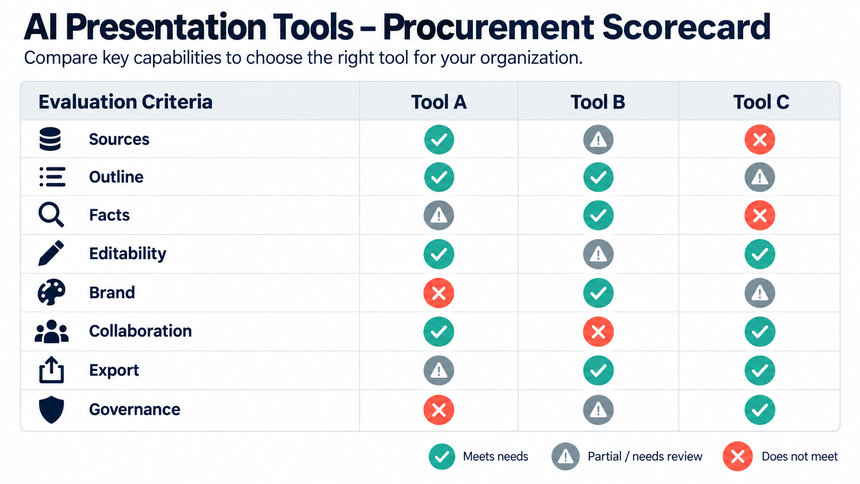
| Dimension | Test | Pass evidence |
|---|---|---|
| Source handling | Upload approved mixed-format inputs | Key text, tables, and images remain traceable |
| Outline control | Change audience and decision before generation | Structure updates without losing source scope |
| Factual reliability | Check ten material claims | Support is visible; uncertainty is not disguised |
| Editability | Update text, chart, image, layout, and theme | Elements remain controllable without rebuilding |
| Brand control | Apply an approved system and one exception | Rules are consistent and exceptions are manageable |
| Collaboration | Run author, reviewer, and approver handoffs | Comments, ownership, and status remain clear |
| Export and delivery | Export and open in the required environment | Content, layout, and accessibility survive |
| Governance | Review permissions, retention, privacy, and admin controls | Policies match the team's risk level |
Weight the scorecard for the actual use case. A classroom outline and an investor presentation do not require the same evidence, review, or security controls.
Run one common-input test
Choose a source packet that resembles real work: one document, one spreadsheet or chart, one brand guide, and a clear audience decision. Ask every tool to create the same eight- to ten-slide deck. Use the same account tier, language, and export requirement, and record the test date because capabilities change.
Measure the entire path, not only generation time. Track preparation time, outline corrections, unsupported claims, source-review time, chart repairs, brand corrections, broken edits, export defects, and final rehearsal changes. A slower first draft may be the better system if it produces a traceable, maintainable artifact with less downstream repair.
Keep screenshots and exported files from the test. They provide a baseline for product updates and prevent the team from replacing evidence with memory or marketing claims.
How Presenti Fits This Direction
Presenti currently supports an input-to-outline-to-style-to-edit workflow. A user can begin with a topic or source material, review the outline, choose a visual direction, generate an editable deck draft, and revise the result in the workspace.
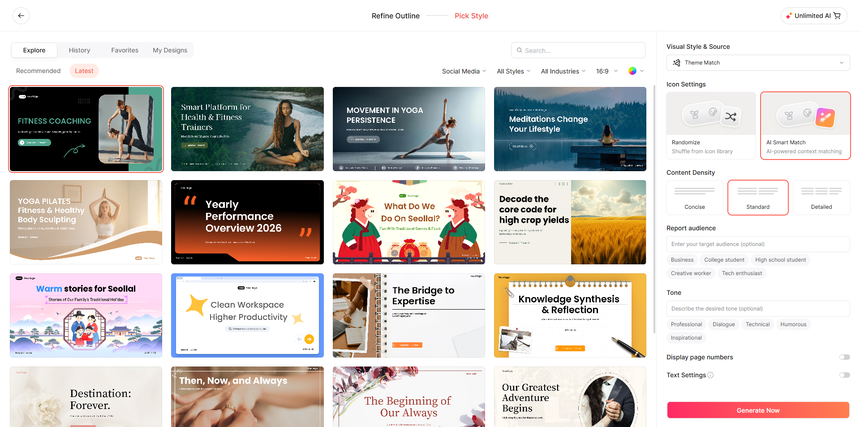
Review the outline and generated slides against your source material. Check charts and images in particular: an attractive slide may still omit a qualifier or show the wrong value. The practical benefit depends on how much work remains before the deck is ready to use.
For a useful first trial, choose a report you know well and turn it into a short deck. Familiar material makes it easier to spot omissions and judge whether the draft saves editing time.
Try One Real Presentation Task
Choose a recurring task, such as turning a monthly report into a team update. Give two shortlisted tools the same source file and outline. Compare how much time you spend correcting the content, changing the layout, and preparing the final file.
Keep the exported decks so you can compare the results. If one tool drafts quickly but turns every chart into an image, that may matter more than its generation speed when next month’s figures arrive.
Frequently Asked Questions
Will AI presentation tools replace PowerPoint or presentation designers in 2027?
No universal replacement can be predicted. AI can automate parts of research, outlining, drafting, and formatting, while people still provide direction, evidence review, brand judgment, stakeholder context, and delivery.
What is an agentic presentation workflow?
It is a multi-step process in which AI systems handle connected tasks such as source collection, outlining, slide generation, and revision under defined goals and review gates. The human remains responsible for the result.
Why does editable output matter?
Presentations change during review and after new evidence arrives. Editable text, charts, images, and layouts reduce rebuild work and let teams correct the artifact instead of regenerating from scratch.
Can citations make AI-generated slides trustworthy?
Citations help only when they are real, relevant, and checked against the exact claim. Reviewers must open the source, confirm scope, and remove unsupported statements.
How can I tell a research trend from an available product feature?
Distinguish a capability described in a research paper from a feature available in a commercial product. Then check whether that feature is included in the plan, language, and export format your team uses.
Choose for the Work After Generation
The most useful changes will make presentations easier to revise, support with evidence, and share in the format the audience needs. Treat these six trends as areas to watch. When choosing a tool today, judge what it can do with your material and how much editing the result needs.