A useful before-and-after presentation shows the same subject in two clearly labeled states, then explains what changed and what the evidence supports. Keep the scope, scale, and measurement consistent. If the second state is a proposal, call it “proposed” rather than presenting it as an achieved result.
The design choices that make presentation slides easier to read also help a comparison: a clear hierarchy, restrained color, and enough space to follow the change. But the layout cannot make unlike states comparable. Start with the claim you can defend, then choose the visual.
Name the change you can demonstrate
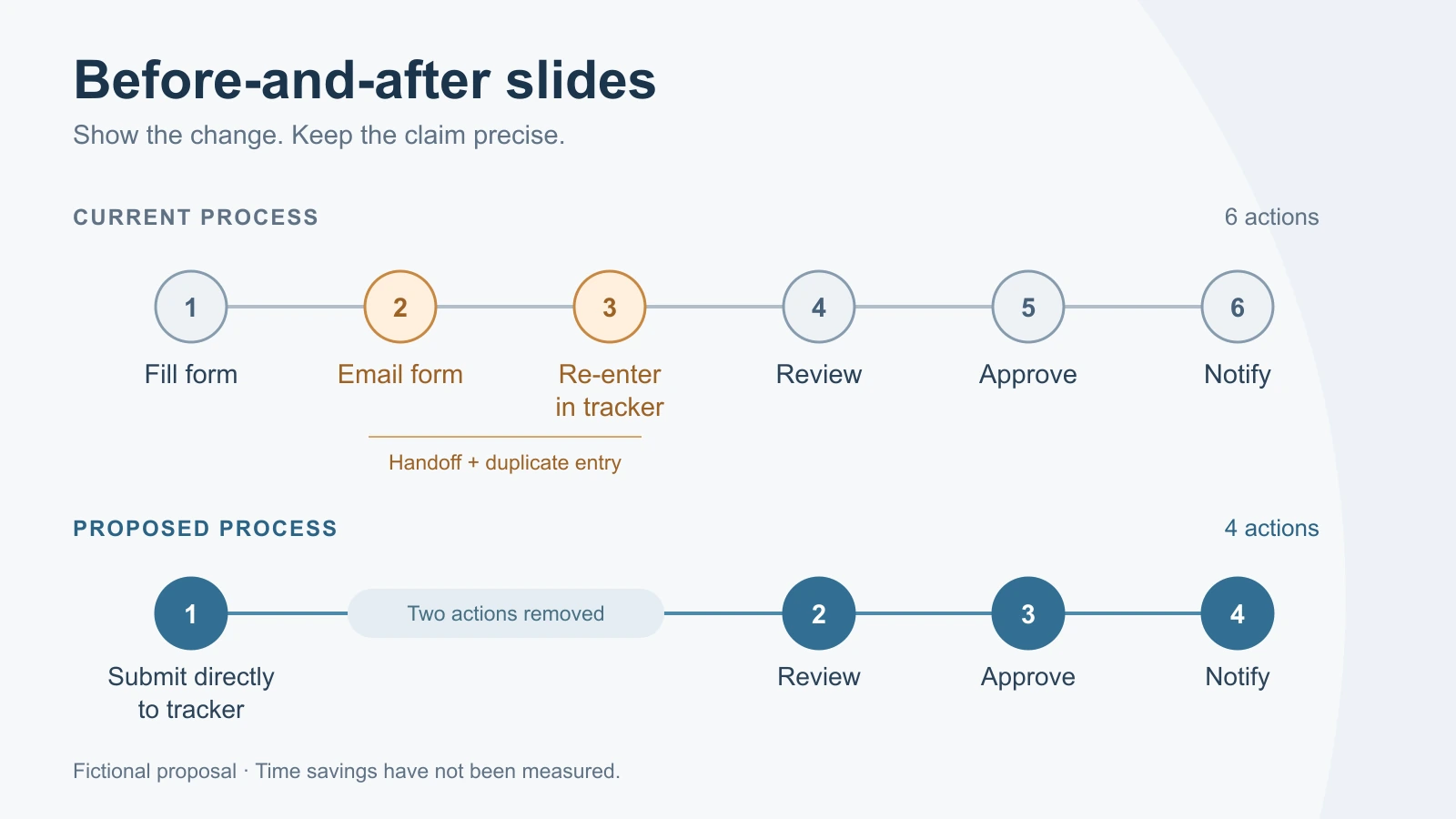
Imagine a team proposing a simpler internal request process. This is a fictional example, not a measured customer result. The current process has six listed actions:
- The requester fills in a form.
- The requester emails the form to a coordinator.
- The coordinator re-enters the request in a tracker.
- A reviewer checks the request.
- An approver makes the decision.
- The requester receives a notification.
The proposed process has four: submit the request directly to the tracker, review it, approve it, and notify the requester. It removes a separate email handoff and duplicate entry. Review and approval remain.
A defensible headline is: “The proposed request flow removes email handoff and duplicate entry.” “The new process is 33% faster” is not defensible: six actions becoming four says nothing about the time each action takes. Even “33% fewer steps” needs a stable definition of a step. The exact removed actions are easier to understand and harder to misread.
Keep the two states comparable
Define the frame before drawing. In this case, both diagrams begin when a requester prepares a request and end when the requester receives a decision. Both cover the ordinary path, not every exception. Neither includes the work needed to fulfill an approved request.
Use the same level of detail on both sides. Splitting the current process into every click while compressing the proposed process into broad stages would manufacture an apparent improvement. Likewise, do not leave approval out of the second diagram merely because it takes place in the same system.
For a completed change, label the periods or versions being compared. For this unimplemented proposal, label the states “Current process” and “Proposed process.” That small wording choice tells the audience whether they are evaluating a design or reviewing an outcome.
Keep these distinctions in other comparisons too. A redesigned page should show the same page area at a comparable size. A room renovation should use a comparable viewpoint. A chart should retain the same units and explain any change in measurement. When a fair match is impossible, state the difference next to the visual.
Map the six actions to four
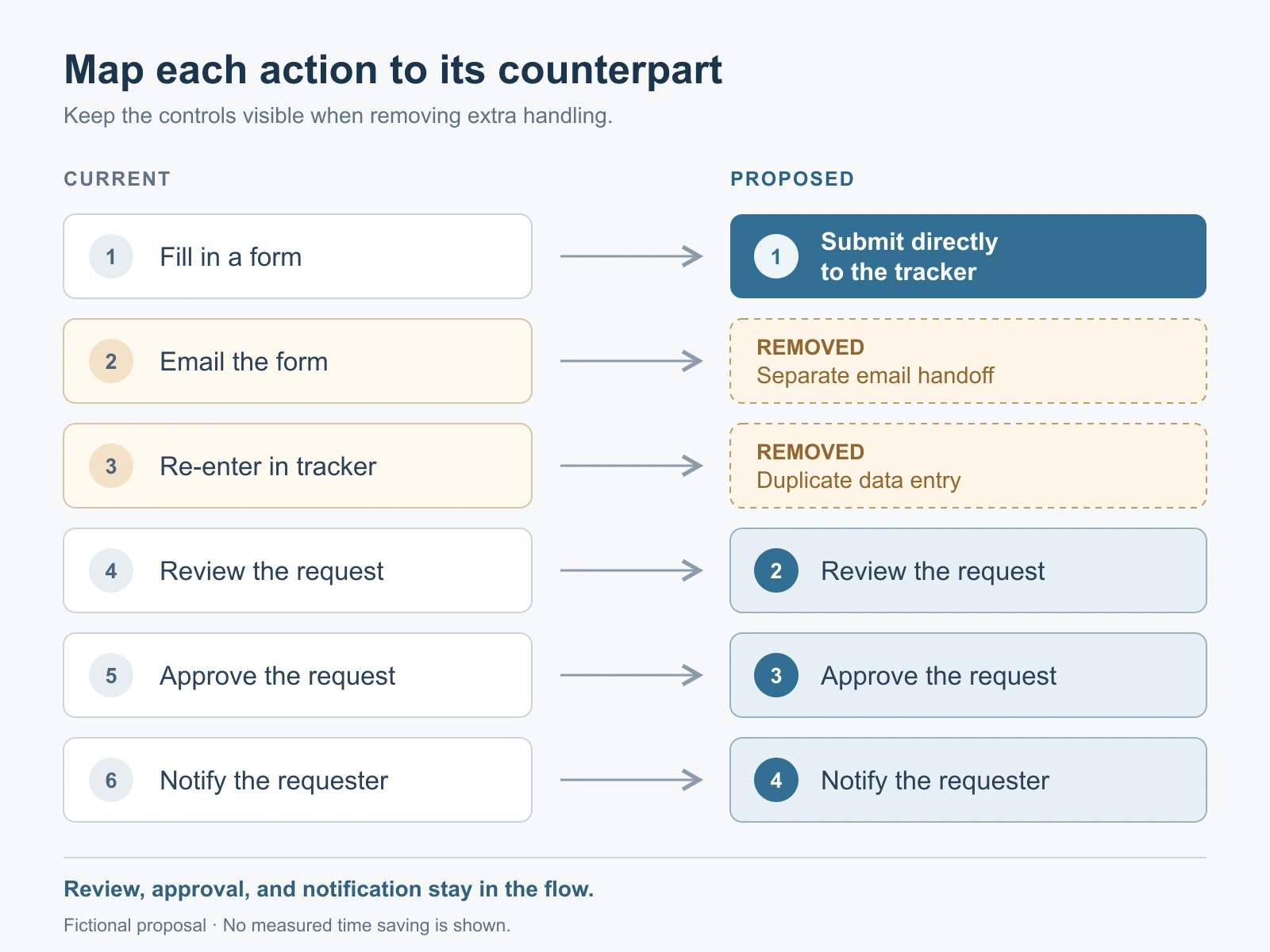
Two independent lists make the audience work out which actions survived. A mapping makes the change explicit:
| Current action | Proposed counterpart | What changes |
|---|---|---|
| 1. Fill in a form | 1. Submit directly to the tracker | The request starts in the system used for review. |
| 2. Email the form | No separate action | The email handoff is removed. |
| 3. Re-enter the request | No separate action | The coordinator no longer copies the same details. |
| 4. Review the request | 2. Review the request | The review remains. |
| 5. Approve the request | 3. Approve the request | The approval remains. |
| 6. Notify the requester | 4. Notify the requester | The notification remains. |
On a slide, draw the current process across six positions. Align the proposed submission with the first position and the three retained actions with their original counterparts. Leave labeled gaps for the removed email and re-entry actions. The gaps explain the difference; stretching four boxes to fill the entire row would obscure that correspondence.
Use one accent color for the changed submission step and another restrained treatment for removed actions. Keep retained actions visually consistent. Add text labels as well as color, so the meaning survives a grayscale printout or an audience member who cannot distinguish the colors.
Separate the design from the results
The process diagram supports a design claim: two actions are removed. It does not support a performance result. Separate those categories in the presentation rather than putting an unsupported benefit in the headline and a correction in tiny text below.
| Statement | Status in this example |
|---|---|
| Separate email handoff and duplicate entry are removed. | Shown by the proposed process mapping. |
| Review and approval are retained. | Shown in both process rows. |
| Requests reach a decision sooner. | Not measured; the proposal needs a timing comparison. |
| Fewer requests arrive with missing details. | Not measured; direct submission alone does not establish completeness. |
This distinction helps the decision-maker. The team can approve a pilot of a simpler workflow without being asked to believe a result that does not exist yet. It also exposes a practical dependency: someone must decide which fields are required, who can submit, and how exceptions reach the reviewer.
Do not imply that changing the diagram resolves those operating questions. If the tracker cannot support direct submission, the proposed first step needs a different implementation.
Keep the measurement separate from the process diagram
Keep proposed measurements off the process diagram. Give them a separate slide when they need discussion, or place the two pilot measures beside the decision requested. Either way, the audience should be able to distinguish what the diagram shows from what the pilot would test.
For the request example, define elapsed time from initial submission to the recorded decision. This measures decision turnaround, not time spent preparing the request or delay before the notification reaches the requester. Record requests still open when the observation period ends; excluding them without explanation could make the process look faster. Also record whether the initial submission contains the information required for review.
Compare similar request types and make workload differences visible. A quiet week of simple requests is not a fair counterpart to a busy week of complex ones. If you report a typical duration, explain the summary used and include enough context to show whether some requests still take much longer.
A measured improvement after launch would still need careful wording. Other staffing or policy changes might have happened at the same time. You can report the observed difference without claiming that the redesigned flow alone caused it.
The second slide can therefore say: “Pilot question: does direct submission reduce decision time without increasing incomplete requests?” That is a useful, testable next step. It is not a promise of savings.
Present the change in a short sequence
For a discussion of this proposal, use three slides with distinct jobs:
- The current friction: show where the form is handed off and copied. Explain the extra handling, without inventing error rates or staff complaints.
- The proposed change: show the aligned six-to-four mapping. Name the removed actions and the retained review and approval.
- The decision: ask whether to pilot direct submission, identify the owner, and state the two outcomes to observe.
If the change is already implemented and measured, the third slide can instead show the observed results, dates, population, and remaining limits. Keep a proposal and a results review visibly different.
For a single-slide comparison, retain the two state labels, aligned visual, specific headline, and one short line about the evidence. In this example that line is: “Proposed workflow; decision time and completeness have not yet been measured.” It belongs here because it changes how the audience should interpret this particular diagram.
Build the deck from the comparison brief
Prepare a brief containing the shared start and end points, the six current actions, the four proposed actions, and the exact claim. You can use Presenti to turn that outline into an editable slide draft, then adjust the comparison layout.
Preserve “current” and “proposed” in the draft, keep the retained controls visible, and remove any invented percentage or time saving. The finished presentation should make the change easy to inspect. A reader should be able to point to what disappeared, what stayed, and what still needs evidence.