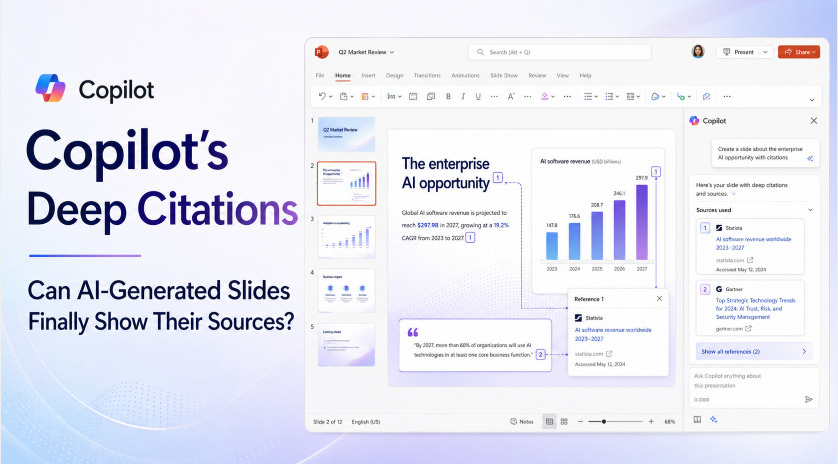
You’ve been here before: Copilot drops a confident-sounding stat into your slide, credits it to “Q3 Report,” and you’re left flipping through a forty-page document trying to find the one paragraph it was actually talking about. The citation exists. It just isn’t useful.
Microsoft's planned Deep Citations capability addresses this problem: links are intended to take you to a relevant location within a source, rather than leaving you to search the whole file. Treat the roadmap description as a planned capability, not proof that it is available in your account. If you present this research in slides, the PowerPoint citation guide explains where to place source details and references.
Availability note: Deep Citations appears on Microsoft's Microsoft 365 roadmap under item 523223. Timing, supported sources, and account access may change; check the roadmap and Microsoft 365 Copilot release notes.
The Difference Between “A Source” and “The Source”
Think about the difference between a research paper that cites “Smith, 2024” and one that cites “Smith, 2024, p. 14.” Both are technically citations. Only one of them saves you from reading the whole paper to find the sentence that matters.
That is the gap Deep Citations is intended to address. A file-level citation identifies a source, but a link to a relevant passage can make the supporting evidence easier to locate. The exact destinations and source types depend on the implemented feature.
A precise link can reduce the searching involved in fact-checking. You still need to read the passage in context and decide whether it supports the slide.
How to Check Availability
Before depending on the feature, check the Microsoft 365 roadmap and your organization's release information.
Confirm whether Deep Citations is available for your Copilot license, application, platform, and source type. A roadmap entry alone does not establish access. A citation also does not grant permission to a source file; recipients must have the required access.
For a shared deck, test source access with the intended reviewers. A useful review trail includes the claim, its supporting passage, the source version, and any interpretation applied to it.
What Deep Citations Doesn’t Fix
It’s worth being precise about what this feature is — and isn’t.
Source-level links are intended to make supporting passages easier to locate. It does nothing to guarantee that the claim itself is correct, or that Copilot represented the source accurately in the first place. The feature closes the “which document was this even from” gap; it doesn’t close the “did the AI summarize this correctly” gap. You still need to actually click through and read the linked section — a link helps you locate evidence but does not replace that check.
Do not assume the same support for a Word document, a slide deck, a PDF, a meeting, or a web page. Verify the supported source types before designing a workflow around them.
Where This Leaves Manual Citation Formatting
Here’s a distinction worth being clear on, because it’s easy to conflate: Deep Citations addresses traceability — locating the source behind an AI-surfaced claim. It doesn’t solve formatting — turning that source into a properly structured APA, MLA, or Chicago-style citation for a thesis defense, a published report, or any context that requires a specific academic style.
These are separate tasks. A source-location link is not, by itself, an APA, MLA, or Chicago reference. If your deck requires a citation style, prepare and check the reference against the relevant style guide (we’ve written a full breakdown of APA-style templates for PowerPoint slides if that’s the piece you’re missing).
Where Presenti Fits Into This
Worth being straightforward here: Presenti AI doesn’t currently have a direct equivalent to Deep Citations’ click-through source linking — that specific traceability mechanic is tied closely to Microsoft’s own ecosystem of grounded files and permissions, and isn’t something we’re claiming to replicate.
When drafting with Presenti, keep your own copy of each source and record page or section references for important claims. Compare the generated slides with those sources, then add citations in the format your audience needs. Word and PDF imports are listed on paid plans. A single-source deck still needs these checks; fewer files do not guarantee a faithful summary.
Frequently Asked Questions
Is Deep Citations available in all Microsoft 365 plans? Do not assume universal access. Check Microsoft's rollout information and the requirements for your license, application, and organization.
Does Deep Citations work outside of Word and PowerPoint? Supported applications and source types depend on the rollout. Check the released documentation for the specific workflow you need.
Can Deep Citations show me a source I don’t have permission to access? No. The feature is built on top of existing file permissions — if you don’t already have access to a referenced file, clicking the citation won’t grant you access to it.
Does Deep Citations replace the need for proper citation formatting, like APA style? No. It solves traceability — showing you exactly where a claim came from — but it doesn’t format that source into a specific academic or business citation style. That’s still a manual step if your deck requires one.
The Bottom Line
The useful idea behind Deep Citations is precise source navigation. If the capability is available in your workflow, use it to inspect evidence in context. Continue checking whether the source supports the claim and whether the deck includes the citation format its audience requires.