A product launch template should make the launch decision explicit: who the product is for, what promise it makes, how the team will reach the market, what success looks like, and what will change if the evidence does not support the plan. A useful product launch presentation is not a countdown calendar. It connects positioning, channel work, ownership, timing, and measurement so the team can evaluate the launch plan.
This guide fits product marketing, product management, sales, customer success, and leadership teams preparing a new offer, feature, market entry, or major update. It also applies when a small team needs a launch presentation template without building a full go-to-market program. For the broader narrative workflow, see Presenti's guide to making a product launch deck; this page focuses on the reusable template and launch decision structure.
What Should a Product Launch Presentation Decide?
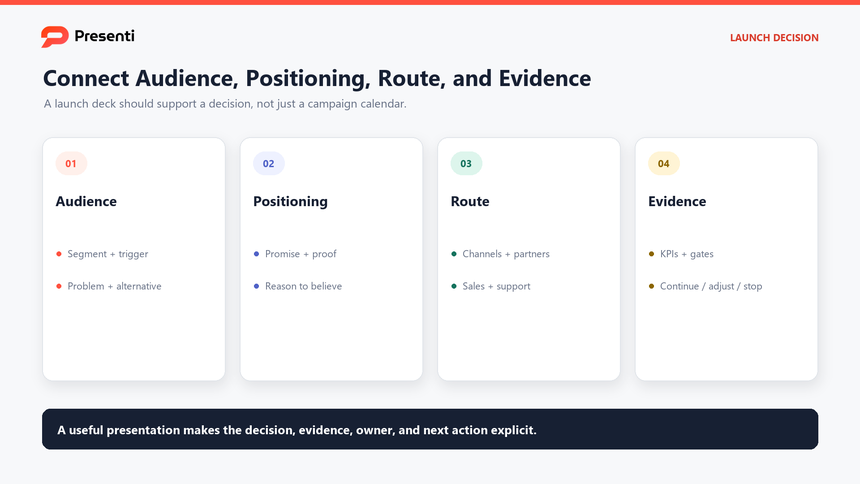
The presentation should answer five questions: which audience will care, what problem the product solves, why this offer is credible, how the team will reach the audience, and what evidence will trigger a continue, adjust, or stop decision. If the slides only show campaign dates and creative assets, the team has a production plan but not a launch strategy.
Start with a one-sentence launch thesis. For example: "Launch the new analytics workspace to mid-market operations leaders who need faster exception reporting, using a guided demo, partner webinars, and a 30-day proof program, with activation and qualified pipeline as the primary launch measures." That sentence gives the audience, problem, route, and review criteria.
| Launch question | Evidence to show | Decision expected |
|---|---|---|
| Who is the launch for? | Segment criteria, pain, trigger, current alternative | Commit to a priority audience |
| Why will they care? | Value proposition, proof, differentiation, limitations | Approve the positioning |
| How will they hear about it? | Channel roles, message fit, sequence, budget | Fund and staff the launch plan |
| What does success mean? | Leading indicators, business outcomes, thresholds | Agree on review gates |
Keep the launch scope honest. A launch may be an announcement, a beta, a limited release, a new market entry, or a full commercial release. Each version needs different evidence and different success measures. State the launch type on the first slide so the audience does not assume a bigger commitment than the team is prepared to make.
Which Slides Belong in a Product Launch Deck?
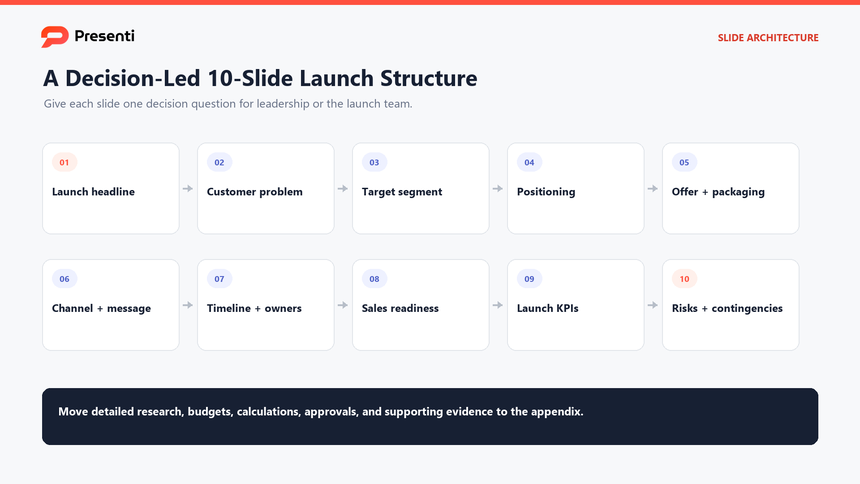
A strong launch presentation usually needs ten to twelve core slides, with an appendix for creative examples, detailed channel plans, legal review, pricing scenarios, and local-market requirements. Each core slide should answer one decision question for leadership, sales, or the launch team.
A product launch slide deck should give each decision a visible home so the audience can approve, revise, or reject the plan without searching through campaign detail.
- Launch headline and decision. State the product, audience, launch type, and approval needed.
- Market and customer problem. Show the evidence that the problem is worth solving now.
- Target segment. Define who the launch is for and who it is not for.
- Positioning and value proposition. State the promise, proof, and boundaries.
- Offer and packaging. Explain the product experience, pricing assumptions, and commercial terms.
- Channel and message plan. Give each channel a role in the buyer journey.
- Launch timeline. Show milestones, dependencies, owners, and decision gates.
- Sales and support readiness. Cover enablement, demo, documentation, and service impact.
- Launch KPIs. Define leading and outcome measures with targets and thresholds.
- Risks and contingencies. Name the material risks, triggers, owners, and fallback plans.
If the launch is small, combine slides rather than removing the decision logic. A limited beta may need only six core slides, but it still needs an audience, positioning, timeline, readiness check, measurement plan, and risk discussion.
How Do You Define Positioning and the Launch Audience?
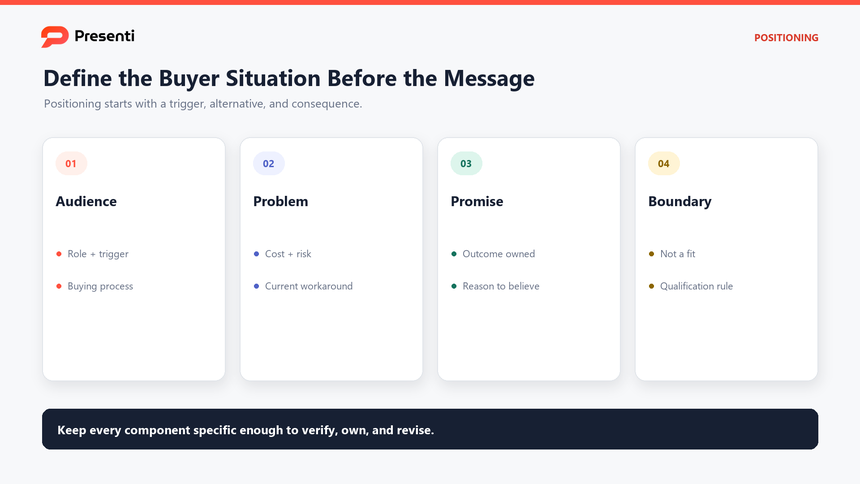
Start with a priority segment, not a demographic description. The useful unit is a buying situation: a role, a trigger, a current workaround, and a consequence of leaving the problem unsolved. Write the positioning statement around that situation so the launch team can judge whether the message and proof match the audience.
| Positioning element | Question to answer | Example evidence |
|---|---|---|
| Priority audience | Who experiences the problem often enough to act? | Role, trigger, workflow, current alternative |
| Problem | What becomes slower, riskier, or more expensive? | Customer evidence, support data, sales pattern |
| Promise | What outcome can the product credibly own? | Product demonstration or pilot result |
| Proof | Why should the buyer believe the promise? | Test, benchmark, customer evidence, transparent limit |
| Boundary | Where does the product not fit? | Excluded use case and qualification rule |
Prepare a message hierarchy: one headline, three supporting claims, and the proof for each claim. This prevents the launch deck from turning into a feature catalog. It also gives sales, customer success, and support the same language for qualification and follow-up. If the launch includes journalist outreach, prepare a separate PR story pitch brief with an outlet-specific angle, verifiable sources, a spokesperson and an agreed next step.
How Should You Plan Channels, Timeline, and Owners?
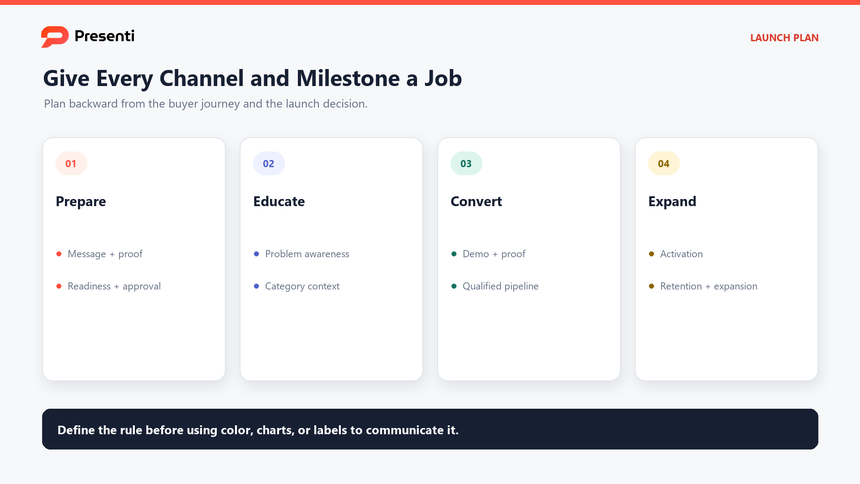
Plan backward from the launch date and the buyer's decision sequence. A buyer who does not know the problem needs education before a demo. A buyer already evaluating alternatives needs proof, comparison, and a clear commercial path. Give each channel a role rather than repeating the same message everywhere. If the launch also requires a wider market-entry plan, the go-to-market strategy template connects those channel roles with segment choice, commercial assumptions and a 90-day operating plan.
| Launch phase | Primary job | Typical channel | Owner and exit condition |
|---|---|---|---|
| Prepare | Align message, proof, enablement, and readiness | Internal briefing, sales enablement, documentation | Launch owner confirms assets and approvals |
| Educate | Create problem awareness and category context | Blog, webinar, community, partner briefing | Marketing owner confirms reach and learning signal |
| Convert | Show value and remove evaluation friction | Demo, trial, sales sequence, proof program | Sales or growth owner confirms qualified pipeline |
| Expand | Support adoption and identify expansion signals | Onboarding, customer education, case evidence | Customer owner confirms activation and retention signal |
The timeline should show dependencies, not just dates. If the launch requires legal approval, pricing signoff, partner confirmation, localization, or support staffing, make those dependencies visible. Assign one accountable owner to each milestone and state what must be true before the next gate opens. The PowerPoint schedule slide guide shows how to choose and build a dated layout or owner-based swimlane once those dependencies are agreed.
Which Launch Metrics and Review Gates Matter?
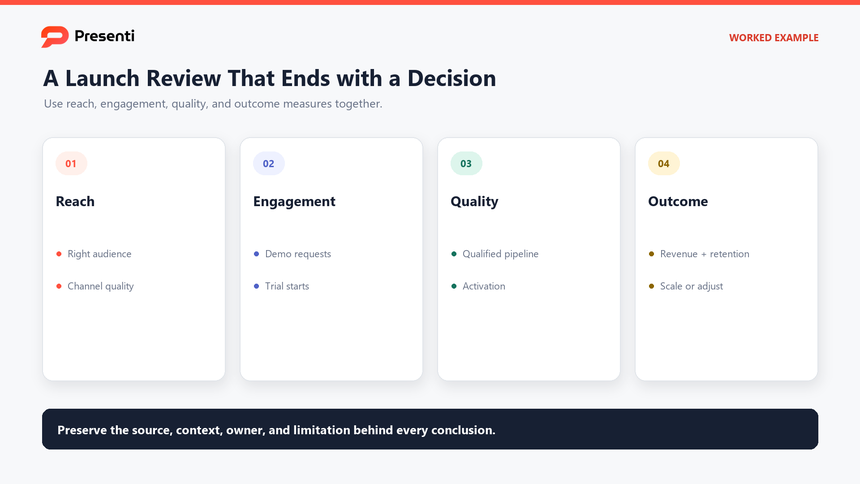
Use a small set of measures that show whether the launch is working. Leading indicators reveal whether the audience is engaging and the message is landing. Outcome measures show whether the launch is producing qualified demand, adoption, revenue, retention, or another business result. Each measure needs a source, definition, and review date.
| Measure type | Example measure | Question it answers | Review action |
|---|---|---|---|
| Reach | Qualified audience reached by channel | Are we in front of the right buyers? | Adjust targeting or channel mix |
| Engagement | Demo requests, webinar attendance, trial starts | Does the promise create action? | Change message, offer, or proof |
| Quality | Qualified pipeline, activation, first value | Are the right users progressing? | Refine qualification and onboarding |
| Outcome | Revenue, retention, expansion, adoption depth | Is the launch creating durable value? | Scale, adjust, or stop the plan |
Set review gates before launch. A gate should state the date, owner, evidence, and decision: continue, change the plan, or stop spending. This makes the launch presentation a management tool rather than a one-time announcement.
How Can Presenti Turn a Launch Brief into an Editable Deck?
Once the launch team has the audience, positioning, channel plan, timeline, and measurement logic, Presenti can organize the brief into an editable first draft. Use text to presentation for a written brief, or upload a Word, PDF, or Markdown file when the plan already exists in a document.
The tool can structure the deck and provide a visual starting point, but it cannot validate market evidence, approve pricing, confirm legal claims, or decide whether the launch should proceed. Keep those checks with the launch owner.
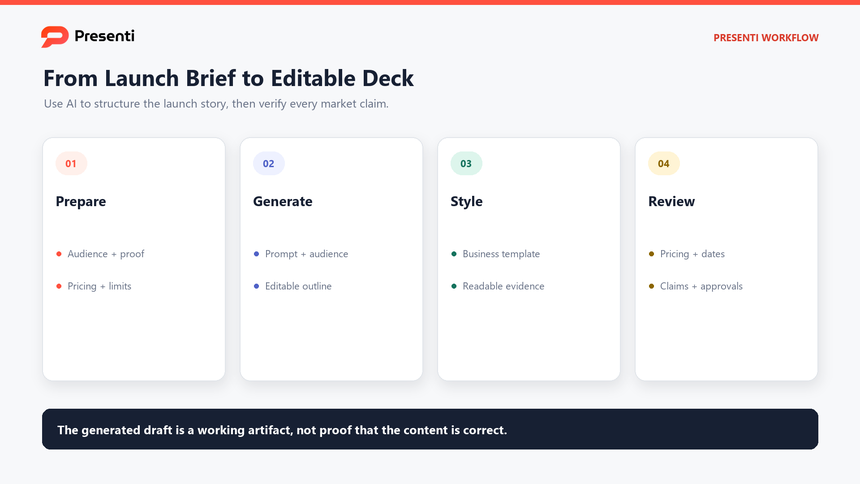
Step 1: Prepare a decision-ready launch brief
Include the launch type, audience, customer problem, product scope, positioning, proof, packaging, channel roles, timeline, owners, dependencies, risks, KPIs, and decision gates. Remove confidential pricing or customer data that is not approved for the working file.
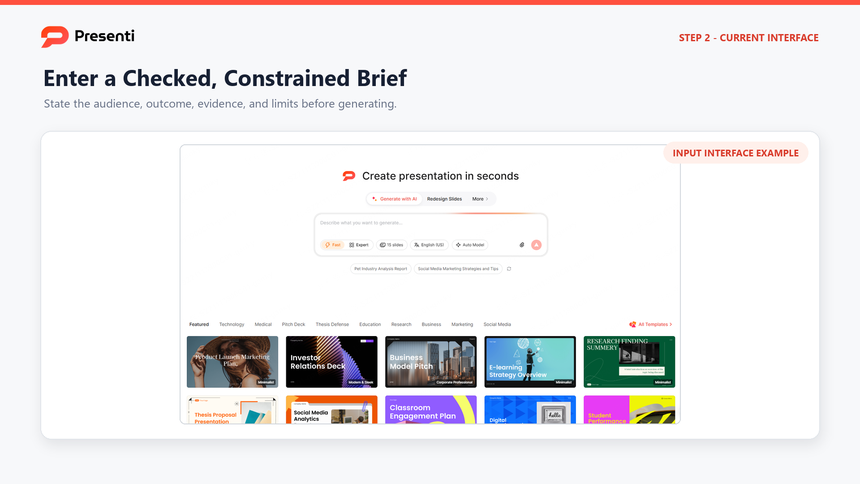
Step 2: Enter a constrained prompt
Use a prompt such as:
Create a 10-slide product launch presentation for an executive review. Audience: product, marketing, sales, support, and finance leaders. Include the launch headline, priority segment, customer problem, positioning, offer and packaging assumptions, channel roles, launch timeline, sales readiness, KPIs, risks, and decision gates. Use placeholders for unverified pricing, legal claims, and customer evidence. Do not invent market size, customer results, or competitive claims.
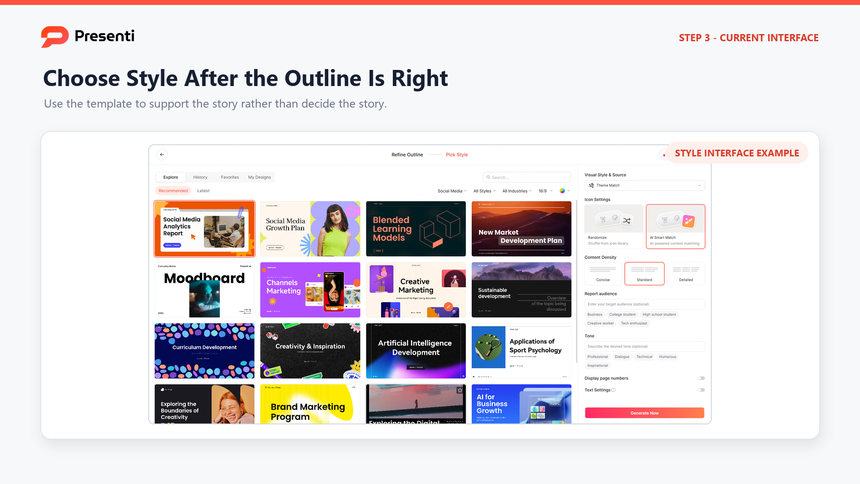
Step 3: Review the outline, then choose a template
Check that the story moves from audience and problem to positioning, plan, measurement, and risk. Remove generic product-feature slides, combine repeated channel slides, and ensure the approval request is explicit. Then open the Presenti template center, preview a business or pitch-deck template, and apply it after the sequence is right.
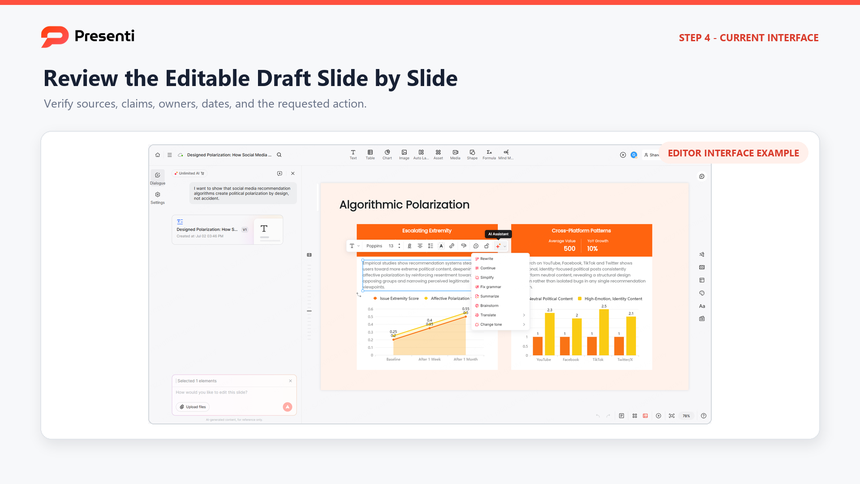
Step 4: Verify the editable deck
Compare every market claim, price, date, owner, dependency, and metric with the approved source. Rehearse the approval ask with the launch owner and remove internal notes, placeholder text, and unapproved customer details before the review.
The finished presentation should make the launch decision easier to approve and easier to review after the market responds.
Frequently Asked Questions
What should a product launch presentation include?
Include the launch headline, decision request, priority audience, customer problem, positioning, offer and packaging assumptions, channel plan, timeline, owners, readiness, KPIs, risks, and review gates.
How is a product launch template different from a launch checklist?
A checklist tracks tasks and completion. A product launch template structures the decisions and evidence that leadership, marketing, sales, support, and product need to align before and after launch.
How many slides should a launch deck have?
Ten to twelve core slides are usually enough for an executive review. Use an appendix for creative concepts, detailed channel plans, pricing scenarios, legal review, localization, and supporting evidence.
What metrics should be used for a product launch?
Use a mix of reach, engagement, quality, and outcome measures. Choose metrics that are connected to the launch decision, define the source and period, and set a review date for each one.
When should the launch team review performance?
Set short-interval reviews for leading indicators and a later review for adoption, revenue, retention, or another durable outcome. The exact timing depends on the sales cycle, product complexity, and launch type.
Bottom Line
A product launch presentation should make the launch decision clear: who the product is for, why they would choose it, how the team will reach them, and what must be ready before release. Keep the timeline, owners, and launch measures together so the team can see which gaps could delay the launch.