To turn a speech into slides, decide what the audience needs to see while you speak. A paragraph might become a diagram, one carefully labeled number, a short instruction, or no new slide at all. The aim is to give the talk a useful visual companion without making people read the script.
Make those choices before asking a tool to build the deck. Presenti’s text-to-presentation workflow can turn a prepared text brief into an editable draft. Your brief should already distinguish the visible content from the explanation you intend to deliver aloud.
The worked example below follows a complete, fictional team briefing about a new support-ticket routing process. The team, records, and proposed trial are invented to demonstrate the editing decisions.

Start with the complete speech
Read the speech once without dividing it into slides. Its job is to ask the team to try a process, explain why, and make the trial concrete. The paragraph numbers below let you trace what survives in the deck.
1. Today I’m asking us to try a clearer way of routing support requests for two weeks. We will keep one place for incoming requests, identify the type of help needed, and make somebody responsible for anything that does not fit. I want us to agree on the trial, the person coordinating it, and when we will review what happened.
2. In our fictional review of last week’s 24 requests, seven changed queues at least once. One of those seven changed queues twice, so there were eight reassignment events. These counts do not tell us how long people waited or whether the final answer was good. They tell us that routing deserves a closer look.
3. The proposed intake has three routes: access, billing, and product issues. The person handling intake chooses the route from the request itself. If the type is unclear or several teams might be involved, the request goes to the rotating triage owner. That person identifies the next owner instead of sending the customer around to find one.
4. A handoff needs more than a new queue name. The sender includes what the customer is trying to do, what has already been checked, and what the receiving team needs to answer. The receiving person acknowledges ownership. Until that acknowledgment, the sender remains responsible for following up on the handoff.
5. During the trial, we will record which requests changed queues, how many reassignments occurred, and which cases needed triage. At the review, we will inspect a few actual handoffs as well as the counts. A lower reassignment count alone would not establish that customers received better help.
6. I know the immediate concern is that triage sounds like another job. It is a responsibility we already handle informally. The trial makes that responsibility visible so we can see where it gets stuck. We should change the proposal if it creates an unmanageable burden.
7. For today, please agree on the coordinating owner and a start date. Before we begin, that owner needs to confirm the triage rotation and share the handoff checklist. We will review the two-week trial together before deciding whether to keep the process.
Give each paragraph a visual job
This speech needs five visual moments, not seven paragraph-shaped slides. The objections and closing request can use the final slide. Here is the complete mapping.
Paragraph 1: show the proposed change
Show: “Try one intake route with an owner for unclear requests.” Under it, use three short labels: identify the need, assign the route, resolve uncertainty.
Say: the trial lasts two weeks and needs the team’s agreement. Keep the conversational opening in your voice.
Omit from the screen: “Today I’m asking us” and the full list of meeting decisions. Those phrases help a spoken introduction, but they do not help someone understand the process visually. The final slide will hold the concrete request.
Paragraph 2: separate requests from reassignment events
Show: three labeled counts: 24 requests reviewed; 7 requests changed queues; 8 reassignment events. Keep “fictional one-week sample” visible beside them. A small note should say that one request changed queues twice.
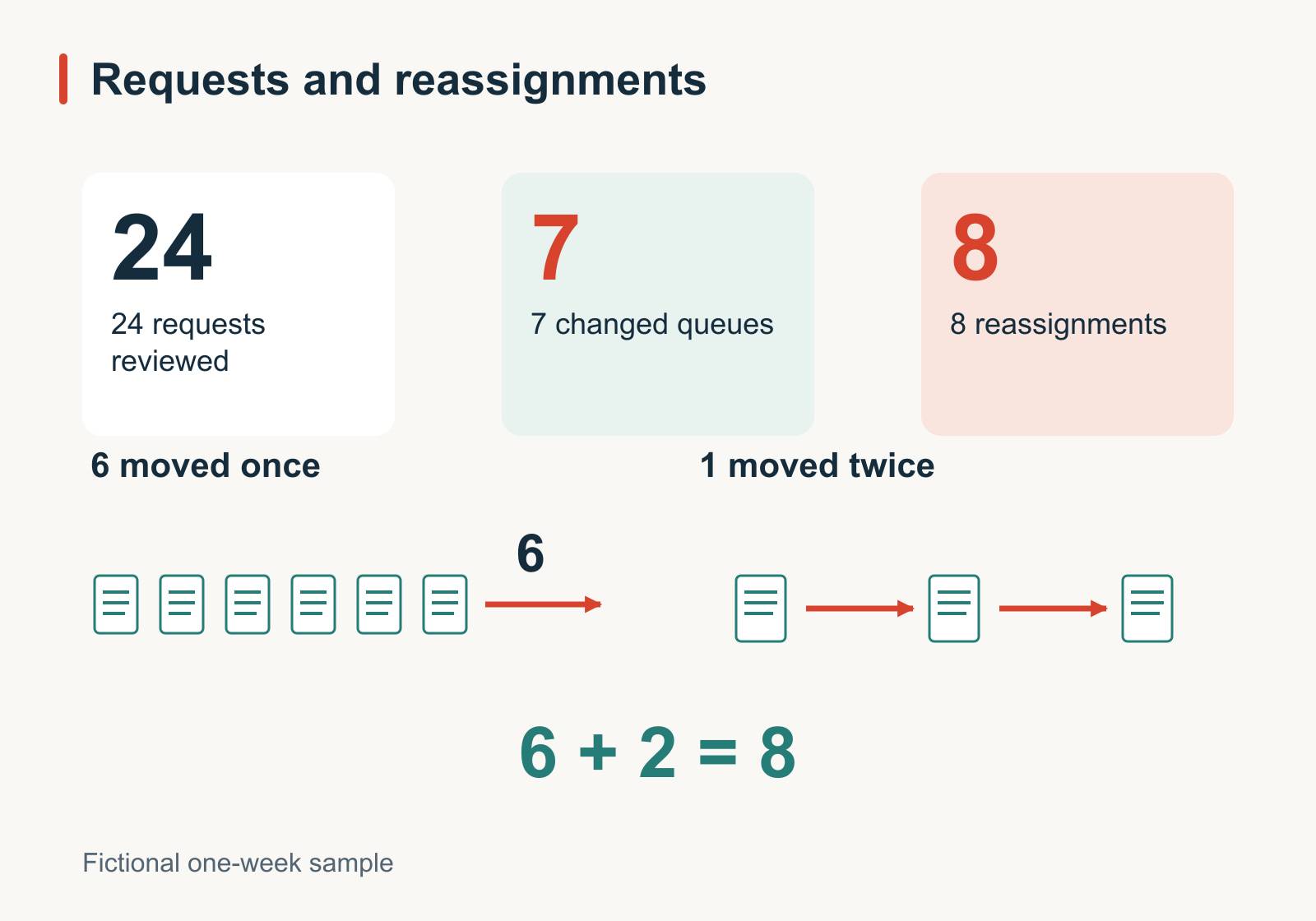
Say: why this is worth investigating. Explain that neither waiting time nor answer quality was measured.
Omit: any new percentage or performance headline. “Routing wastes time” would go beyond the source. The count labels do more work here than an unlabeled chart or a decorative icon. If you use a graphic, it must preserve the difference between requests and events.
Paragraph 3: draw the route the audience must remember
Show: incoming request → identify the help needed → access, billing, or product-issue queue. Add a separate branch labeled “Unclear or shared responsibility” leading to “Triage owner identifies the next owner.”
Say: that intake uses the actual request, and explain what qualifies as unclear. The branch is the point of the visual: uncertainty has somewhere to go.
Omit: the paragraph’s repeated description of someone taking responsibility. The labeled branch already communicates it. Keep the diagram as an illustration of the proposed team process; it is not a screenshot of an implemented support system.
Paragraph 4: make the handoff observable
Show: a compact handoff card with three fields: customer’s goal, checks already completed, and question for the receiving team. Below it, write: “Sender follows up until the receiver acknowledges ownership.”
Say: one example of a poor handoff and its repair. “Billing issue—please check” becomes “The customer sees two charges; the account and invoice numbers have been checked; please confirm whether the second charge is valid.” This example is illustrative, not an additional finding from the 24 requests.
Omit: repeated instructions to be clear. The filled-in card shows what clarity requires.
Paragraphs 5–7: keep the trial and the request together
Show for paragraph 5: a two-week trial with three observations to collect: requests moved, reassignment events, and triage cases. Add “Inspect actual handoffs” and keep the limitation visible: fewer moves alone do not prove better help.
Say for paragraph 6: the concern about workload and the willingness to change the proposal. Keep this on the trial slide; a new page reading “Concerns” would interrupt the explanation without adding evidence.
Show for paragraph 7: a closing box on that same slide: “Agree on the coordinating owner and start date; confirm the rotation and checklist before starting.” Leave the owner and date unfilled until the team agrees.
Omit: another recap of all five slides. Finish on the action the audience can take. There is no need to add a generic thank-you page between the proposal and the discussion.
Give the slide tool a visual brief
Pasting the original speech alone leaves a tool to guess which details should be visible. Use the paragraph decisions to write a more explicit input. For this example, the brief could read:
Create five slides for a fictional support-team briefing.
The audience is deciding whether to try a routing process for two weeks.

1. Proposal: one intake route, with an owner for unclear requests.
2. Evidence: 24 requests reviewed; 7 requests changed queues;
   8 reassignment events because one request moved twice.
   Label the sample fictional. Waiting time and answer quality
   were not measured.
3. Process: access / billing / product issues.
   Unclear or shared cases go to a triage owner who finds the next owner.
4. Handoff: customer goal / checks completed / question to answer.
   Sender follows up until the receiver acknowledges ownership.
5. Trial: record moved requests, reassignment events, and triage cases;
   inspect actual handoffs. Ask for an owner and start date.
   Fewer moves alone do not prove better help.

Do not invent results, names, dates, or software integrations.
Keep spoken explanations out of the slide body.
Use the diagram and handoff card to explain the process.
In Presenti, select Paste Text and enter the prepared brief. Treat the generated slides as a starting point: compare them with the source speech, especially the counts, uncertainty branch, and ownership rule. Revise any diagram or wording that changes those details.
Keep the original script in a separate document while editing. Do not rely on a slide tool to preserve passages that you deliberately excluded from the visible content. After the visuals settle, you can turn the spoken material into speaker notes that support the finished slides.
Rehearse the moments when the picture changes
Read the speech aloud with the storyboard beside it. Change the visual when the audience’s task changes: understand the proposal, inspect the counts, follow the route, recognize a complete handoff, then consider the trial. A new paragraph is not automatically a new visual task.
Pause on the routing diagram long enough to trace the unclear-case branch. If the audience must decode the diagram while you explain the next topic, either simplify the picture or give that explanation more time. Do not solve the problem by shrinking labels.
Then make two separate checks. Looking only at the slides, can a colleague identify the proposal, the evidence’s limits, and the requested decision? Listening only to the speech, can they follow the argument without phrases such as “this bit here”? The two versions need not contain identical words, but they should tell the same story.
If rehearsal reveals a missing condition, restore it where the audience needs it. If it reveals a repeated introduction, cut the repetition. The finished deck should make the speech easier to follow while leaving the speaker room to speak.