There is no reliable way to predict whether a teacher, employer, or detector will flag a presentation. Generic writing can come from a person, and polished slides can involve AI. Focus on what you can establish: accurate claims, traceable sources, your contribution, and the rules for the assignment or workplace.
Our PowerPoint AI detection guide explains why style, metadata, and detector scores cannot settle authorship. This article focuses on editing an AI-assisted draft so that it communicates your work clearly.
First, check whether AI assistance is allowed and whether it must be disclosed. Keep the source notes and drafts needed to explain your process. A detector score alone is not a sound basis for an accusation; Turnitin also cautions against treating its report as a definitive answer in isolation.
Review the Draft for Clarity
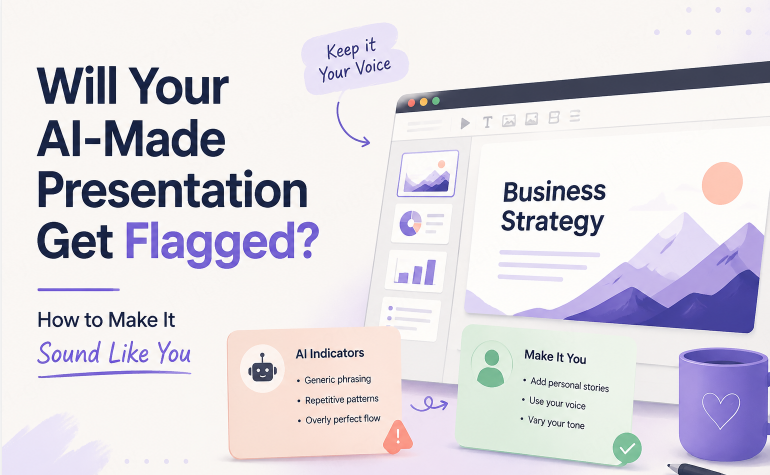
Read the deck from the audience’s perspective. These questions identify communication problems, not evidence of AI authorship.
- Visual: Does every slide have roughly the same visual weight, regardless of how important the content is? Do the images look "premium" but generic — abstract shapes, glassy gradients — rather than specific to your actual topic?
- Content: Does the copy sound confident but stay vague? Could you swap out your company or topic name for a competitor's and have most of the slide still technically work?
- Tone: Is every slide written in the same polite, neutral register, with no place where your actual opinion or emphasis comes through?
- Sources: Can you trace each important figure and quotation to its source? Could you explain how you reached the recommendation?
Use the sections below to address the problems you find. A consistent layout or neutral tone is not a problem by itself.
Step 1: Make the Visuals Serve the Message
- Break the uniform layout. Go through the deck and identify the two or three slides that actually matter most — your core data point, your main recommendation. Give those slides more visual weight: a bigger number, more white space, a bolder color accent. Let the less important slides look genuinely secondary.
- Choose visuals with a clear purpose. Use a relevant screenshot, a chart from your data, or an image that helps explain the point. Remove decorative images that compete with the message.
- Check credits and branding. Keep attribution or watermarks required by the tool or asset license. Remove optional branding only when the applicable terms allow it; this does not determine whether AI use needs to be disclosed.
Step 2: Replace Vague Claims with Evidence
❌ Generic: "Our solution improves efficiency and drives better outcomes for stakeholders."
Specific, fictional example: “Our Q3 time logs recorded about six fewer hours of approval work per week after we reduced the process from five steps to two.” Use this wording only with your own supporting records.
A number is useful because a reader can check it, not because it proves a human wrote the slide. AI can invent precise figures and source names. Use the actual record, explain what was measured, and avoid claiming causation from a simple before-and-after comparison.
- Add relevant context. Explain the team, period, customer group, or process the claim covers. Use information you are permitted to share, and cite it when the audience needs to verify it.
- Connect adjacent slides. If the transition is unclear, explain why the next point follows: “Given that gap, here is what we tested next.” The aim is a coherent argument, regardless of who drafted the wording.
- Verify every statistic, then cite it properly. If a number came from an AI draft, confirm it's real before it goes anywhere near an audience — and if it's not verifiable, cut it or replace it with something you can actually back up.
- State your recommendation plainly. Say what you think should happen and what evidence supports it. Natural wording helps the audience understand your judgment; it is not an authorship test.
Step 3: Keep an Accurate Record of Your Work
Keep your source document, relevant drafts, and citations. File metadata can reflect a template, an account setting, or the application that saved the file; it is not proof of who wrote the content. Do not replace accurate attribution with your name just to make the file appear unaided.
Version history can help you revisit genuine revisions, but edit timing cannot prove whether AI was involved. Revise the slides because they need improvement, not to create an artificial editing pattern. If asked, explain which parts you researched, drafted, checked, and generated with assistance.
Step 4: Start From Your Own Material, Not a Blank Prompt
A prompt such as “make me a deck about Q3 results” leaves out the results themselves. Provide the actual figures, audience, and purpose so the draft has relevant material to work with.
Starting with your report, notes, or analysis can reduce generic content. It does not guarantee that a generated draft preserves every fact or qualification. Compare the slide claims with your source, especially where the tool has summarized or expanded the text.
Presenti supports drafting from a Word document, a PDF, Markdown notes, or an outline, as well as from a prompt. Use the source material to guide the outline, then review the generated text and layout before presenting.
5 Before-and-After Slide Examples
The following examples are fictional illustrations of clearer writing. The numbers, organizations, and results are invented for explanation, not customer evidence or Presenti performance claims. Replace them with verified information before using them in a real deck.
1. Before — Market slide, generic prompt output
Slide title: "Market Opportunity"
Body: "The market presents significant growth potential, driven by increasing demand and favorable industry trends. Companies that act quickly can capture meaningful market share."
After — illustrative rewrite
Slide title: “What Our Customer Interviews Suggest”
Body: “In this fictional example, 24 of 34 interviewed mid-market buyers said they were evaluating another vendor. Follow-up research should test whether pricing or another factor is driving that interest.”
What changed: The rewrite identifies the sample and separates the observation from the next research question. It does not extrapolate a market value from 34 interviews. A sample size such as “n=34” is easy to invent; the underlying interview records are what would support the claim.
2. Before — Problem statement, generic prompt output
Slide title: "Customer Churn"
Body: "Many customers are leaving before renewal, which impacts long-term revenue and growth."
After — illustrative rewrite
Slide title: "We're Losing Customers in Month 4, Not Month 12"
Body: "Cohort data shows 60% of Q2 churn happened before the 4-month mark — earlier than our retention team assumed, and before our first check-in call even happens."
What changed: The fictional cohort example gives a time window the retention team could investigate. In a real deck, define the cohort and period, show the supporting calculation, and distinguish an observed pattern from its possible cause.
3. Before — Methodology, generic prompt output
Slide title: "Our Approach"
Body: "We use a data-driven, collaborative methodology combining industry best practices with innovative techniques to deliver optimal results."
After — illustrative rewrite
Slide title: "How We Tested This"
Body: "We ran a 6-week A/B test across two customer segments (n=1,200), holding pricing constant and varying only the onboarding email sequence."
What changed: The fictional rewrite names a duration, sample, and variable so the audience can ask useful questions. In a real study, also explain group assignment and relevant limitations. Detailed wording alone does not establish that a test occurred or that it was valid.
4. Before — Competitive analysis, generic prompt output
Slide title: "Competitive Landscape"
Body: "We operate in a competitive market with several established players, but our unique value proposition sets us apart."
After — illustrative rewrite
Slide title: “Compare Setup Time on the Same Task”
Body: “Test both tools from a new account, use the same source file, and time the steps through a successful export. Report the number of attempts, plan used, and any manual cleanup.”
What changed: The rewrite proposes a reproducible comparison instead of asserting an unmeasured win. A measured result from one tool and an estimate in a competitor’s guide are not like-for-like evidence.
5. Before — Results, generic prompt output
Slide title: "Positive Results"
Body: "The initiative delivered strong results and positive feedback from stakeholders across the organization."
After — illustrative rewrite
Slide title: “Monthly Support Tickets Fell by About 34%”
Body: “In this fictional example, monthly ticket volume fell from 1,140 to 752 between two comparable periods. The self-service refund flow launched during that interval; further analysis is needed to estimate its contribution.”
What changed: The figures allow the reader to check the percentage, and the explanation separates an observed change from a causal claim. A real analysis should also account for customer volume, seasonality, and changes in how tickets were counted.
Across the examples, specificity makes claims easier to examine. It does not make them automatically true or human-written. The useful improvement is a clearer connection between the slide, its evidence, and the conclusion the evidence can support.
Frequently Asked Questions
Is it wrong to use AI to build a presentation?
AI assistance may be allowed for one task and restricted for another. Follow the applicable assignment or workplace rules, acknowledge assistance where required, and take responsibility for the claims you present.
Will a teacher or employer definitely notice if I used AI?
Neither a person nor a detector can reliably infer the full production process from style alone. Good editing does not guarantee that a deck will avoid a flag. Keep evidence of your work and explain your use of AI honestly if a question arises.
Does removing a watermark count as hiding that I used AI?
A watermark may be required by a license or plan. Check those terms before removing it. Optional branding and disclosure of AI assistance are separate questions: removing a permitted logo does not remove any obligation to acknowledge how the work was made.
How much editing does an AI draft actually need before it's "mine"?
There is no editing percentage that establishes authorship or policy compliance. You should be able to explain the claims and sources, distinguish your contribution from generated material, and meet any disclosure requirements.
A Better Standard Than “Does This Look Like AI?”
Judge the deck by whether its claims are supported, its message is clear, and its use of assistance follows the relevant rules. Better visuals and more natural writing help readers; neither can prove authorship or guarantee a detector outcome.