Imagine a familiar deadline: It is 4 PM on a Thursday. The client presentation is due Friday morning. You open PowerPoint, stare at a blank slide, and suddenly the next two hours disappear into font adjustments, misaligned text boxes, and a color palette that refuses to look intentional.
The rise of the AI PPT generator promises to end that cycle. But the question most people actually need answered is not whether AI tools exist — it’s whether they’re genuinely better for your specific workflow, or just a shinier version of the same problem. This guide compares the work involved and shows how to measure the difference using your own presentation.
What Is an AI PPT Generator?
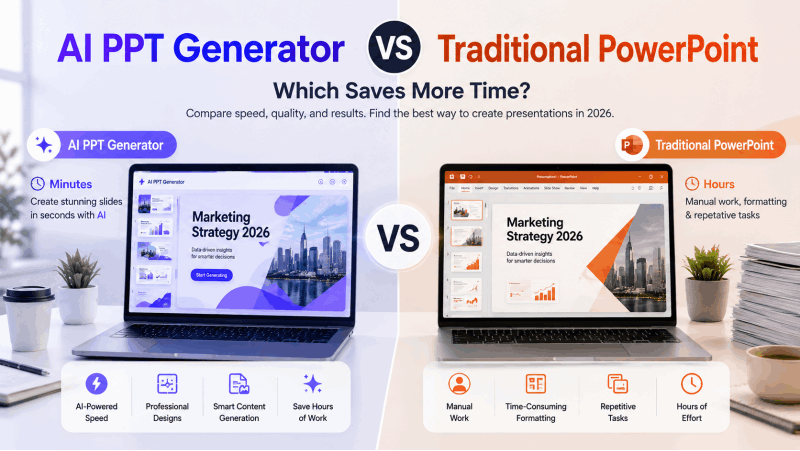
An AI PPT generator creates a presentation draft from a prompt, outline, or supported source file. It can propose a sequence of slides and apply layouts, leaving you to check the argument, facts, and design.
Tools differ in input support, editing controls, and export conditions. Some also work inside existing presentation software, so AI generation and PowerPoint editing are not mutually exclusive. The Copilot and ChatGPT presentation comparison shows how an in-application route differs from a conversational workspace and file handoff.
Presenti AI offers a source-to-outline and slide-design workflow. Its free access has limited AI credits; Word/PDF/TXT inputs and editable PPTX/PDF exports are listed on paid plans.
Where Presentation Time Goes
The time required for a deck depends on how much of the argument already exists, how complex the visuals are, and how closely the result must follow a brand system. Generation speed alone does not measure the full job.
| Stage | Manual or template-led process | AI-assisted process |
|---|---|---|
| Structure | Write and arrange slide titles | Prepare a brief and review the proposed outline |
| Layout | Apply layouts or build custom slides | Review generated layouts and repair crowding |
| Content | Write or condense source material | Check omissions, invented details, and emphasis |
| Visuals | Create or source charts, images, and diagrams | Validate generated or selected visuals and replace unsuitable ones |
| Delivery | Inspect the final presentation and rehearse | Inspect the export in the destination editor and rehearse |
For a fair comparison, use the same brief and the same definition of “ready to present.” Record time spent at each stage, including corrections and export cleanup. This guide does not report a controlled timing study.
Compare the Two Workflows
Manual or Template-Led PowerPoint
- Choose a starting point. Use a theme, an approved template, an existing deck, or a blank presentation.
- Build the structure. Arrange the argument and choose a suitable layout for each slide.
- Apply consistent design. Themes, layouts, and slide masters can handle recurring styles. Use manual adjustments for exceptions.
- Add visuals. Insert source-backed charts, relevant images, and diagrams that explain the message.
- Review and rehearse. Check reading order, text fit, factual accuracy, and pacing.
AI-Assisted Drafting
- Prepare the input. State the audience, purpose, length, and key points. Supply a supported document when it contains the material you need.
- Review the outline. Correct the narrative before investing in slide design.
- Generate and choose a style. Select a template or visual direction appropriate to the audience.
- Refine the draft. Verify figures and claims, restore essential context, and adjust layouts.
- Deliver the file. Confirm the plan includes the required format, then inspect the exported file in PowerPoint or your other destination editor.
The faster route is the one that reaches an acceptable result with less total work for your particular source and requirements.
When AI Drafting Is Worth Trying
You have a clear source document. An AI tool can propose a slide structure from a report or brief. In a document-to-presentation workflow, review whether the outline preserves the central argument and important qualifications.
You need a starting structure. A draft can help you evaluate the sequence of a business review, lesson, or pitch before you make detailed design decisions.
You repeat a format. Compare AI drafting with updating an existing approved template. Check whether it actually reduces revision work for recurring reports.
You are still learning slide design. Generated layouts can offer useful starting points. Check hierarchy, contrast, and text density rather than assuming every design choice is suitable.
You produce many decks. Evaluate the process with several representative projects. A gain on a simple overview may not carry over to a technical presentation with custom diagrams.
When Detailed Manual Control Matters
Precise brand requirements. Proprietary fonts, exact spacing, custom icons, and established slide masters may require detailed editing. A generated draft can still supply content that you place in an approved template.
Complex data visualization. Custom charts and diagrams require decisions about scales, units, labels, and the relationship between data and claims. Build or inspect them with the appropriate source data.
Bespoke visual storytelling. A keynote or major campaign may call for original illustration and a visual sequence developed with a designer.
Timed animations. Use the presentation editor's controls when entrance effects, transitions, or reveal timing must match specific speaking beats.
These needs can coexist with AI drafting. Choose the level of manual control each part of the deck requires. The guide to editing an AI-generated slide draft breaks that review into text, layout, visuals, and delivery changes.
Choose by the Work the Deck Requires
| Presentation requirement | A useful approach to test |
|---|---|
| Summarize an existing report | AI-generated outline followed by source checks |
| Match an approved brand system | Approved template or slide master, with detailed manual refinement |
| Build a standard business update | Compare AI drafting with updating last month's deck |
| Create custom data visuals | Source-based chart construction and close review |
| Develop a pitch narrative | Outline iteration, audience feedback, and selected AI drafting |
| Produce a custom visual sequence | Designer-led layouts with manual control where needed |
A combined process is often worth evaluating: use AI to explore structure, then use PowerPoint or another editor for the final controls your presentation needs.
How to Evaluate an AI Presentation Tool
- Input fit: Does it accept your source format on the plan you can use?
- Outline fidelity: Does it preserve the central claim, supporting evidence, and qualifications?
- Editing: Can you make the changes your team commonly needs?
- Export: Is the required file included, and do its objects remain usable in the destination editor?
- Cost: Include credits, subscriptions, export access, and any premium assets.
Presenti is one candidate for this process. It supports prompts and supported documents, template selection, editing, and paid PPTX/PDF export. Compare it with the other workflows covered in this overview of AI PPT tools.
Frequently Asked Questions
Can an AI generator replace PowerPoint?
It may cover your drafting and delivery needs, or you may use PowerPoint for final editing. Check the specific file, layout, and collaboration requirements.
How accurate is generated content?
Accuracy varies with the source and task. Verify facts, figures, citations, and organization-specific details against reliable sources.
Are free AI generators usable?
Limited free access can help you explore a workflow. Presenti offers limited free AI credits, while Word/PDF/TXT imports and editable PPTX/PDF export are paid features.
What input should I use?
Supply a clear brief or a relevant source document. Neither guarantees a strong draft; review the outline for the audience and purpose before generating the complete deck.
Compare Total Effort, Not Just Generation Time
AI drafting can reduce some outlining and layout work. Manual or template-led editing remains useful wherever you need specific design controls. The right balance depends on the source material and the standard the finished deck must meet.
Try both routes with a representative project and record preparation, editing, and delivery time. To explore an AI-assisted draft, start with Presenti's free access and review its plan conditions for your intended input and export.