Presentation skills package instructions and supporting resources for an AI agent. They can help create slide files, browser presentations, or text-based decks. The useful choice depends on the output you need and the environment that will run the skill.
What Makes Something an "AI Skill"?
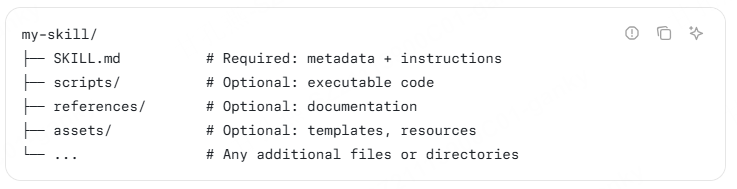
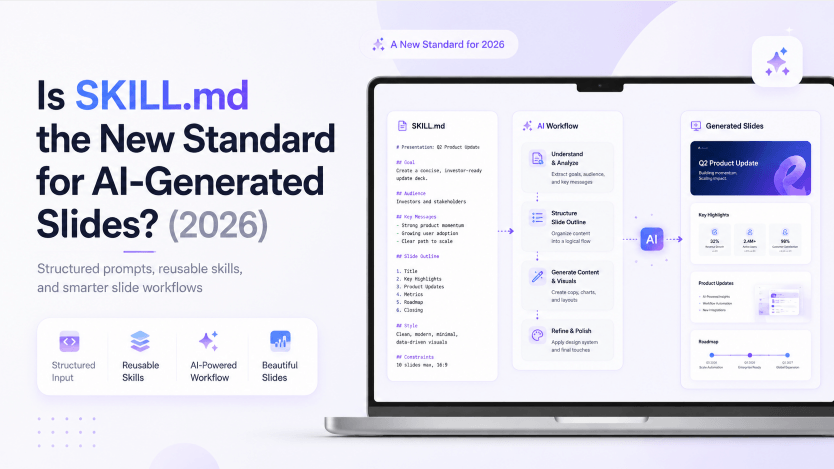
An Agent Skills package has a SKILL.md file containing metadata and instructions, with optional scripts, references, and assets. Compatible hosts can discover and load it; the package may still need particular tools or dependencies.
That agent-agnostic design is the whole reason this took off the way it did: an AI skill PPT package built for one environment tends to work, with minor adjustment, in several others, because they’re all reading the same basic SKILL.md file format.
For presentations, compare the package’s supported inputs, rendering method, output files, and review process. A skill that creates slides does not necessarily inspect their rendered appearance. The community Codex PPT Skill's image-based output is one concrete example where a PPTX container does not mean every object can be edited separately.
The Distribution Layer: How AI Skill PPT Tools Actually Spread
Registries and directories help users discover skill packages. Check who maintains a package, what it does, which tools it runs, and how to install it in your chosen host. A directory listing is not a quality guarantee.
In January 2026, Vercel formalized this further with skills.sh, an open directory and leaderboard for skill packages that work across the full agent ecosystem rather than being locked to one tool. It ships with a CLI that installs a skill from GitHub with a single command, which meaningfully lowered the barrier to trying a new AI skill PPT generator — no manual file copying, no per-agent setup instructions to hunt down.
The practical effect is that “which AI skill PPT generator should I use” has become a real question with real competition behind it, rather than “is there one at all.”
Three Output Approaches for AI-Generated Slides
The most interesting split in this ecosystem isn’t which agent a skill works with — it’s what kind of file comes out the other end. Broadly, three approaches to producing AI-generated slides have emerged.
Native PPTX generation. Some skills build an actual PowerPoint file directly, typically using a JavaScript library like PptxGenJS or Python’s python-pptx library. This is the approach behind an AI skill PPT generator built specifically to preserve editable output — recreating slides from a screenshot or reference deck, adding charts and diagrams, or diagnosing layout problems like text overflow and font substitution, while keeping the result genuinely editable afterward in PowerPoint itself. If you are building the file pipeline yourself, compare PPT SDK operations, rendering, and integration requirements separately from the agent's writing instructions.
HTML presentations. A large and fast-growing share of the ecosystem has moved away from PowerPoint entirely. Skills in this category generate a single, self-contained HTML file that can be viewed in a browser; dependencies and packaging vary by skill. The appeal is practical: no software to install, native smooth animations that PowerPoint can’t easily replicate, a portable single file that’s easy to share, and the ability to export to PDF or publish to a live URL when needed. Check whether the output is self-contained, needs a server, or depends on external assets before sharing it. Before choosing the static deliverable, review HTML-to-PDF methods and when a deck is more appropriate; a PDF does not retain the browser interaction.
Markdown-to-ppt generation. A third approach leans on Markdown presentation frameworks like Marp, generating structured, styled slide content from a topic, outline, or rough notes, with the framework handling final rendering. It’s a lighter-weight approach that trades some visual flexibility for simplicity and version-control-friendly plain text.
None of these three approaches has “won” as of mid-2026 — which AI skill PPT generator you’d choose depends heavily on whether you need a real PPTX file to hand off to someone else, a quick shareable web link, or a lightweight text-based format you can track in Git.
Specialization Is Starting to Emerge
As the ecosystem has matured, a division-of-labor pattern has shown up that’s worth watching. Rather than one skill trying to handle everything from narrative structure to final visual polish, some setups now split the job: one skill focuses specifically on structured narrative design — guiding a user through organizing their argument before any slide exists — then hands off to a separate, dedicated skill purely for visual generation. The reasoning behind that split is straightforward: narrative structure is something a human still needs to be closely involved in shaping, while visual execution is the part most people are happy to fully delegate to an AI skill PPT workflow. For longer-term team planning, the 2027 presentation workflow outlook considers evidence, editable output, and human approval at these handoffs; it separates directional signals from vendor commitments.
This kind of specialization has also produced its own quality-control layer. Independent reviewers have started publishing head-to-head comparisons — testing a batch of competing AI skill PPT generators against the same brief and ranking them on a tiered scorecard — which is a reasonably strong signal that this has moved past the experimental phase into something people are actively choosing between, the same way developers compare libraries or frameworks.
What the Whole Ecosystem Still Has in Common
Setup varies. Some presentation skills run within a graphical agent application; others require a command line, libraries, or API credentials. Read the package requirements before deciding whether its workflow fits you.
The setup trade-off matters alongside output control. A team maintaining repeatable decks may value scripts and version history, while an occasional presenter may prefer a hosted editor.
The HTML Philosophy Isn’t Confined to the Skill Ecosystem
It’s worth noting that the HTML-first output style hasn’t stayed exclusive to the CLI-and-skills world — it’s also shown up in standalone, no-code browser tools built for people who were never going to install an AI skill PPT package in the first place.
Browser-based presentation and design services provide another route. Before choosing one, check whether it creates web pages, slide files, or both; whether you can revise individual elements; and how sharing and export work on the selected plan.
Choose according to your starting material and intended output. A browser design tool may suit a web-based visual experience, while Presenti supports presentation drafting from a topic or compatible source document. An agent-and-skills workflow offers another route when its host, tools, and output format fit the project.
Where This Leaves Non-Developers
If you do not already use an agent environment, compare the setup effort with a browser presentation editor. Developer experience is not a universal requirement, but some packages need technical configuration.
This is the same gap we’ve pointed to before: a browser-based tool like Presenti AI is built for the version of this problem that doesn’t start with “which agent am I running.” Upload a document, PDF, or outline, and you can generate and review an editable slide draft, with no CLI, no skill installation, and no choice between native PPTX, HTML, or Markdown output to make upfront.
The two worlds aren’t really in competition for the same user. If you’re already deep in a coding agent’s environment and want tight control over output format and visual style, the SKILL.md ecosystem of AI skill PPT generators is worth exploring — it’s grown fast and genuinely well in 2026. If your priority is going from a document to a usable deck with the least setup possible, that’s a different, more direct path.
Frequently Asked Questions
What is an AI skill PPT generator? It’s an AI capability — usually packaged as a SKILL.md file — that a coding agent installs to gain the ability to turn a prompt, document, or outline into AI-generated slides. Instead of a standalone app, it’s a plugin-style skill that runs inside an agent you’re already using, like Claude Code or Codex.
What is a SKILL.md file? It’s a standardized text file, usually paired with supporting scripts, that teaches an AI coding agent a new capability. A compatible host can load those instructions. Required tools, dependencies, permissions, and installation paths can differ between environments.
Which coding agents support AI skill PPT generators? The format works broadly across Claude Code, Codex, Cursor, OpenClaw, Gemini CLI, GitHub Copilot, Goose, Windsurf, Kiro, and Trae, but support, discovery paths, and required runtime tools vary by host.
Do these tools produce editable PowerPoint files? It depends on the specific AI skill PPT generator. Some generate native, editable .pptx files directly. A large portion of the ecosystem instead generates self-contained HTML presentations, which aren’t PowerPoint files at all but can usually be exported to PDF. A smaller group uses Markdown-based frameworks like Marp.
Do I need to already be a developer to use these tools? No. Some skills work through a graphical agent interface, while others require terminal setup and dependencies. Check the host application and the individual skill’s instructions.
The Bottom Line
SKILL.md provides a common way to package agent instructions, but it does not guarantee presentation quality or compatibility. Choose the output format first, check the host and dependencies, and inspect the generated result before sharing it.