A useful chart annotation tells the audience where to look and what the marked feature means. It might identify a change between two points, show a meaningful reference, or explain why one value is provisional. It should answer a question the chart otherwise leaves the reader to solve.
Start with the question, then add the smallest annotation that answers it. If the chart itself is unsuitable, fix that first: the guide to choosing a chart for your presentation explains the difference between showing comparisons, trends and relationships. An arrow cannot make an unsuitable chart clear.
This article uses one fictional series of completed orders to demonstrate three different annotation choices. The numbers are intentionally simple so you can check every label and adapt the approach to your own data.
Write the question before the callout
“Make this chart stand out” is a design request, not an analytical purpose. Replace it with a question: “Where did the largest month-to-month increase occur?” or “Which months were above the team's planning target?” Those questions can use the same data but need different annotations.
| Month | Completed orders | Status |
|---|---|---|
| January | 100 | Final |
| February | 110 | Final |
| March | 108 | Final |
| April | 145 | Final |
| May | 150 | Final |
| June | 148 | Provisional full-month count |
In this example, the team's planning target is 120 completed orders per month. It is a target supplied with the example, not the average calculated from the series. June covers a full month, but its total is still subject to reconciliation. That differs from a partial-month count, which would need an explicit warning against direct comparison with complete months.
Before adding shapes or labels, write one plain sentence you want the audience to understand. If you need three unrelated sentences, you may need three views of the chart rather than three competing callouts on one slide.
Annotate a change with both endpoints
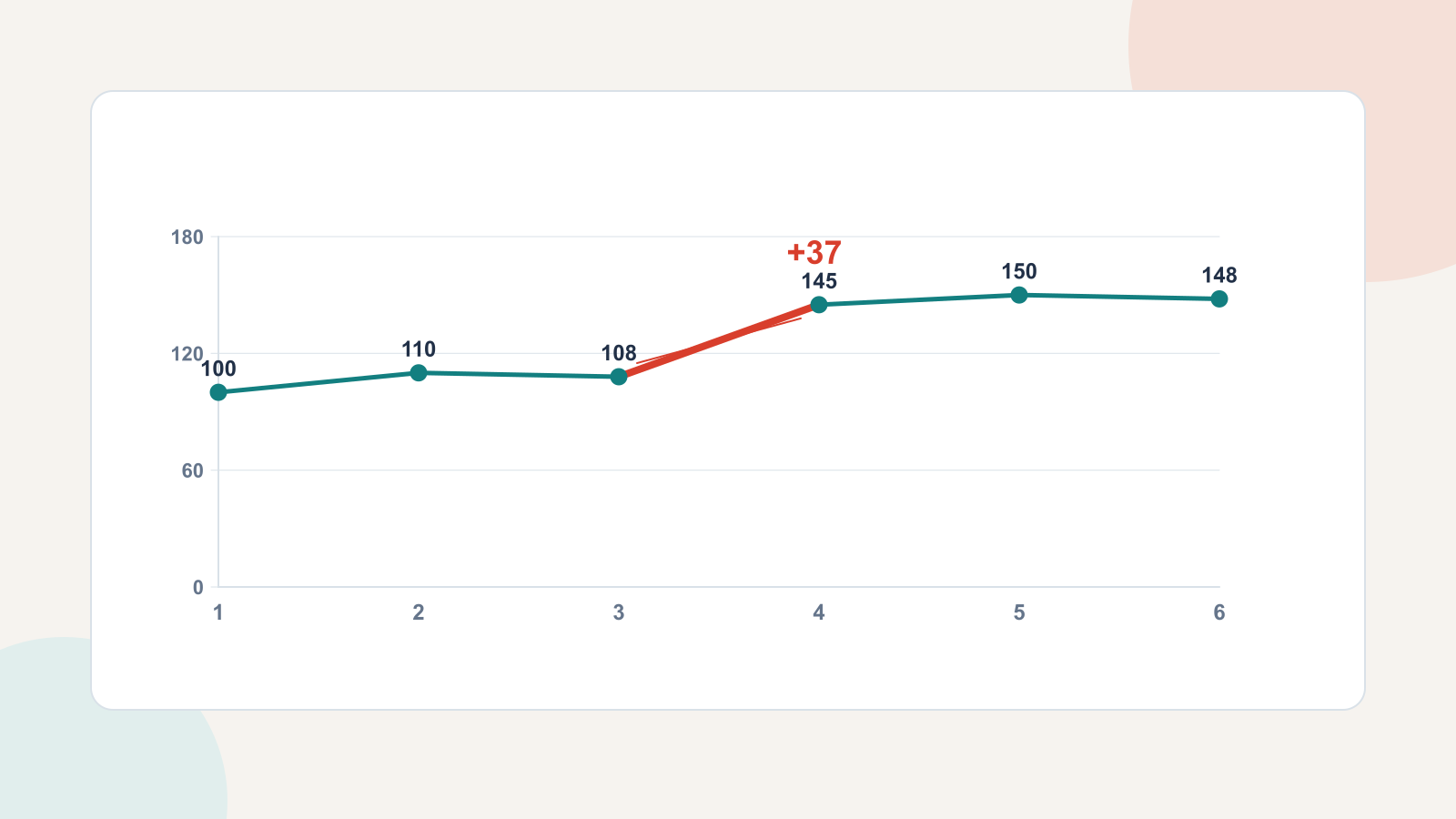
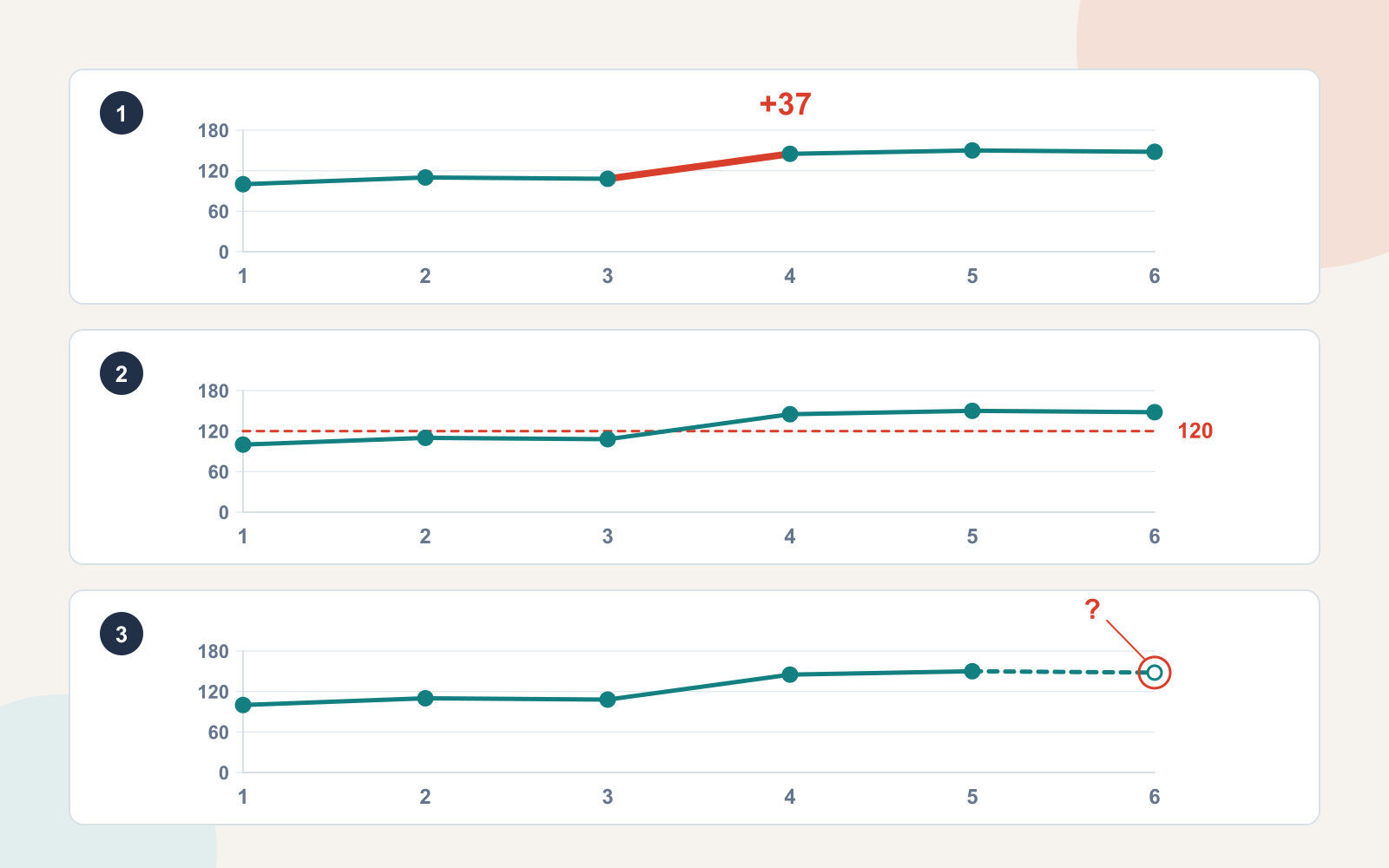
For the question “Where did orders increase most?”, the relevant comparison is March to April: 108 to 145, an increase of 37 orders. Mark the two endpoints and place the difference close to the interval they define.
A precise annotation reads “+37 orders, March to April.” “Strong growth” is less useful because it neither names the comparison nor explains what counts as strong. A label saying “37%” would be wrong: 37 is the change in the order count, not its percentage change.
The other points should remain visible. Muting them slightly can help the selected comparison stand out, but fading them until they are unreadable removes context. An audience should still be able to see that February to March fell by two and that April to May rose by five.
Keep the annotation close to the relevant points without covering the line. A short connector helps when the text must sit farther away. Make the connector end at the actual point or interval, not somewhere nearby where it could identify a different month.
The headline can say “Orders increased by 37 between March and April.” It cannot say “The campaign caused 37 additional orders” unless you have evidence for that causal explanation. A timing coincidence and a chart annotation do not establish cause.
Label the reference, not just the line
For “Were we above the planning target?”, add a horizontal reference at 120 and label it “Monthly target: 120 orders.” The label needs both meaning and unit. An unexplained dashed line at 120 might be mistaken for an average, a forecast or a minimum acceptable value.
January, February and March are below the target. April, May and the provisional June total are above it. Those are observations from the example. Whether the target was appropriate, or whether being above it was profitable, requires information the chart does not contain.
Use a line style as well as color to distinguish the reference from the data. Directly labelling the reference avoids asking readers to move repeatedly between a legend and the chart. Keep the annotation outside the dense part of the plot if it would otherwise cover a value.
Do not add every available benchmark. A target, previous-year average, forecast, industry comparison and confidence band may all be meaningful separately, but together they can obscure the specific question. Include the comparison that helps the present decision; put additional views on a supporting slide when they matter.
Attach uncertainty to the value it affects
The June value is provisional. That status belongs next to June, where it changes how the audience reads the point. An open marker, a distinct final line segment and a nearby “Provisional” label can make the difference visible. The written explanation must remain clear even if the slide is viewed in grayscale.
Do not make the final segment look like a prediction if it is actually an observed but unfinalized count. The annotation should say why the point differs: “June: 148 orders; reconciliation pending.” It should not quietly convert that value into a confirmed downward trend.
Keep qualifications proportionate. If only June is provisional, a large warning across the whole chart overstates the problem. If the counting definition changed in April, on the other hand, that would affect the central comparison and require a more prominent explanation. Put the limitation where it changes the interpretation.
Keep annotations out of the data's way
A callout should be easier to read than the explanation it replaces. Avoid a paragraph inside a box, several crossing arrows, or a large highlight that covers the values. If the label needs a long qualification, keep the chart label brief and explain the condition in adjacent slide text.
Preserve consistent axes when showing before-and-after or alternative annotated versions. The examples above use the same time span, values and scale. Changing the scale while adding the annotation would make it harder to tell whether the apparent difference came from the data or the design.
- Direct label: best when identifying a series or a specific point.
- Connector or bracket: useful for an interval or a comparison between two places.
- Reference line: useful for a documented target or other clearly defined benchmark.
- Distinct marker plus text: useful when one value has a different status.
These are options, not a recipe to apply all four. A simple bar chart may need only a labelled bar and a clear title. More annotation is not automatically more explanation.
Make the chart, title and spoken explanation agree
Read the title, annotation and source note together. Do they use the same measure, dates and status? “Orders” must not become “customers,” a target must not become an actual result, and a provisional count must not become a final performance claim.
A useful chart brief for this example is: “Show monthly completed orders from January to June. Keep every value and the same scale. For this slide, highlight the March-to-April increase of 37 orders. June is provisional. Do not infer a cause for the increase.” The brief gives a designer or drafting tool a precise job without asking it to invent an explanation.
You can include that brief when creating an editable slide draft from your text in Presenti. Supply the checked values and intended takeaway, then verify the chart and labels in the resulting deck. This does not assume that the tool will automatically create the exact annotation you have specified.
If you want help with the surrounding argument, data storytelling for presentations explains how evidence connects to a recommendation. The annotation has a smaller, valuable job: make the relevant part of that evidence easy to find and hard to misread.