A histogram shows how numerical observations are distributed across intervals. Use one in a presentation when the question is about the spread of results: how long most tasks take, whether values cluster together, or whether a few observations sit far from the rest. Use a bar chart instead when you want to compare named categories, such as departments or product types.
The essential work happens before you style the slide: define the measurement, count each observation into one interval, and keep the unusual values visible. If you are still choosing the chart for your message, the guide to building charts for a presentation covers the broader choice. Here, we will build and explain one histogram from twenty values.
Start with one measurement per observation
Imagine you are presenting the time taken to complete twenty document reviews. The following values are a fictional teaching example, measured in whole minutes. They are not a product benchmark or customer result.
Review times: 2, 3, 4, 5, 6, 6, 7, 7, 8, 8, 9, 10, 10, 11, 12, 13, 14, 17, 22, 38.
Each value describes one completed review. In a real dataset, define when the clock starts and stops. Time spent actively reviewing a document is different from elapsed time between submission and completion. Combining those measurements in the same histogram would make the chart difficult to interpret, even if the arithmetic were correct.
Keep the record behind each value. If you only have a total of 212 minutes, you cannot reconstruct this distribution from that total. Likewise, an average for each department is not a substitute for the individual review times when your question concerns individual reviews.
State which cases are included. This example contains completed reviews; it says nothing about reviews still waiting or in progress. In a real report, give the observation period and explain that boundary next to the chart when it matters.
Count the intervals before drawing
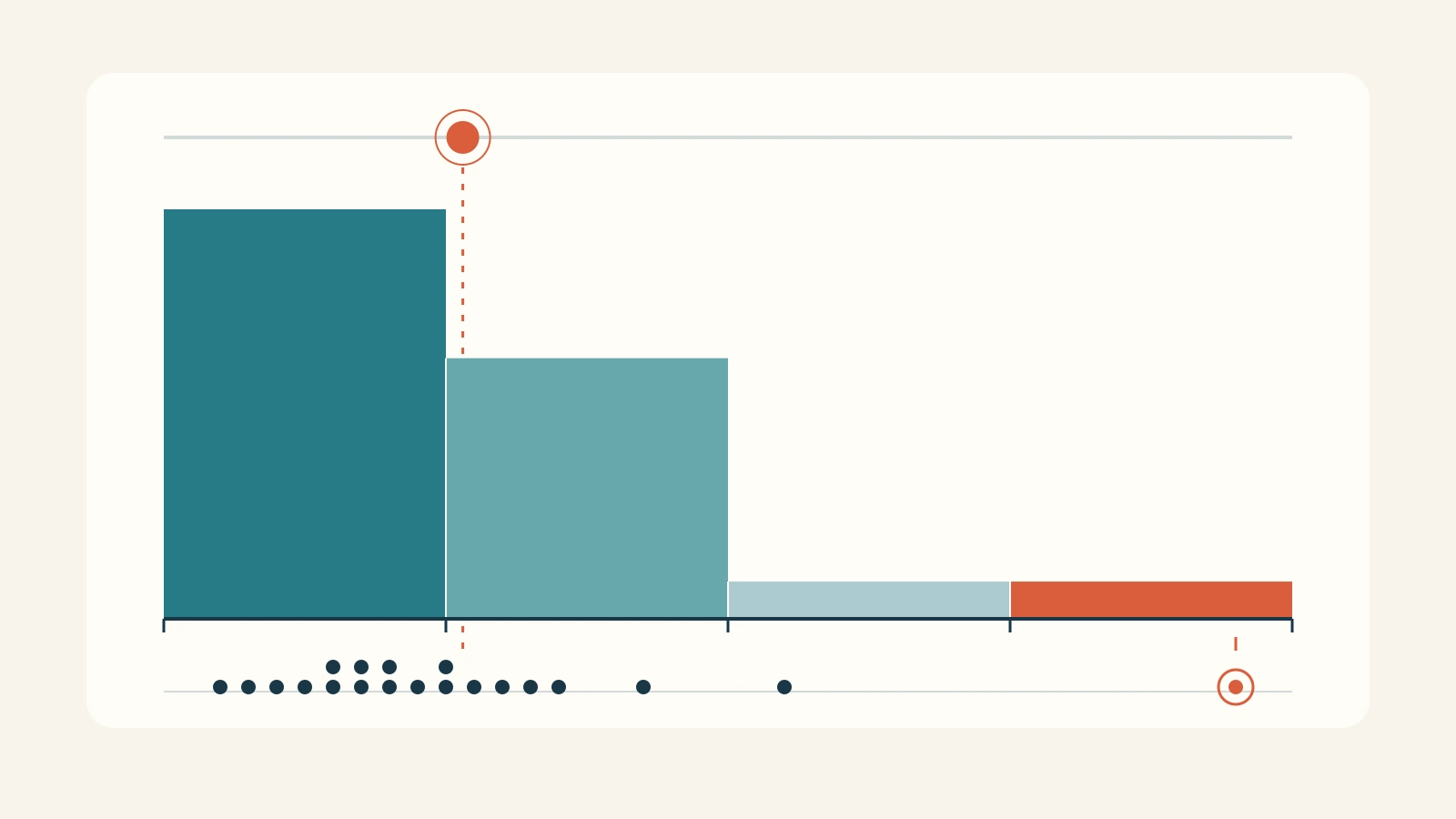
Start with equal intervals ten minutes wide. Use a clear boundary rule: include the lower endpoint and exclude the upper one. A review lasting exactly 10 minutes therefore belongs in the 10-to-under-20 interval, not the first interval.
| Time interval | Values in the interval | Number of reviews |
|---|---|---|
| 0 to under 10 minutes | 2, 3, 4, 5, 6, 6, 7, 7, 8, 8, 9 | 11 |
| 10 to under 20 minutes | 10, 10, 11, 12, 13, 14, 17 | 7 |
| 20 to under 30 minutes | 22 | 1 |
| 30 to under 40 minutes | 38 | 1 |
The counts add to twenty. Draw four adjacent bars over those intervals, with heights 11, 7, 1 and 1. Label the horizontal axis Review time (minutes) and the vertical axis Number of completed reviews. Start the count axis at zero so bar heights represent the counts fairly.
NIST's histogram guide describes this equal-width construction: divide the numerical range into intervals and count the observations in each. The resulting shape helps you examine the distribution rather than just one summary value.
Keep the intervals in numerical order. Sorting these bars from tallest to shortest would destroy the time axis. Unlike separate category bars, neighboring intervals meet because the intervals cover a continuous numerical range.

Say what the shape supports
The first two bars contain 18 of the 20 reviews. A defensible headline is “18 of 20 completed reviews took under 20 minutes.” That is a description of these values, not a promise about the next review.
The chart also contains a longer tail: one review took 22 minutes and another took 38. Do not hide the 38-minute value to make the picture look more consistent. First check its underlying record. A recording error may need correction; an unusual but valid observation remains part of the data.
The total is 212 minutes, so the mean is 10.6 minutes. The two middle observations are 8 and 9, giving a median of 8.5 minutes. Those summaries answer different questions from the histogram. A slide showing only “Average: 10.6 minutes” would conceal how many reviews were short and that one took 38 minutes.
Nothing here explains why that longer review took more time. It could have involved different material, interruptions or another circumstance, but the chart does not establish any of those explanations. If the audience needs a cause, return to the records and gather evidence. With twenty illustrative observations, a claim about a stable population distribution would also go beyond this example.
Change the bin width without changing the data
Ten-minute intervals make a compact slide. Five-minute intervals reveal more detail from the same observations:
| Time interval in minutes | Review count |
|---|---|
| 0 to under 5 | 3 |
| 5 to under 10 | 8 |
| 10 to under 15 | 6 |
| 15 to under 20 | 1 |
| 20 to under 25 | 1 |
| 25 to under 30 | 0 |
| 30 to under 35 | 0 |
| 35 to under 40 | 1 |
Now the concentration from 5 to under 15 minutes is easier to see. The empty intervals before the 38-minute review are visible too. Retain those intervals on the axis; closing the gaps would suggest that 22 and 38 are closer together than they are.
Choose the version that answers the slide's question. The four-bin view supports a quick explanation of how many reviews finish under twenty minutes. The eight-bin view is better for discussing the concentration and the separated long observation. Neither changes the underlying values.
Do not test different widths until one produces the story you wanted. Inspect an alternative width to see whether a claimed pattern depends heavily on the grouping. If a small change makes a supposed second peak disappear, avoid building the presentation around a confident claim of two distinct groups.
Keep this example's bins equally wide. With unequal widths, bar heights based on raw counts do not make bar areas proportional to frequency; a correctly constructed density histogram needs different scaling. For a simple presentation, equal widths and an explicit count axis avoid that extra interpretation burden.
Give the chart one slide-sized message
Use the four-bin histogram as the main exhibit and the headline about 18 of 20 reviews above it. Place a short subtitle underneath: “Illustrative example: 20 completed document reviews; time in minutes.” This establishes the unit and scope without turning the slide into a paragraph.
Put the counts directly above the bars if they help the audience verify the headline. One short note can identify the 38-minute observation. A second chart of the mean, several arrows and a large percentage badge would compete with the distribution rather than explain it.
A spoken explanation could be: “Eleven reviews took under ten minutes and seven took between ten and twenty. Two took longer, including one at thirty-eight minutes. We should inspect that longer case before deciding whether it needs a different review route.” The proposed investigation is a next step, not a conclusion that a new route is already justified.
Keep the original values and the five-minute grouping available in supporting material. They let someone examine the bin choice without forcing the whole audience to read twenty numbers on the main slide.
Compare distributions on matching scales
If you later compare two teams or two periods, use the same measurement, interval boundaries and horizontal range. Otherwise a narrower bin or a cropped tail can look like an operational difference. Label each sample size.
When the groups contain different numbers of observations, raw counts answer how many cases fall in each interval. Percentages answer what share of each group falls there. For our twenty reviews, the four percentages are 55%, 35%, 5% and 5%. Name the vertical axis accordingly; do not call percentages “number of reviews.”
If your real question is simply which department handled the most reviews, use a category bar chart. If you only know each department's average time, show and label those averages rather than presenting them as the distribution of individual reviews. Choose the chart from the information you actually have.
Carry the data into the presentation brief
For a Presenti presentation draft, prepare the chart's numbers and message together. This brief keeps the important decisions explicit:
Show twenty illustrative completed document reviews. Use equal ten-minute intervals from 0 to under 40 minutes. Counts: 11, 7, 1, 1. Label time in minutes and the number of completed reviews. Headline: 18 of 20 completed reviews took under 20 minutes. Keep the 38-minute observation visible. Do not infer why it took longer or claim a guaranteed turnaround time.
The brief is not a claim that Presenti calculates a histogram or verifies its data. Keep the checked frequency table beside the draft and compare the final bars, boundaries and labels with it. The useful result is a slide where the audience can see both the common range and the cases that a single average would hide.