A stakeholder communication plan presentation should show who needs to be involved, what they need to understand or decide, and how their response will change the work. “Send everyone a weekly email” is a distribution schedule, not a complete communication plan.
Start with the next important project decision and work backward to the people affected by it. Once the messages and response owners are clear, use Presenti to turn the communication plan into slides. Keep the working stakeholder record separate from the presentation, especially when it contains private contact details or sensitive observations.

Choose the conversation before the channel
The Association for Project Management’s stakeholder communication guidance recommends understanding stakeholders and their communication preferences, then reviewing the approach as feedback and the project change. In practice, this means asking what a group needs from the conversation before choosing email, a workshop, or a dashboard.
Separate three purposes. An update tells people what has changed. Consultation asks for input while an option can still be influenced. A decision request asks someone with authority to choose or approve something. The same message may support more than one purpose, but the expected response must be clear. A product retirement presentation applies this distinction to a booking service: people moving to a new booking route, managing existing bookings, or retrieving past records need different instructions. One person may use more than one route, so organize notices by task rather than treating the groups as separate customer counts.
For example, a launch-date email sent after the date is fixed does not count as consultation with the people who must work that day. If their availability could change the plan, speak with them before the decision.
Use a real project decision to organize the deck
Consider an illustrative project replacing an internal service-request process. The team needs to decide whether to pilot the new process with one department next month. The sponsor cares about the pilot’s scope and resource demand. The service desk needs workable routing and support coverage. Department staff need to understand how their everyday requests will be handled.
These are different questions about the same decision. A single status slide might show all three groups the same progress percentage without helping any of them respond. The communication plan should explain what evidence each group will see and how its response reaches the decision owner.
An organization chart can identify formal roles, but it does not tell you who will experience the change. Ask the initial contacts which affected users, support roles, or partner teams are missing. Do not assume that a lower position in the hierarchy means a lower need for involvement.
Build a matrix that includes the response
| Group | Question to resolve | Conversation and timing | Response owner |
|---|---|---|---|
| Project sponsor | Is the pilot scope and resource request acceptable? | Decision briefing after operational concerns are summarized, before scope is confirmed | Project lead records the decision and any conditions |
| Service desk | Can requests be routed and supported during the pilot? | Workflow review before the pilot decision, with sample cases | Service owner resolves support and routing questions |
| Pilot department staff | Can people complete their common requests without losing necessary information? | Small-group walkthrough while the process can still change | Process analyst records issues and returns the proposed response |
| Data owner | Are required fields and access arrangements suitable? | Focused review before sample data is used | Data owner confirms the relevant requirements or identifies an unresolved issue |
The table uses roles instead of private names. Add confirmed contacts to the internal working version if needed. Keep the slide readable by showing only the groups relevant to the current decision; move the full contact register out of the main deck.
Notice that “weekly” does not appear in every row. Some communication belongs at a decision gate, some follows an event, and some benefits from a regular rhythm. Frequency should follow the information need rather than the convenience of copying a schedule.
Write a message that makes the required response obvious
Compare two invitations to pilot department staff.
Vague: “Please review the new request process and send feedback.”
Specific: “In Thursday’s walkthrough, try submitting the three request types your team uses most often. Tell us where the instructions or required information do not match your work. We will return a response to each issue before the pilot scope is confirmed.”
The second version names the task, the kind of evidence wanted, and what will happen to the response. It does not promise that every suggestion will be accepted. That distinction matters: consultation gives people a meaningful route to influence a decision, not an automatic veto or a guarantee of agreement.
For the sponsor, use a different message: “The service desk can support two request types with current coverage; the third requires an additional support arrangement. Decide whether to reduce the pilot scope or fund that arrangement.” This is a decision request supported by the consultation, not a repeat of the user walkthrough.
Show what happens when stakeholders disagree
Suppose staff ask to keep a free-text field because unusual requests do not fit the predefined choices. The service desk worries that unrestricted text will make routing inconsistent. A communication plan should help the project expose that conflict early, not label one group “resistant.”
The process analyst could bring two anonymized sample requests to a joint review. The team might consider a required category plus an optional explanation field, then test whether both routing and user context remain workable. This is an illustrative option, not a claim that it is the correct design for every service.
| Feedback record | Example entry |
|---|---|
| Observed problem | Two sample requests do not fit the proposed categories |
| Affected work | Staff need to explain the exception; support needs a routing category |
| Next action | Review anonymized samples and test a category-plus-explanation option |
| Owner and decision point | Process analyst brings the test result before the pilot scope decision |
| Response to participants | Explain the chosen option and any unresolved limitation |
If the conflict cannot be resolved within the team’s authority, the deck should state the trade-off for the decision owner. Do not convert an unresolved concern into a green status simply because a meeting occurred.
Separate “we replied” from “the issue is resolved.” Continue the fictional walkthrough with two open records. On Thursday, staff raise the free-text concern and the data owner is asked to review access. On Friday, the process analyst explains the proposed category-plus-optional-explanation design. A staff member replies, “So we can no longer describe an unusual request?” The message reached its recipient, but its meaning did not.
| Open record | Response and next step | Status for the scope discussion |
|---|---|---|
| Staff think the explanation field will disappear | The analyst shows where the optional explanation remains and asks the participant to describe how an unusual request would be submitted | Explanation sent; understanding not yet confirmed. The design still needs the routing-and-context test above |
| No data-owner response to the access question | The project lead follows up with the data owner or a confirmed authorized delegate and identifies the unanswered access requirement | Access review outstanding; no approval has been recorded |
Suppose the staff member then replies, “We choose a category and can still explain the exception.” Record that response against the concern: the explanation is now understood. Do not relabel the design “accepted” or the operational problem “solved” unless the relevant agreement or test supports that status. An accurate update is: “The participant understands the proposed field arrangement; the two sample requests still need the joint routing check.”
If the data owner has not replied by the planned scope discussion, silence is not agreement. The sponsor can still consider the choice between two supported request types and funding support for the third, but that discussion is not evidence that access has been approved. State the missing response, who is following it up and which work depends on it. Do not choose a new approver merely because that person is available, or give participants a launch promise while the required review remains open.
Return the outcome to the people who raised each concern, including a decision not to adopt a suggestion and its reason. This closes the response loop without hiding disagreement: a record can say “explanation received” and “decision pending” at the same time. In the presentation, those two states tell the audience what conversation must happen next.
Measure whether communication helped the work
Attendance, email opens, and distribution counts can show reach. They do not establish that people understood the change or had a usable chance to respond. For this example, look at whether the expected groups participated, whether each material issue has an owner, and whether participants received an explanation of the outcome.
A short check after a walkthrough might ask participants to describe the next step in their own words or complete a sample task. If several people misunderstand the same instruction, revise that instruction and the communication. Do not describe misunderstanding as a stakeholder attitude without evidence.
Review the plan when the project changes: a new affected department joins, the pilot scope shifts, or a decision date moves. A fixed weekly cadence cannot compensate for a missing conversation at the point when it matters.
Present the plan in six slides
- Decision context: the change, next decision, and affected work.
- Stakeholder coverage: roles involved, missing voices, and how they were identified.
- Communication matrix: purpose, timing, channel, and response owner.
- Two message examples: show how a consultation differs from a decision request.
- Feedback route: use one issue to show recording, resolution, escalation, and response.
- Agreement needed: confirm owners and upcoming conversations, with unresolved points visible.
Present the most important decision first. Avoid opening with a dense influence-interest grid whose labels the audience cannot inspect or challenge. Such a grid may help private planning, but the shared deck should concentrate on the work and the conversations people can act on.
Turn the agreed matrix into a presentation draft
In Presenti’s Paste Text mode, supply the matrix and a short explanation of the decision. Remove personal contact information and private assessments before using a demonstration brief.
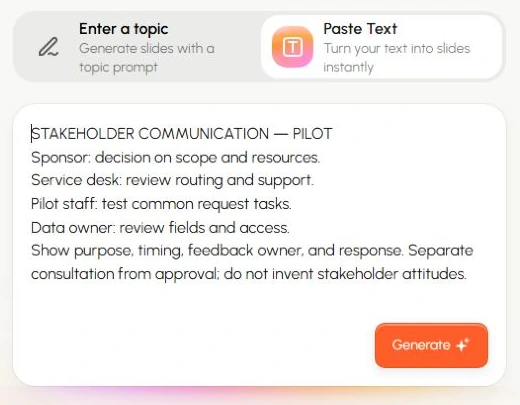
Create a six-slide stakeholder communication plan draft for an illustrative internal service-request pilot. Include sponsor, service desk, pilot staff, and data owner. Distinguish updates, consultation, and decision requests. Show who receives feedback, who can resolve it, and when participants hear the outcome. Use the free-text-versus-routing example as an unresolved design question. Do not invent stakeholder attitudes, approvals, survey findings, or project results.
Review the draft for statements that turn assumptions into facts. The finished presentation should make the next conversation easy to arrange and its purpose easy to explain.