A useful webinar presentation gives attendees something they can do after the session, then makes time to explain it, demonstrate it and let them try. Start with that outcome before deciding how many slides to create.
Here is a complete 45-minute example: Fix the handoff between sales and onboarding. By the end, participants should be able to turn unclear sales notes into a handoff record that distinguishes confirmed scope from an unresolved promise and names the next action. The examples are fictional, and the timing is a plan to adapt, not a benchmark for every webinar.
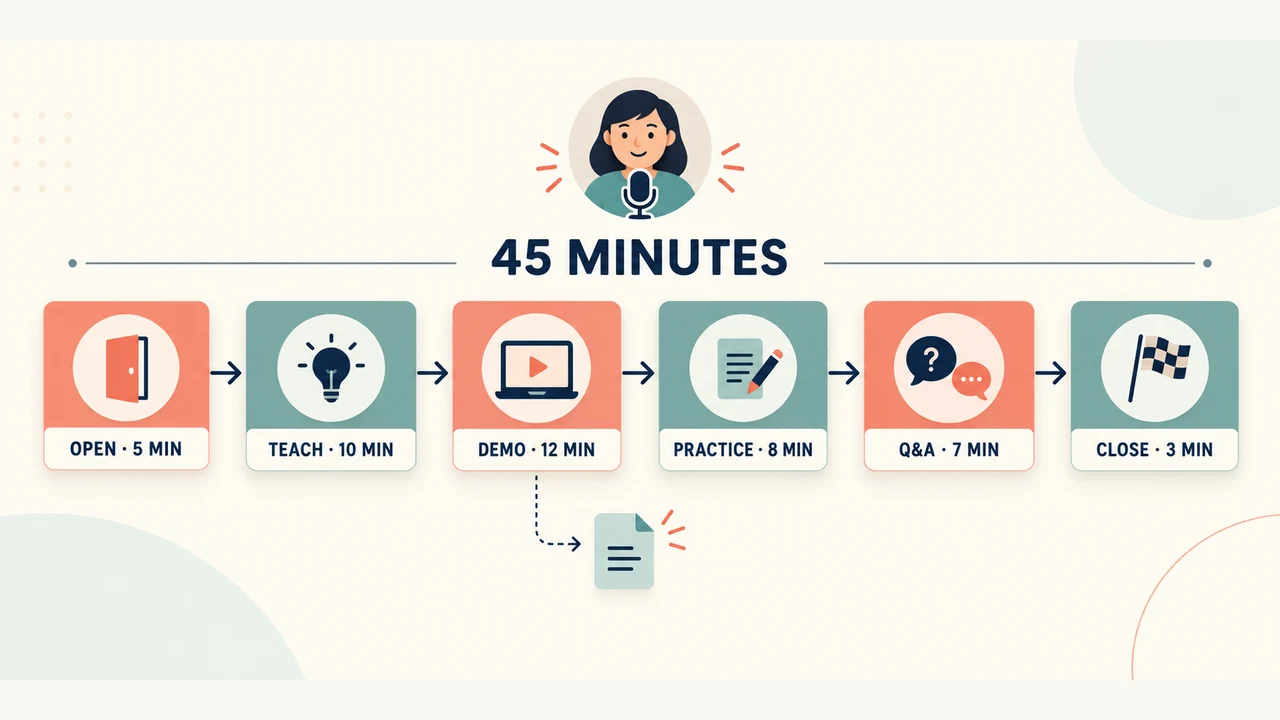
Write a promise narrow enough to deliver live
“Learn everything about customer success” is difficult to fulfill in one session. “Complete a handoff record that an onboarding colleague can act on” gives the presentation a specific destination. It also tells you what to leave out: a tour of every customer-success metric, a long company history, and unrelated product features.
Define the audience's starting point. In this example, attendees already work with customer accounts but use inconsistent handoff notes. They need a common record and a way to expose unclear commitments. They do not need an introduction to every sales or onboarding role.
Write three pieces before opening a slide editor: the promised outcome, the example you will demonstrate, and the small task attendees will complete. The demonstration and exercise should test the same idea. An unrelated poll may create activity without helping participants learn the promised skill.
A 45-minute webinar plan
This schedule includes housekeeping and questions. Rehearse it with the actual demonstration; slide count alone will not tell you whether it fits.
| Time | Segment | What the attendee does |
|---|---|---|
| 00:00–05:00 | Open: 5 minutes | Understands the outcome and identifies a familiar handoff problem. |
| 05:00–15:00 | Teach: 10 minutes | Learns the four fields needed for an actionable handoff. |
| 15:00–27:00 | Demo: 12 minutes | Watches unclear notes become a usable record, including an unresolved item. |
| 27:00–35:00 | Practice: 8 minutes | Completes a short example and compares the reasoning with a sample answer. |
| 35:00–42:00 | Q&A: 7 minutes | Asks about exceptions, ownership and applying the method. |
| 42:00–45:00 | Close: 3 minutes | Leaves with the worksheet and one next action. |
The total is 5 + 10 + 12 + 8 + 7 + 3 = 45 minutes. If your session must be shorter, simplify the example or reduce the scope before removing all practice and questions. A webinar that promises a skill needs room for the attendee to use it.
Give twelve slides distinct jobs
Use this route for the example above. Some demonstration time will be spent in a prepared document rather than on the slide deck.
- The outcome. “Turn a sales handoff into a record onboarding can act on.”
- The problem participants recognize. Show a vague note and ask which missing detail would block their work.
- The four-field record. Customer goal; confirmed scope; unresolved question; owner and next action.
- A promise is not the same as confirmed scope. Contrast a documented commitment with an idea mentioned in conversation.
- The demonstration source. Display the fictional sales notes and explain what is known.
- The completed record. Reveal the four fields as you work through them.
- The remaining gap. Show how to assign the next action without inventing an approval.
- The participant task. Give a new short case and a clear response format.
- A sample answer. Explain acceptable alternatives and the assumption that must remain unresolved.
- Questions and exceptions. Keep the relevant source or example available for discussion.
- The method in one view. Revisit the four fields with a reminder about confirmed versus pending information.
- Use it on your next handoff. Provide the worksheet and ask attendees to apply it to one upcoming account.
The slide titles should help someone rewatching the recording find the example and exercise. Put links and instructions in readable text; avoid making a small QR code the only route to the resource.
Build the demonstration around a real reasoning step
Start with these fictional notes: “Northline Bikes, 12 stores. Wants a two-store pilot. Target: November 1. Daily stock export discussed. Onboarding lead not confirmed.”
The useful demonstration is the distinction between what the notes say and what they do not establish. A polished template should not turn “discussed” into “included.”
| Field | Worked entry |
|---|---|
| Customer goal | Prepare a two-store pilot for a twelve-store retailer. |
| Confirmed scope | The notes describe a requested two-store pilot; approved scope still needs confirmation. |
| Unresolved question | Is a daily stock export included, and can it be ready for the target date? |
| Owner and next action | Ask the sales owner to confirm the commitment and the onboarding manager to assign a receiving lead before confirming the schedule. |
During the demonstration, narrate the choice you are making: “I am leaving the export marked pending because these notes do not establish a delivery commitment.” Then show where the confirmation would be recorded. This teaches a decision attendees can repeat, rather than only showing where to type.
Prepare three still frames of the demonstration: original notes, partially completed record and final record with the open question. They can preserve the explanation if the live document or screen share fails. Label them as demonstration material, and use fictional account information throughout.
Make the eight-minute exercise easy to start
Give participants this second case: “Larch Retail has six stores. It wants a two-store pilot starting November 10. A custom connector was mentioned, but no delivery commitment is approved. A technical owner has not yet accepted the handoff.”
Ask them to write the four fields and identify what must be confirmed before the date can be promised. Allow one minute to explain the task, three minutes for individual work and four minutes to compare answers. Attendees can respond in chat if it is available, or keep private notes; the task should not depend on everyone wanting to speak publicly.
A sound answer keeps the connector unconfirmed, assigns a next step to establish its scope, and identifies the missing receiving owner. There may be several sensible escalation paths. Explain the principle behind the sample answer instead of treating your wording as the only correct response.
If no one posts an answer, give people the promised thinking time and then work through the sample. Do not invent audience responses or claim that silence proves understanding.
Give the host a run of show, not just the slides
The presenter explains the material. The host can track timing, share resources, collect questions and manage transitions. A small team may combine roles, but someone still has to carry out each task. Zoom's hosting guide recommends rehearsing on the intended devices and using a run of show with timing and technical cues.
Adapt the 45-minute run of show and participant exercise for your host and presenter. The text resource includes the schedule, transition cues, fallbacks and blank response fields.
15:00 — Presenter moves from slide 5 to the prepared demo document.
Host confirms the attendee view shows the correct window.
If the document fails, presenter uses the three saved demo frames.

27:00 — Presenter returns to slide 8 and reads the exercise.
Host posts the case and response format in the available audience channel.
If that channel is unavailable, attendees write privately from the slide.

35:00 — Host introduces the questions with the broadest relevance.
Presenter distinguishes a live answer from an item requiring follow-up.
Prepared questions are introduced as common or submitted-in-advance questions.

42:00 — Presenter returns to the four-field method and next action.
Host shares the resource link and the agreed follow-up arrangements.
Before going live, check the attendee view rather than only the presenter's screen. Confirm which window is shared, what private notes remain visible to the presenter, how captions will be provided where available, and whether a guest can open the resource. Use the PowerPoint speaker notes guide for the notes and Presenter View setup.
Rehearse the transitions and fallback, not just the introduction. If the demonstration overruns, know which optional explanation can be removed. Preserve the central example, the chance to practice and the closing instruction.
Draft the slides from the plan, then prepare the follow-up
Use the outcome, twelve-slide route and fictional cases as the source for a slide draft. In Presenti, review the proposed outline against the timed plan before choosing a design. Keep the worksheet and production cues available separately; they serve different purposes from the audience slides. Check current export access if you need a PowerPoint file for the session.
Prepare the follow-up while the deck is still being written: the completed example, a blank four-field record and answers to questions that needed further checking. If a recording will be shared, state the actual access arrangements. Do not promise a replay that the team has not planned to provide.
For this webinar, the final request is small and concrete: use the record for one upcoming handoff, then ask the receiving colleague which field was still unclear. That gives the attendee a way to apply the session and improve the next version of the process.
If you still need to attract the audience, use the separate event marketing plan guide. The plan here starts when people arrive and keeps the live session focused on what they came to learn.