Dokie AI has entry points for turning documents, spreadsheets, images, and text into slides. Its usage-based credit model is one of the first things to understand: generating a draft and revising individual slides can both consume credits.
This review concentrates on the source routes and credit terms Dokie publishes, then offers a small file you can use to evaluate the workflow. It is published by Presenti, a competing tool. We do not assign a score or present the example as a completed Dokie test.

Quick verdict
Dokie belongs on a shortlist if you start with existing material and want help turning it into a presentation. Its listed input routes make it relevant to more than prompt-only drafting. The deciding question is what happens to your material after upload and how the cost changes as you revise it.
A trial should include a finished handoff, not just the first preview. If someone else must edit the deck in PowerPoint, produce that file during the trial and ask them to make one ordinary change. The result will be more useful than a rating without a test record.
What is Dokie AI?
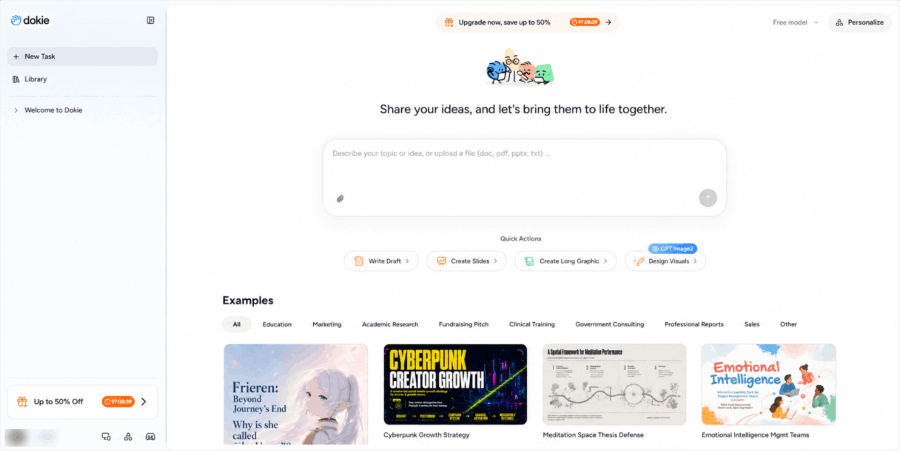
Dokie is an AI presentation service with dedicated routes for converting different kinds of source material. Its tools page lists PDF, Word, text, Excel, JPG, PNG, HTML, and DOC inputs. That list tells you where to begin; it does not prove that every source object becomes an editable slide object.
Choose a source format that matches your goal. A Word brief gives you text and headings to reorganize. A spreadsheet requires care over which rows and units matter. An image can show a design or contain text, but it is not the same input as the underlying editable document.
What to find out from your own file
For a report, the first question is whether the draft keeps the useful distinctions. Does a figure still name its period? Is a proposal described as a proposal, rather than an approved decision? Are source notes carried over or separated from the statements they support?
The second question is editing. Try shortening a title, replacing a figure, and moving a source note. You may find that a generated draft is easy to start but needs a different kind of work to finish. That is a practical observation about your task, not a reason to rank every tool in the market.
Do not treat a visually convincing chart as evidence that the right data was used. If the draft invents a series that is absent from your input, remove it or rebuild it from a source table. Decorative images cannot supply missing evidence.
A sourced example to reuse
Our sample uses NASA's January 10, 2025 announcement about 2024 temperatures. Its different comparison periods make it a useful test of whether a short presentation keeps the meaning of its source.
Download the source brief as Word, PDF, or Markdown. The five-slide reference deck is an editable editorial example, not an output from the tool reviewed here.
Use the Word or PDF version in the corresponding Dokie input route. Request five slides for a general audience, retaining each number's unit and baseline. Ask it not to add new measurements or infer a trend from figures that use different baselines.
When the draft is available, shorten one title and revise one explanatory sentence without changing its meaning. Record the credit balance before generation and after those edits. The purpose is to understand the work and cost for this file. We have not run this exercise in Dokie or measured its output.
Dokie AI pricing and credits
Dokie's pricing FAQ currently lists a 300-credit welcome grant, valid for one year, and a 200-credit daily visit bonus that expires after one day. It estimates about 100 credits for a new presentation and around 20 for a single-slide edit, with actual consumption depending on request complexity.
Using those indicative rates, a draft plus five slide edits would total about 200 credits. That is a calculation from the published estimates, not a measured run or a guarantee of what your project will cost.
| Plan | Published monthly price | Monthly allowance |
|---|---|---|
| Plus | $19 | 2,000 credits |
| Pro | $59 | 6,000 credits |
| Ultra | $199 | 20,000 credits |
| Enterprise | Custom quote | Custom limits |
These are the monthly figures published when reviewed on October 2, 2026. Confirm the billing period and included export options before subscribing. A daily bonus should not be treated as a bank of credits you can leave untouched all month.
Export is part of the decision
The pricing page lists export options among paid-plan benefits but does not establish how every object in your file will behave. If PowerPoint delivery is essential, confirm the required export in your account and inspect the actual file before committing to the workflow.
There are two separate questions: does the exported slide look right, and can the recipient change what needs changing? A title, table, or chart that appears correct may still require rebuilding for the next report. Open the file in the application your recipient uses and make the real edit.
Likewise, a feature that works in a browser should not be assumed to remain interactive in every download format. Keep the delivery format in the trial rather than discovering its limits on the day of a presentation.
Who should try it?
Dokie may suit people who already have a written brief, teaching material, or a report and want a presentation draft. The file routes give those users a concrete place to start.
People who revise heavily should pay closer attention to usage. A plan that looks sufficient for initial drafts may cover fewer completed decks once changes are included. Use one typical assignment to estimate your own pattern instead of dividing the allowance by the advertised cost of a new deck.
Comparing Dokie with Presenti
Presenti also has Word and PDF presentation workflows. The fair comparison is to use the same brief, audience, and slide count, then request the same two edits.
Compare the remaining work and the account conditions alongside the draft. Do not assume Presenti has unlimited free generation, or that either tool delivers a perfect PowerPoint file. A clear record of your input and result is stronger evidence than either vendor's positioning.
Our recommendation
Start with a small, representative file and take it through the full handoff. Dokie's source routes are relevant to document-based work; whether they suit you depends on the draft, the revisions, and the export you actually need. Keep the credit balance alongside those observations so cost and usefulness are evaluated together.
FAQ
Is Dokie AI free to use?
Dokie lists a free Starter option with welcome credits and a daily visit bonus. These have different expiry rules; see the pricing section above before treating them as a recurring monthly allowance. For other products, the guide to free drafting, editing, and export allowances helps separate benefits that the word ‘free’ can otherwise obscure.
What source formats does Dokie list?
Its tools page lists document, text, spreadsheet, image, and HTML routes. Use the route for your source format, then inspect what survives into the draft.
Does a paid plan mean unlimited presentation generation?
No. Dokie's published paid plans have credit allowances. Generation and slide changes can consume credits, so the number of completed decks depends on your usage.