A presentation rehearsal should tell you what to change before the audience arrives. Reading the slides silently will not reveal an explanation that takes twice as long as expected, an awkward speaker handover, or a demo that leaves you with nothing to show when the connection fails.
Use the checklist below with a near-final deck, a timer, and, if possible, one listener. It focuses on delivery rather than redesigning the whole presentation. If the argument is still unclear, first revisit the structure and evidence a good presentation needs; rehearsing an unclear argument faster will not fix it.
Give the rehearsal a real time budget
Start with the meeting slot, not the number of slides. Subtract introductions, discussion, and the final decision. A 15-minute meeting might leave only 10 minutes for your prepared talk. That is a planning example, not a universal speaking rule. If the deck is still too large for that budget, use the slide-count planning method to give each slide a specific job before deciding which ones to combine or remove.
For a fictional request to pilot a new support form, those 10 minutes could be divided as follows:
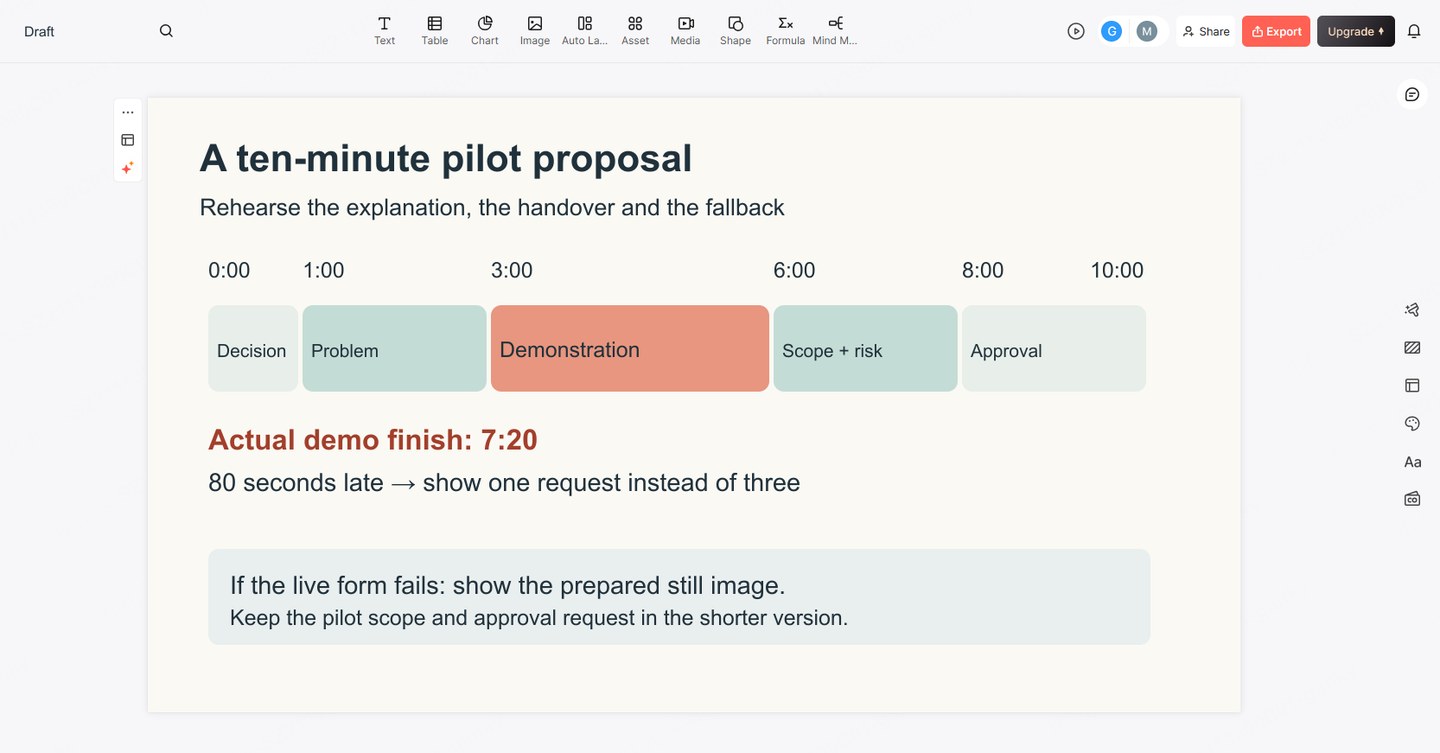
- 0:00–1:00: State the decision: approve a two-week pilot with one support team.
- 1:00–3:00: Explain the recurring missing information in requests, using a labeled example.
- 3:00–6:00: Walk through the proposed form and what changes for the requester.
- 6:00–8:00: Explain the pilot's scope, owner, and unresolved risks.
- 8:00–10:00: State what approval covers, what it does not cover, and when results will be reviewed.
Mark elapsed-time checkpoints beside section changes. Do not assign every slide an equal duration: a diagram may need explanation, while a section divider may need one sentence.
A timed format is an exception to that flexible allocation: a PechaKucha presentation uses 20 slides shown for 20 seconds each, so rehearse the story against those fixed transitions.
Run the whole talk once without stopping
Present aloud using the actual display mode. Advance slides, open links, and perform the demonstration. Keep the timer running through mistakes. If you restart every difficult section, you never learn how long the audience's version of the talk will take.
Ask your listener to note three things: where the requested decision became clear, where an unfamiliar term blocked understanding, and where the explanation repeated itself. Avoid asking only whether they liked the presentation.
After the run, compare the planned checkpoints with the actual times. Suppose the form demonstration ends at 7:20 rather than 6:00. You are already 80 seconds over budget before the risk discussion. Shorten the demonstration to one representative request or remove a repeated setup explanation; do not plan to recover the time by racing through the approval request.
Keep a small rehearsal log: section, planned finish, actual finish, and one revision. A specific entry such as “show one request instead of three” is actionable. “Be more concise” is not.
Practice the joins, then repeat the difficult section
A transition should explain why the next idea follows. Between the problem and the proposed form, try: “Those missing details are what the new form asks for before a request reaches the team.” That is more useful than announcing “Next slide.”
For multiple speakers, rehearse the outgoing sentence, the incoming speaker's first sentence, and who advances the slide. For example: “Maya will explain what the pilot includes.” Maya can begin with the scope directly instead of repeating the introduction. Agree who continues if a speaker is absent. The three-speaker handover example pairs each outgoing line with the next speaker’s response and shows how to resume after an audience interruption.
Write short cues rather than a second script: “missing detail → required field” or “pilot only, not rollout.” If you present in PowerPoint, our guide to using speaker notes explains how to keep prompts separate from what the audience sees. For a worked example, see how to write speaker notes for an AI-generated presentation without turning uncertain slide claims into confident spoken promises.
Repeat the section you changed, including the slide before and after it. Then run the full talk again. A local improvement can still create a timing problem elsewhere.
Rehearse a shorter version and one failure
Decide in advance what you will omit if discussion takes longer than expected. In the pilot example, a second worked request is optional; the pilot's scope and approval request are not. Mark optional slides in your own cues so you can skip them without explaining that the presentation has gone wrong. If the new time limit requires more than skipping one example, use the worked example of cutting twelve slides to six to preserve the decision, evidence and time for questions.
Choose the most plausible technical failure and practice the replacement. If a live form does not load, show a prepared still image and explain one request. If the projection stops, state the decision and the three facts the audience needs while the host restores the display. Keep confidential material out of any backup distributed to attendees.
A backup file is not ready merely because it exists. Open the actual copy on the intended device and confirm that its fonts, images, and essential links work. For a remote talk, also check which window is shared and whether the audience can read the smallest important label. Follow the offline presentation backup workflow to test the local deck, media and static fallback from a cold start with the network disconnected.
Use this final presentation rehearsal checklist
- I have delivered the full talk aloud within the prepared-talk budget, including the ending.
- A listener can state the decision or main takeaway in their own words.
- Section changes have clear connecting sentences; speaker handovers include a slide-control plan.
- I know which example to skip if time is reduced, without losing essential evidence.
- I have practiced a usable alternative to the most fragile demo or connection.
- I have opened the final delivery copy and checked the audience view.
If rehearsal reveals a missing explanation, revise that part of the deck rather than adding a new closing disclaimer. You can use Presenti to turn a revised outline into an editable slide draft, then compare it with your original evidence and timing plan. It does not replace the spoken rehearsal.